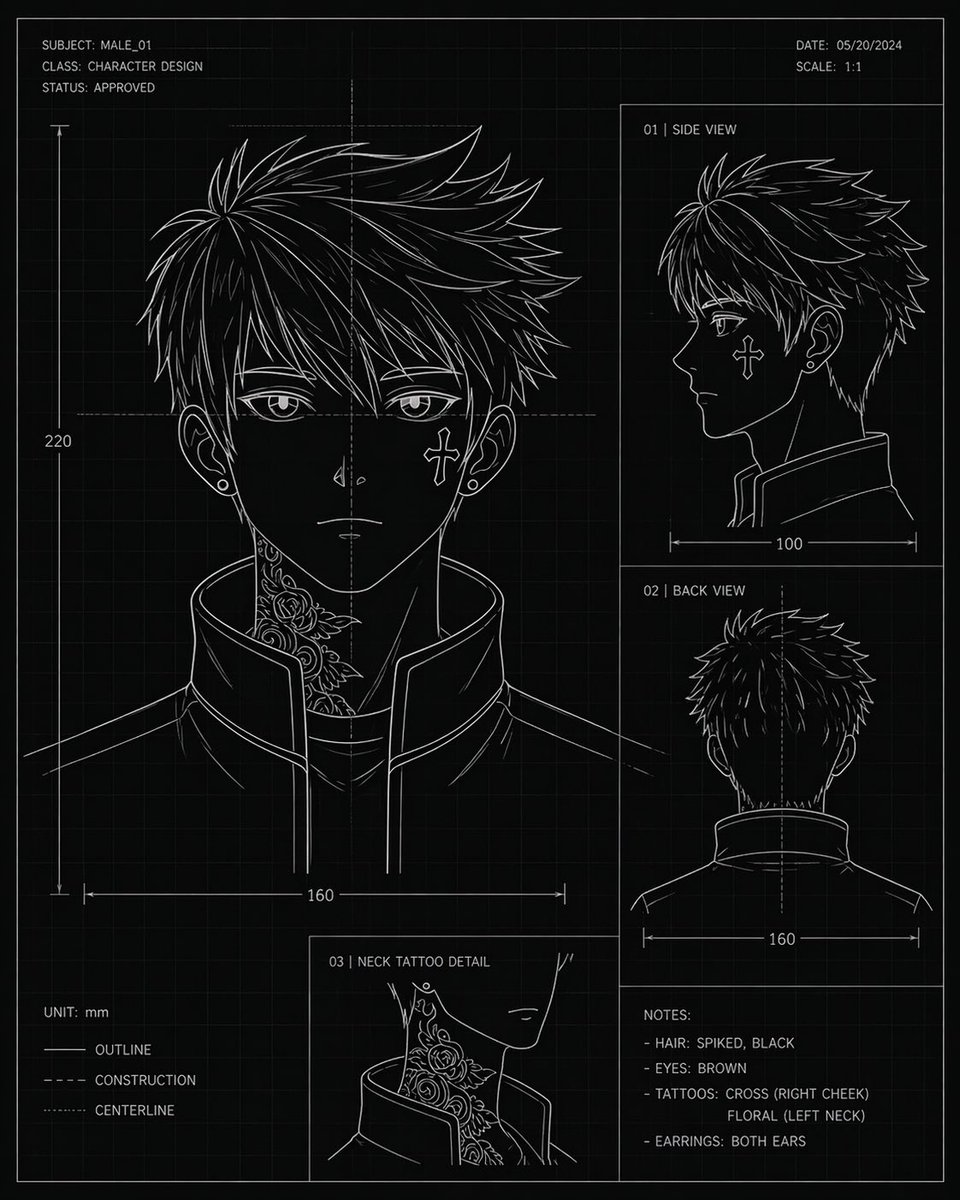
アニメキャラクター設計図
コンセプトアートやモデルの参考資料として使用できる、複数の視点から見たアニメ風の若い男性の頭部を描いた、技術的な設計図スタイルのキャラクターデザインシート。寸法、注釈、タトゥーの詳細が記載されている。
これはアニメ&ゲーム向けのGPT Image 2プロンプトケースです。以下のコピー可能なプロンプトを使用して同様のビジュアルを生成し、再利用する前にAwesome GPT Image 2 Prompts帰属表示と商用利用権を確認してください。
プロンプトセット全体が必要ですか? アニメ&ゲーム 関連する例をもっと見るにはトピックハブを開くか、 GPT Image 2 プロンプトカタログ 完全な例の索引、再利用可能な構造、および出典の明記については、こちらをご覧ください。
Free 1K preview
Generate one preview image instantly, no sign-up required.
3060/4000
プロンプト
コピー準備完了プロンプト
{
  "type": "character design blueprint sheet",
  "style": "technical concept art, black blueprint background with faint square grid, thin white line art, minimalist monochrome drafting aesthetic",
  "subject": {
    "category": "anime-inspired male character head turnaround",
    "name": "{argument name=\"character name\" default=\"MALE_01\"}",
    "gender_presentation": "male",
    "age_appearance": "young adult",
    "hair": {
      "color": "{argument name=\"hair color\" default=\"black\"}",
      "style": "short spiky layered hair with sharp jagged strands, dense volume at the crown, tapered sides and back"
    },
    "eyes": {
      "color": "{argument name=\"eye color\" default=\"brown\"}"
    },
    "accessories": {
      "earrings": "small studs in both ears"
    },
    "clothing": {
      "top": "high-collar structured jacket, open slightly at the front, clean angular seams"
    },
    "tattoos": [
      "cross on right cheek",
      "floral tattoo climbing the left side of the neck"
    ]
  },
  "layout": {
    "orientation": "portrait sheet",
    "sections": [
      {
        "title": "front view main portrait",
        "position": "left large panel",
        "count": 1,
        "details": "large head-and-shoulders front view with neck tattoo visible above the raised collar, ears visible, dimension line showing width 160 and vertical height 220"
      },
      {
        "title": "01 | SIDE VIEW",
        "position": "upper right panel",
        "count": 1,
        "details": "right-facing side profile, collar visible, width measurement 100"
      },
      {
        "title": "02 | BACK VIEW",
        "position": "middle right panel",
        "count": 1,
        "details": "back of head and upper shoulders, centerline shown, width measurement 160"
      },
      {
        "title": "03 | NECK TATTOO DETAIL",
        "position": "bottom center-left inset",
        "count": 1,
        "details": "close-up inset of the floral neck tattoo beside the jawline and collar"
      },
      {
        "title": "NOTES:",
        "position": "bottom right",
        "count": 4,
        "labels": [
          "HAIR: SPIKED, BLACK",
          "EYES: BROWN",
          "TATTOOS: CROSS (RIGHT CHEEK) FLORAL (LEFT NECK)",
          "EARRINGS: BOTH EARS"
        ]
      }
    ],
    "header": {
      "top_left": [
        "SUBJECT: {argument name=\"subject code\" default=\"MALE_01\"}",
        "CLASS: CHARACTER DESIGN",
        "STATUS: APPROVED"
      ],
      "top_right": [
        "DATE: {argument name=\"date\" default=\"05/20/2024\"}",
        "SCALE: 1:1"
      ]
    },
    "legend": {
      "bottom_left": [
        "UNIT: mm",
        "OUTLINE",
        "CONSTRUCTION",
        "CENTERLINE"
      ]
    }
  },
  "composition": "clean drafting-page layout with thin panel borders, measurement arrows, center guides, and blueprint annotation typography; all text in crisp white uppercase sans-serif",
  "color_palette": {
    "background": "black",
    "lines": "white",
    "grid": "dark gray",
    "accents": "none"
  }
}
プロンプト変数
プロンプトに表示される編集可能な引数プレースホルダーと、それらのデフォルト値。
変数
character name
デフォルト
MALE_01
変数
hair color
デフォルト
black
変数
eye color
デフォルト
brown
変数
subject code
デフォルト
MALE_01
変数
date
デフォルト
05/20/2024
Best for
- - アニメ&ゲーム visual exploration
- - Image generation and reference-image edits
- - Reusable briefs that keep source attribution visible
Change these parts
- - Subject, product, character, or scene
- - Aspect ratio, camera, lighting, and background
- - Brand, text, color, and output constraints
Recommended model and settings
- - Model: gpt-image-2
- - Input mode: テキストから画像
- - Aspect ratio: source
- - Commercial status: review original source
How to use this prompt
- 1. Copy the prompt and preserve its structure for the first test.
- 2. Replace the subject, context, and publishing channel.
- 3. Change one camera, lighting, or style variable per iteration.
- 4. Inspect the output, source, text, and rights before reuse.
Limitations, source, and reuse cautions
- - Generated output is an editable draft, not factual, legal, or rights evidence.
- - Review the linked source, people, brands, logos, text, and third-party media before commercial use.
Awesome GPT Image 2 Promptsからインポートされました。出典の明記が必要です。商用利用の可否はallowedです。有料利用の前に、出典元の権利をご確認ください。
このカテゴリーのその他の事例
カテゴリー、入力モードの互換性、品質、およびリスクの低さに基づいて優先順位付けされています。






再利用と出典に関する注記
ケースを事前に確認してから、このプロンプトを安全に使用してください。
- 1.プロンプトをコピーするか、生成ボタンを使ってDovooで直接開いてください。
- 2.ご自身の用途に合わせて、変数、アスペクト比、および参照画像を調整してください。
- 3.公開または有料利用の前に、情報源の権利、帰属表示の要件、およびブランドまたは肖像権に関するリスクを確認してください。