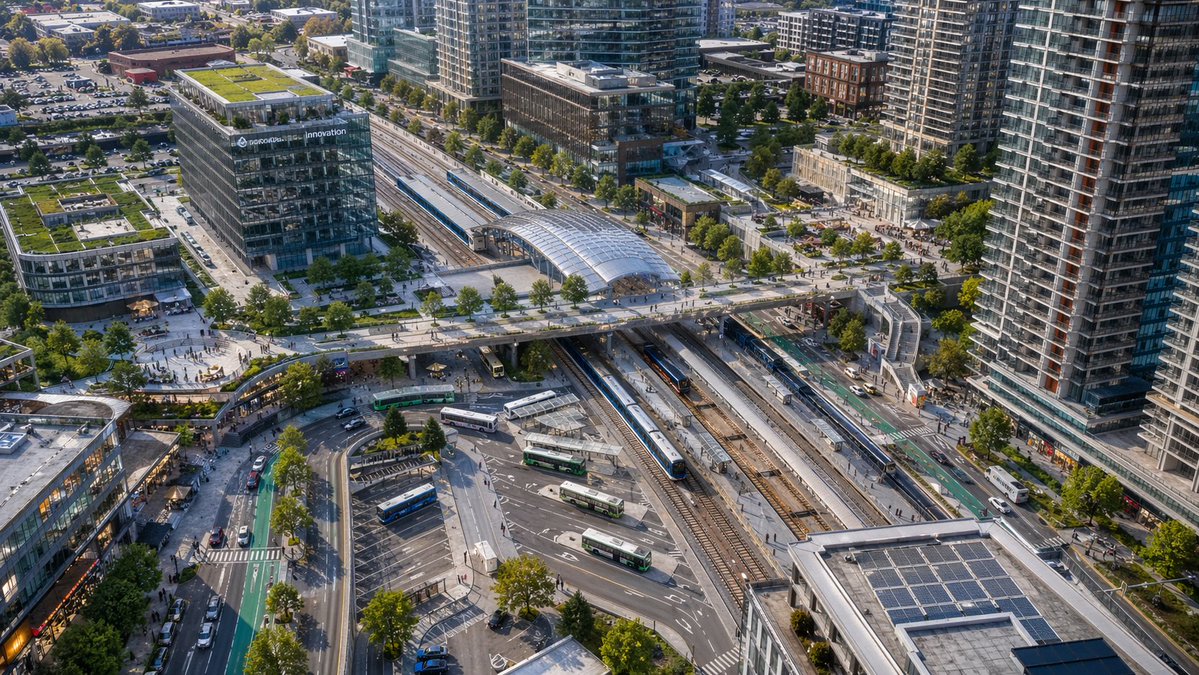
近代的な交通ハブの空撮写真
このプロンプトは、現代的な鉄道駅とバスターミナルのリアルな鳥瞰図を生成します。都市計画のビジュアル、建築プレゼンテーション、または交通指向型開発のイメージに最適です。
これは風景と自然向けのGPT Image 2プロンプトケースです。以下のコピー可能なプロンプトを使用して同様のビジュアルを生成し、再利用する前にAwesome GPT Image 2 Prompts帰属表示と商用利用権を確認してください。
プロンプトセット全体が必要ですか? 風景と自然 関連する例をもっと見るにはトピックハブを開くか、 GPT Image 2 プロンプトカタログ 完全な例の索引、再利用可能な構造、および出典の明記については、こちらをご覧ください。
Free 1K preview
Generate one preview image instantly, no sign-up required.
1325/4000
プロンプト
コピー準備完了プロンプト
A high-angle aerial drone photograph of a modern urban transit hub in a dense mixed-use city district, captured in crisp late-afternoon sunlight with realistic architectural detail. The scene centers on a large multi-track rail station running diagonally through the frame, with 6 visible railway tracks, 2 long passenger trains at platforms, and a glass-covered station canopy near the upper middle. A broad pedestrian bridge crosses above the tracks from left to right, connecting plazas on both sides. In the lower middle is a bus interchange with 7 visible buses parked or moving through curved lanes and marked bays. Surround the station with tall contemporary residential towers, mid-rise office buildings, retail frontages, tree-lined streets, bike lanes, sidewalks, parked cars, and small groups of pedestrians. Include one prominent glass office building on the left with rooftop greenery and a visible corporate sign reading {argument name="building sign text" default="innovation"}. Add multiple green roofs and rooftop solar panels, especially on the lower-right building. Composition should feel like a clean, realistic North American transit-oriented development, viewed from an oblique bird's-eye perspective, ultra-detailed, natural colors, sharp focus, professional city-planning photography, no stylization.プロンプト変数
プロンプトに表示される編集可能な引数プレースホルダーと、それらのデフォルト値。
変数
building sign text
デフォルト
innovation
Best for
- - 風景と自然 visual exploration
- - Image generation and reference-image edits
- - Reusable briefs that keep source attribution visible
Change these parts
- - Subject, product, character, or scene
- - Aspect ratio, camera, lighting, and background
- - Brand, text, color, and output constraints
Recommended model and settings
- - Model: gpt-image-2
- - Input mode: テキストから画像
- - Aspect ratio: source
- - Commercial status: review original source
How to use this prompt
- 1. Copy the prompt and preserve its structure for the first test.
- 2. Replace the subject, context, and publishing channel.
- 3. Change one camera, lighting, or style variable per iteration.
- 4. Inspect the output, source, text, and rights before reuse.
Limitations, source, and reuse cautions
- - Generated output is an editable draft, not factual, legal, or rights evidence.
- - Review the linked source, people, brands, logos, text, and third-party media before commercial use.
Awesome GPT Image 2 Promptsからインポートされました。出典の明記が必要です。商用利用の可否はallowedです。有料利用の前に、出典元の権利をご確認ください。
このカテゴリーのその他の事例
カテゴリー、入力モードの互換性、品質、およびリスクの低さに基づいて優先順位付けされています。






再利用と出典に関する注記
ケースを事前に確認してから、このプロンプトを安全に使用してください。
- 1.プロンプトをコピーするか、生成ボタンを使ってDovooで直接開いてください。
- 2.ご自身の用途に合わせて、変数、アスペクト比、および参照画像を調整してください。
- 3.公開または有料利用の前に、情報源の権利、帰属表示の要件、およびブランドまたは肖像権に関するリスクを確認してください。