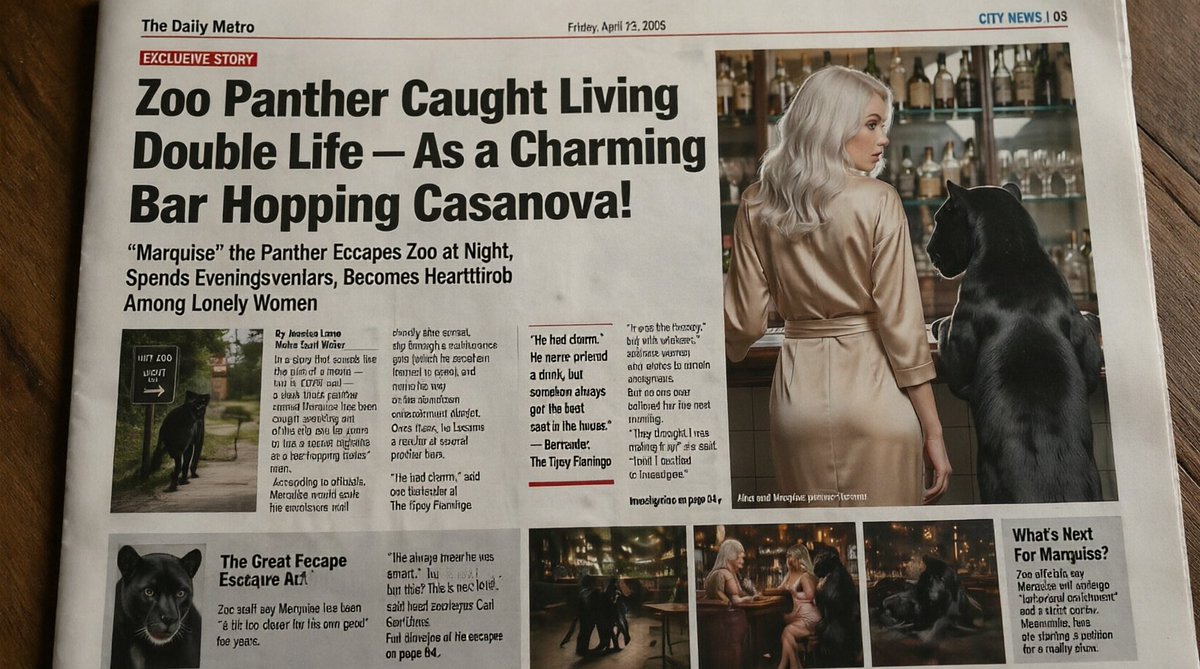
ばかげたタブロイド紙パンサーの1面
このプロンプトは、秘密の夜遊び生活を送る黒豹を題材にした、リアルでコミカルなタブロイド紙風の新聞の一面を生成します。風刺的な社説や、ネット上で拡散する偽の見出し画像に役立ちます。
これはグラフィック&ポスター向けのGPT Image 2プロンプトケースです。以下のコピー可能なプロンプトを使用して同様のビジュアルを生成し、再利用する前にAwesome GPT Image 2 Prompts帰属表示と商用利用権を確認してください。
プロンプトセット全体が必要ですか? グラフィック&ポスター 関連する例をもっと見るにはトピックハブを開くか、 GPT Image 2 プロンプトカタログ 完全な例の索引、再利用可能な構造、および出典の明記については、こちらをご覧ください。
Free 1K preview
Generate one preview image instantly, no sign-up required.
2492/4000
プロンプト
コピー準備完了プロンプト
A realistic, slightly humorous tabloid newspaper front page photographed from above on a wooden table, designed to look like a printed broadsheet with subtle paper texture, fold marks, and mild lens distortion. The masthead at top left reads “The Daily Metro”, the date line near the top center reads “Friday, April 22, 2005”, and the top-right section marker reads “CITY NEWS | 05”. A red banner near the upper left says “EXCLUSIVE STORY”. The dominant oversized black headline spans multiple lines: “Zoo Panther Caught Living Double Life – As a Charming Bar Hopping Casanova!” Below it, a large subheadline reads: ““Marquise” the Panther Escapes Zoo at Night, Spends Eveningsvlenlars, Becomes Heartthrob Among Lonely Women”. The page layout should mimic a sensational tabloid with 1 huge headline area, 1 large main photo on the upper right, 1 small inset photo under the main text on the left, 3 narrow text columns with dense newspaper copy in the center-left, 1 pull-quote box in the middle, 1 lower-left secondary story block with a panther portrait, 3 small bottom photo thumbnails in a row, and 1 right-side sidebar box titled “What’s Next For Mamquiss?”. Keep most body text tiny and partly nonsensical or pseudo-legible like AI-generated newspaper filler, but preserve the major visible headlines exactly.

The main photo on the upper right shows the back view of a glamorous blonde woman in a silky champagne-colored dress standing at a bar beside a large black panther upright on a stool or standing with forepaws elevated near the counter. The bar background contains many liquor bottles and glassware on shelves, warmly lit. Show every face clearly with natural, detailed facial features. The panther is sleek, glossy, and realistically rendered. The inset photo under the headline at left shows the black panther near a zoo exit or pathway sign at night. The lower-left portrait shows a close-up of the panther’s face. The 3 bottom thumbnails show nightlife scenes: the panther moving through a bar interior, the panther seated near two women at a small round table, and the panther lounging in dim warm light.

Use an early-2000s tabloid aesthetic, high-contrast black headline typography, off-white newsprint, red accent rules, narrow columns, and slightly messy authentic newspaper composition. The overall tone is deadpan absurdist journalism, realistic enough to glance as a real newspaper, with the page filling most of the frame and photographed in natural indoor light.
Best for
- - グラフィック&ポスター visual exploration
- - Image generation and reference-image edits
- - Reusable briefs that keep source attribution visible
Change these parts
- - Subject, product, character, or scene
- - Aspect ratio, camera, lighting, and background
- - Brand, text, color, and output constraints
Recommended model and settings
- - Model: gpt-image-2
- - Input mode: テキストから画像
- - Aspect ratio: source
- - Commercial status: review original source
How to use this prompt
- 1. Copy the prompt and preserve its structure for the first test.
- 2. Replace the subject, context, and publishing channel.
- 3. Change one camera, lighting, or style variable per iteration.
- 4. Inspect the output, source, text, and rights before reuse.
Limitations, source, and reuse cautions
- - Generated output is an editable draft, not factual, legal, or rights evidence.
- - Review the linked source, people, brands, logos, text, and third-party media before commercial use.
Awesome GPT Image 2 Promptsからインポートされました。出典の明記が必要です。商用利用の可否はallowedです。有料利用の前に、出典元の権利をご確認ください。
このカテゴリーのその他の事例
カテゴリー、入力モードの互換性、品質、およびリスクの低さに基づいて優先順位付けされています。






再利用と出典に関する注記
ケースを事前に確認してから、このプロンプトを安全に使用してください。
- 1.プロンプトをコピーするか、生成ボタンを使ってDovooで直接開いてください。
- 2.ご自身の用途に合わせて、変数、アスペクト比、および参照画像を調整してください。
- 3.公開または有料利用の前に、情報源の権利、帰属表示の要件、およびブランドまたは肖像権に関するリスクを確認してください。