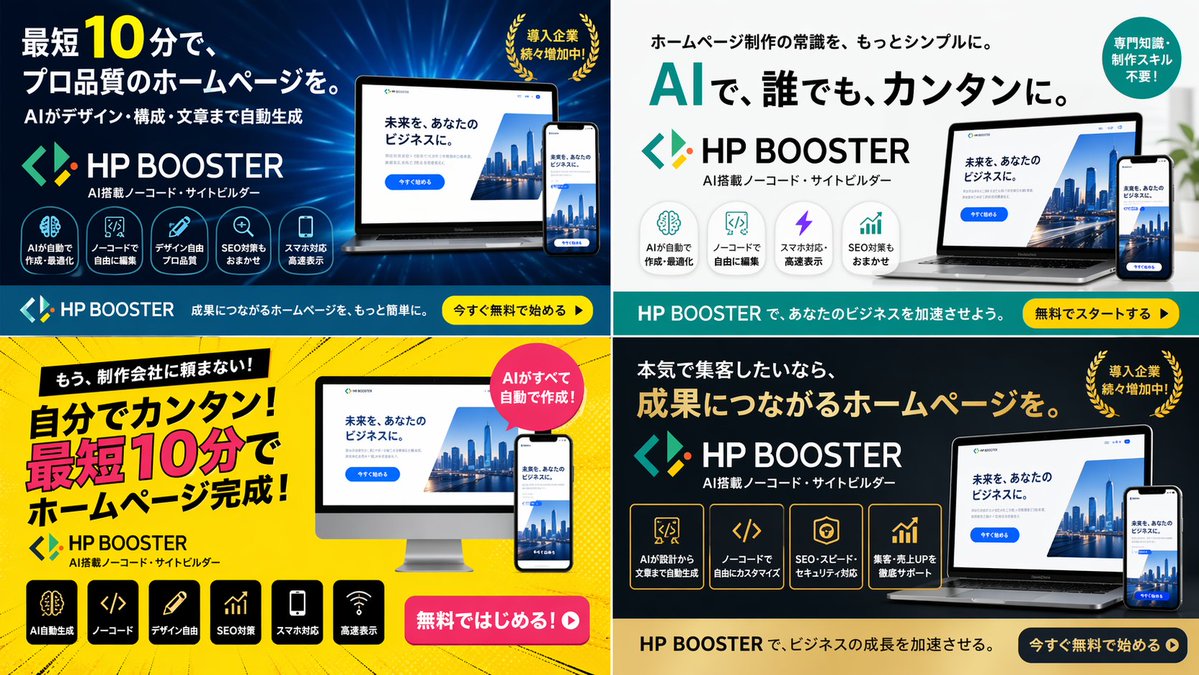
4パネル構成のSaaS広告バナーバリエーション
ソフトウェア製品向けに、異なるカラーテーマ、レイアウト、マーケティングコピーのバリエーションを備えた、2×2のグリッド状のデジタル広告バナーを生成します。
これは製品および商業向けのGPT Image 2プロンプトケースです。以下のコピー可能なプロンプトを使用して同様のビジュアルを生成し、再利用する前にAwesome GPT Image 2 Prompts帰属表示と商用利用権を確認してください。
プロンプトセット全体が必要ですか? 製品および商業 関連する例をもっと見るにはトピックハブを開くか、 GPT Image 2 プロンプトカタログ 完全な例の索引、再利用可能な構造、および出典の明記については、こちらをご覧ください。
Free 1K preview
Generate one preview image instantly, no sign-up required.
2793/4000
プロンプト
コピー準備完了プロンプト
{
  "type": "4-panel ad banner variation grid",
  "product": {
    "name": "{argument name=\"product name\" default=\"HP BOOSTER\"}",
    "subtitle": "AI搭載ノーコード・サイトビルダー",
    "logo": "blue and green angle brackets with a diamond"
  },
  "common_elements": {
    "device_mockups": "laptop and smartphone (desktop monitor in bottom-left panel) displaying a website with a city skyline, text '未来を、あなたのビジネスに。', and a blue '今すぐ始める' button"
  },
  "layout": {
    "grid": "2x2",
    "panels": [
      {
        "position": "top-left",
        "theme": "dark blue gradient with tech lines",
        "headline": "{argument name=\"main headline 1\" default=\"最短10分で、プロ品質のホームページを。\"}",
        "sub_headline": "AIがデザイン・構成・文章まで自動生成",
        "badge": "Golden laurel wreath with the text “The number of companies being introduced is steadily increasing!”",
        "icon_count": 5,
        "icon_labels": [
          "AIが自動で作成・最適化",
          "ノーコードで自由に編集",
          "デザイン自由プロ品質",
          "SEO対策もおまかせ",
          "スマホ対応高速表示"
        ],
        "bottom_bar": "teal background, yellow button '今すぐ無料で始める ▶'"
      },
      {
        "position": "top-right",
        "theme": "white and light gray",
        "headline": "{argument name=\"main headline 2\" default=\"AIで、誰でも、カンタンに。\"}",
        "pre_headline": "ホームページ制作の常識を、もっとシンプルに。",
        "badge": "teal circle with text '専門知識・制作スキル不要!'",
        "icon_count": 4,
        "icon_labels": [
          "AIが自動で作成・最適化",
          "ノーコードで自由に編集",
          "スマホ対応高速表示",
          "SEO対策もおまかせ"
        ],
        "bottom_bar": "teal background, yellow button '無料でスタートする ▶'"
      },
      {
        "position": "bottom-left",
        "theme": "bright yellow with comic-book action lines",
        "headline": "{argument name=\"main headline 3\" default=\"自分でカンタン!最短10分でホームページ完成!\"}",
        "pre_headline": "もう、制作会社に頼まない!",
        "badge": "pink circle with text 'AIがすべて自動で作成!'",
        "icon_count": 6,
        "icon_labels": [
          "AI automatic generation",
          "ノーコード",
          "デザイン自由",
          "SEO optimization",
          "スマホ対応",
          "Fast loading"
        ],
        "call_to_action": "pink pill button '無料ではじめる!▶'"
      },
      {
        "position": "bottom-right",
        "theme": "dark gray and black",
        "headline": "{argument name=\"main headline 4\" default=\"成果につながるホームページを。\"}",
        "pre_headline": "本気で集客したいなら、",
        "badge": "Golden laurel wreath with the text “The number of companies being introduced is steadily increasing!”",
        "icon_count": 4,
        "icon_labels": [
          "AIが設計から文章まで自動生成",
          "ノーコードで自由にカスタマイズ",
          "SEO・スピード・セキュリティ対応",
          "集客・売上UPを徹底サポート"
        ],
        "bottom_bar": "gold background, dark blue button '今すぐ無料で始める ▶'"
      }
    ]
  }
}
プロンプト変数
プロンプトに表示される編集可能な引数プレースホルダーと、それらのデフォルト値。
変数
product name
デフォルト
HP BOOSTER
変数
main headline 1
デフォルト
最短10分で、プロ品質のホームページを。
変数
main headline 2
デフォルト
AIで、誰でも、カンタンに。
変数
main headline 3
デフォルト
自分でカンタン!最短10分でホームページ完成!
変数
main headline 4
デフォルト
成果につながるホームページを。
Best for
- - 製品および商業 visual exploration
- - Image generation and reference-image edits
- - Reusable briefs that keep source attribution visible
Change these parts
- - Subject, product, character, or scene
- - Aspect ratio, camera, lighting, and background
- - Brand, text, color, and output constraints
Recommended model and settings
- - Model: gpt-image-2
- - Input mode: テキストから画像
- - Aspect ratio: source
- - Commercial status: review original source
How to use this prompt
- 1. Copy the prompt and preserve its structure for the first test.
- 2. Replace the subject, context, and publishing channel.
- 3. Change one camera, lighting, or style variable per iteration.
- 4. Inspect the output, source, text, and rights before reuse.
Limitations, source, and reuse cautions
- - Generated output is an editable draft, not factual, legal, or rights evidence.
- - Review the linked source, people, brands, logos, text, and third-party media before commercial use.
Awesome GPT Image 2 Promptsからインポートされました。出典の明記が必要です。商用利用の可否はallowedです。有料利用の前に、出典元の権利をご確認ください。
このカテゴリーのその他の事例
カテゴリー、入力モードの互換性、品質、およびリスクの低さに基づいて優先順位付けされています。






再利用と出典に関する注記
ケースを事前に確認してから、このプロンプトを安全に使用してください。
- 1.プロンプトをコピーするか、生成ボタンを使ってDovooで直接開いてください。
- 2.ご自身の用途に合わせて、変数、アスペクト比、および参照画像を調整してください。
- 3.公開または有料利用の前に、情報源の権利、帰属表示の要件、およびブランドまたは肖像権に関するリスクを確認してください。