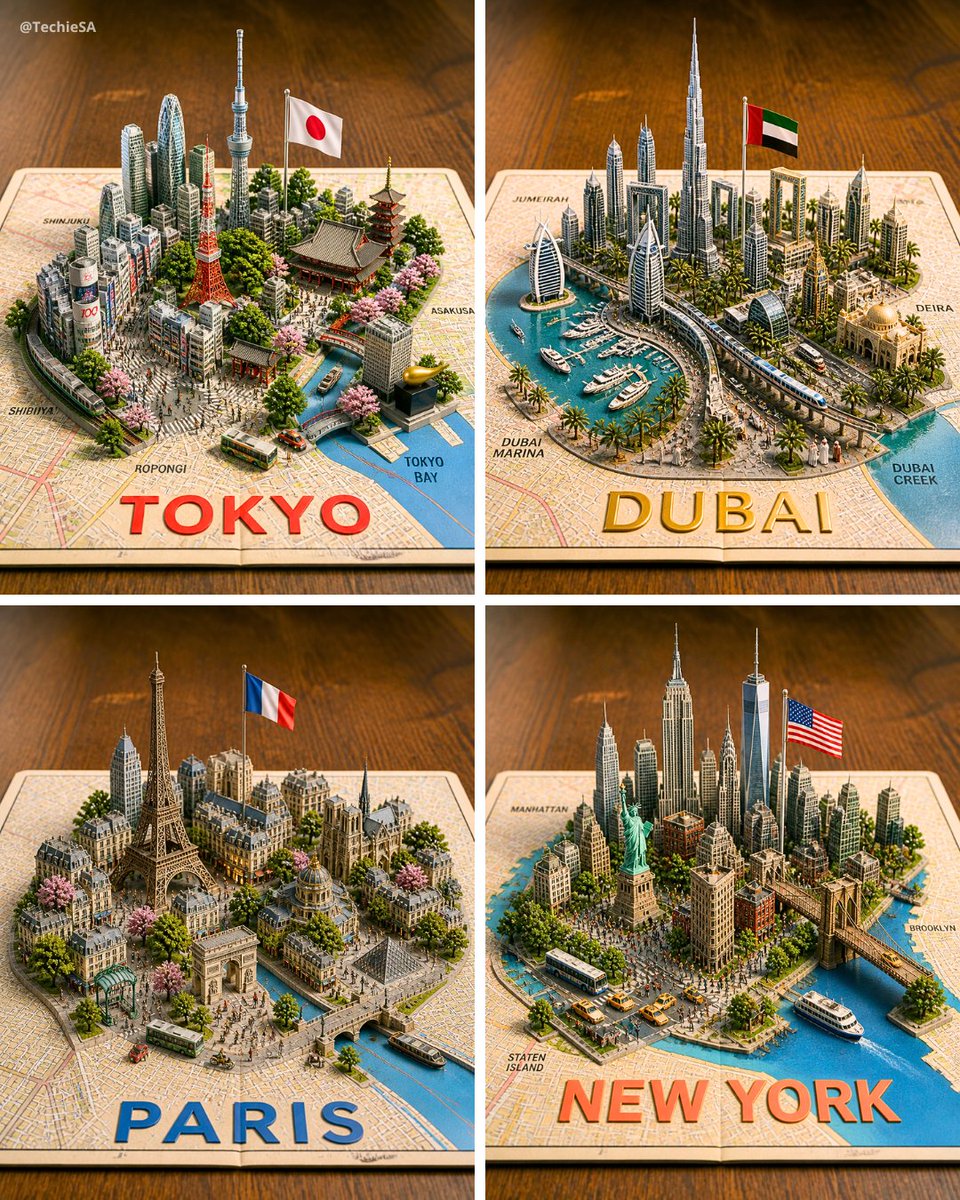
Four 3D Miniature City Maps
Generates a four-panel photorealistic 3D diorama of Tokyo, Dubai, Paris, and New York rising from printed maps for travel or city showcase visuals.
これは風景と自然向けのGPT Image 2プロンプトケースです。以下のコピー可能なプロンプトを使用して同様のビジュアルを生成し、再利用する前にAwesome GPT Image 2 Prompts帰属表示と商用利用権を確認してください。
プロンプトセット全体が必要ですか? 風景と自然 関連する例をもっと見るにはトピックハブを開くか、 GPT Image 2 プロンプトカタログ 完全な例の索引、再利用可能な構造、および出典の明記については、こちらをご覧ください。
Free 1K preview
Generate one preview image instantly, no sign-up required.
3198/4000
プロンプト
コピー準備完了プロンプト
Goal: Create a photorealistic 3D miniature city-map showcase featuring exactly 4 square panels arranged in a 2×2 grid, each panel showing a famous world city as a raised diorama emerging from a printed paper street map on a warm wooden tabletop.

Canvas: Square image, evenly divided by thin white gutters into four equal quadrants. Use an isometric three-quarter view from above, shallow depth of field, warm studio lighting, crisp miniature details, and realistic shadows.

Layout: The 4 panels are: top-left Tokyo, top-right Dubai, bottom-left Paris, bottom-right New York. Each city sits on an open map sheet with a large bold city name printed along the bottom edge of its panel in bright color. Include small neighborhood labels on the map surface.

Panel 1 — Tokyo: Build a dense miniature Tokyo skyline with exactly 6 key recognizable landmarks: Tokyo Tower, Tokyo Skytree, a traditional pagoda, a large temple roof, a modern cluster of skyscrapers, and a canal leading to Tokyo Bay. Add a Japanese flag on a pole, cherry blossom trees, small buses, tiny streets, and map labels such as Shinjuku, Shibuya, Roppongi, Asakusa, and Tokyo Bay. Large bottom text: {argument name="Tokyo label" default="TOKYO"} in bold red letters.

Panel 2 — Dubai: Build a futuristic Dubai marina diorama with exactly 6 key recognizable elements: Burj Khalifa, Burj Al Arab, twin sail-like towers, Dubai Frame, a yacht-filled marina, and a curving elevated transit line. Add palm trees, modern high-rises, an Emirati flag on a pole, blue water, boats, and map labels such as Jumeira, Dubai Marina, Deira, and Dubai Creek. Large bottom text: {argument name="Dubai label" default="DUBAI"} in bold gold letters.

Panel 3 — Paris: Build a classic Paris miniature with exactly 6 key recognizable landmarks: Eiffel Tower, Arc de Triomphe, Notre-Dame-style cathedral, Louvre-like glass pyramid, Haussmann apartment blocks, and a Seine river with bridges. Add a French flag on a pole, tree-lined boulevards, pink blossoms, tiny buses, pedestrians, and warm stone architecture. Large bottom text: {argument name="Paris label" default="PARIS"} in bold blue letters.

Panel 4 — New York: Build a dense Manhattan miniature with exactly 6 key recognizable landmarks: Statue of Liberty, One World Trade Center, Empire State Building, Chrysler Building, Brooklyn Bridge, and a harbor with ferries. Add an American flag on a pole, yellow taxis, buses, crowded streets, waterfront piers, greenery, and map labels such as Manhattan, Brooklyn, and Staten Island. Large bottom text: {argument name="New York label" default="NEW YORK"} in bold orange-red letters.

Visual style: Hyper-detailed 3D paper-map diorama, realistic plastic-and-paper miniature scale model, tilt-shift photography effect, vibrant but natural colors, warm wooden background, soft bokeh at the edges, high-resolution commercial render quality.

Constraints: Keep exactly 4 panels and exactly the 4 city themes listed. Do not add extra cities. Keep all text legible, with the city names large and centered near the lower edge of each panel. Include a small creator watermark in the top-left corner reading {argument name="watermark text" default="@TechieSA"}.
プロンプト変数
プロンプトに表示される編集可能な引数プレースホルダーと、それらのデフォルト値。
変数
Tokyo label
デフォルト
TOKYO
変数
Dubai label
デフォルト
DUBAI
変数
Paris label
デフォルト
PARIS
変数
New York label
デフォルト
NEW YORK
変数
watermark text
デフォルト
@TechieSA
Best for
- - 風景と自然 visual exploration
- - Image generation and reference-image edits
- - Reusable briefs that keep source attribution visible
Change these parts
- - Subject, product, character, or scene
- - Aspect ratio, camera, lighting, and background
- - Brand, text, color, and output constraints
Recommended model and settings
- - Model: gpt-image-2
- - Input mode: テキストから画像
- - Aspect ratio: source
- - Commercial status: review original source
How to use this prompt
- 1. Copy the prompt and preserve its structure for the first test.
- 2. Replace the subject, context, and publishing channel.
- 3. Change one camera, lighting, or style variable per iteration.
- 4. Inspect the output, source, text, and rights before reuse.
Limitations, source, and reuse cautions
- - Generated output is an editable draft, not factual, legal, or rights evidence.
- - Review the linked source, people, brands, logos, text, and third-party media before commercial use.
Awesome GPT Image 2 Promptsからインポートされました。出典の明記が必要です。商用利用の可否はallowedです。有料利用の前に、出典元の権利をご確認ください。
このカテゴリーのその他の事例
カテゴリー、入力モードの互換性、品質、およびリスクの低さに基づいて優先順位付けされています。






再利用と出典に関する注記
ケースを事前に確認してから、このプロンプトを安全に使用してください。
- 1.プロンプトをコピーするか、生成ボタンを使ってDovooで直接開いてください。
- 2.ご自身の用途に合わせて、変数、アスペクト比、および参照画像を調整してください。
- 3.公開または有料利用の前に、情報源の権利、帰属表示の要件、およびブランドまたは肖像権に関するリスクを確認してください。