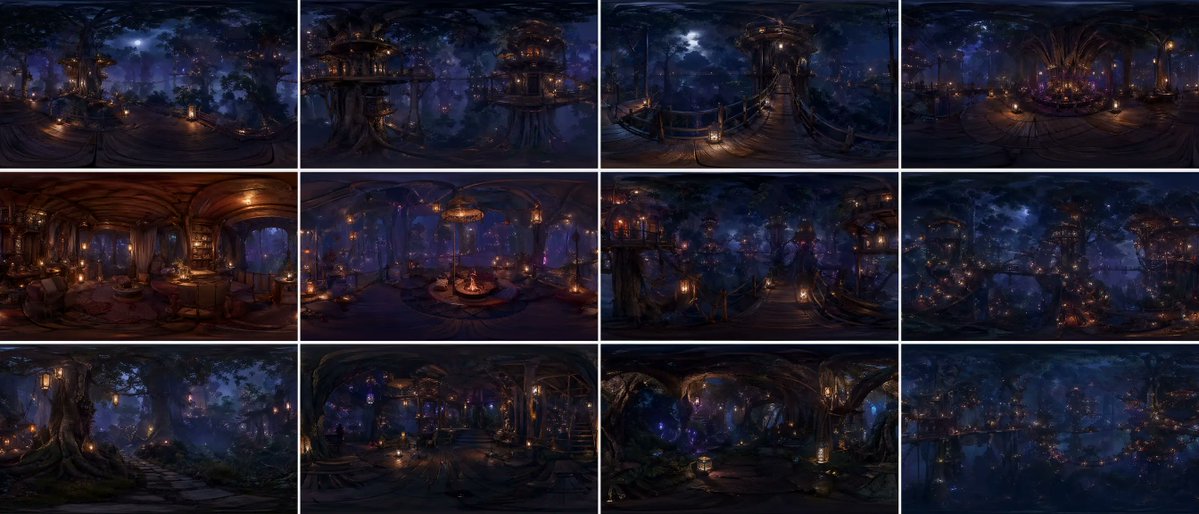
360度森林世界パノラマグリッド
映画のようなリアリズムと全体的な一貫性を備えた、連続する森林世界の12パネルの正距円筒図法パノラマを生成するための洗練されたプロンプト。
これは風景と自然向けのGPT Image 2プロンプトケースです。以下のコピー可能なプロンプトを使用して同様のビジュアルを生成し、再利用する前にAwesome GPT Image 2 Prompts帰属表示と商用利用権を確認してください。
プロンプトセット全体が必要ですか? 風景と自然 関連する例をもっと見るにはトピックハブを開くか、 GPT Image 2 プロンプトカタログ 完全な例の索引、再利用可能な構造、および出典の明記については、こちらをご覧ください。
Free 1K preview
Generate one preview image instantly, no sign-up required.
2477/4000
プロンプト
コピー準備完了プロンプト
{argument name="grid layout" default="12-panel grid (4x3)"}, each panel is an independent FULL equirectangular 360° panorama of the SAME continuous {argument name="environment" default="forest world"}

each panel = complete spherical environment (360° horizontal, 180° vertical)
true equirectangular projection with natural distortion:
stretched edges, curved horizon, vertical compression toward zenith and nadir

STRICT global consistency across panels:
same forest biome, same architectural language, same materials, same lighting logic, same scale, same color palette, no visual drift

cinematic photorealism, live-action quality, physically accurate rendering
natural light behavior, realistic exposure, subtle lens response, filmic dynamic range

ultra-detailed environment, grounded material response (wood, moss, fabric, stone), believable imperfections, micro-detail variation

massive forest environment with large-scale vertical structures integrated into trees
multi-layered platforms, bridges, embedded interiors, organic construction logic

lighting:
motivated light sources only (lanterns, windows, bioluminescence)
soft volumetric fog interacting with light beams
physically correct falloff, no overglow, no artificial bloom
balanced contrast, filmic highlights, deep but readable shadows

atmosphere:
dense air perspective, layered depth, subtle particle presence
natural haze, humidity, soft diffusion

CAMERA (IMPORTANT):
each panel = fixed central capture point of a spherical camera
true 360° capture, no framing, no composition bias, no cropped view
but with subtle real-world camera characteristics:
slight lens softness toward edges, mild exposure adaptation, natural highlight rolloff

each panel represents a different location within the SAME world:
canopy height, mid-bridge level, interior spaces, vertical clearings, forest floor transitions
continuous spatial logic between panels

viewer always positioned at the center of the environment

environment fully resolved in ALL directions:
above (canopy, sky gaps, light sources) and below (structures, roots, depth layers)

COLOR:
{argument name="color scheme" default="deep indigo night base, warm amber practical lights, restrained violet accents"}
cinematic color grading, natural color separation, no oversaturation

STYLE:
cinematic spherical realism, VR-ready environment, physically coherent world
high-end film production quality, not stylized, not game-like

no labels, no text, no numbers
プロンプト変数
プロンプトに表示される編集可能な引数プレースホルダーと、それらのデフォルト値。
変数
grid layout
デフォルト
12-panel grid (4x3)
変数
environment
デフォルト
forest world
変数
color scheme
デフォルト
deep indigo night base, warm amber practical lights, restrained violet accents
Best for
- - 風景と自然 visual exploration
- - Image generation and reference-image edits
- - Reusable briefs that keep source attribution visible
Change these parts
- - Subject, product, character, or scene
- - Aspect ratio, camera, lighting, and background
- - Brand, text, color, and output constraints
Recommended model and settings
- - Model: gpt-image-2
- - Input mode: テキストから画像
- - Aspect ratio: source
- - Commercial status: review original source
How to use this prompt
- 1. Copy the prompt and preserve its structure for the first test.
- 2. Replace the subject, context, and publishing channel.
- 3. Change one camera, lighting, or style variable per iteration.
- 4. Inspect the output, source, text, and rights before reuse.
Limitations, source, and reuse cautions
- - Generated output is an editable draft, not factual, legal, or rights evidence.
- - Review the linked source, people, brands, logos, text, and third-party media before commercial use.
Awesome GPT Image 2 Promptsからインポートされました。出典の明記が必要です。商用利用の可否はallowedです。有料利用の前に、出典元の権利をご確認ください。
このカテゴリーのその他の事例
カテゴリー、入力モードの互換性、品質、およびリスクの低さに基づいて優先順位付けされています。






再利用と出典に関する注記
ケースを事前に確認してから、このプロンプトを安全に使用してください。
- 1.プロンプトをコピーするか、生成ボタンを使ってDovooで直接開いてください。
- 2.ご自身の用途に合わせて、変数、アスペクト比、および参照画像を調整してください。
- 3.公開または有料利用の前に、情報源の権利、帰属表示の要件、およびブランドまたは肖像権に関するリスクを確認してください。