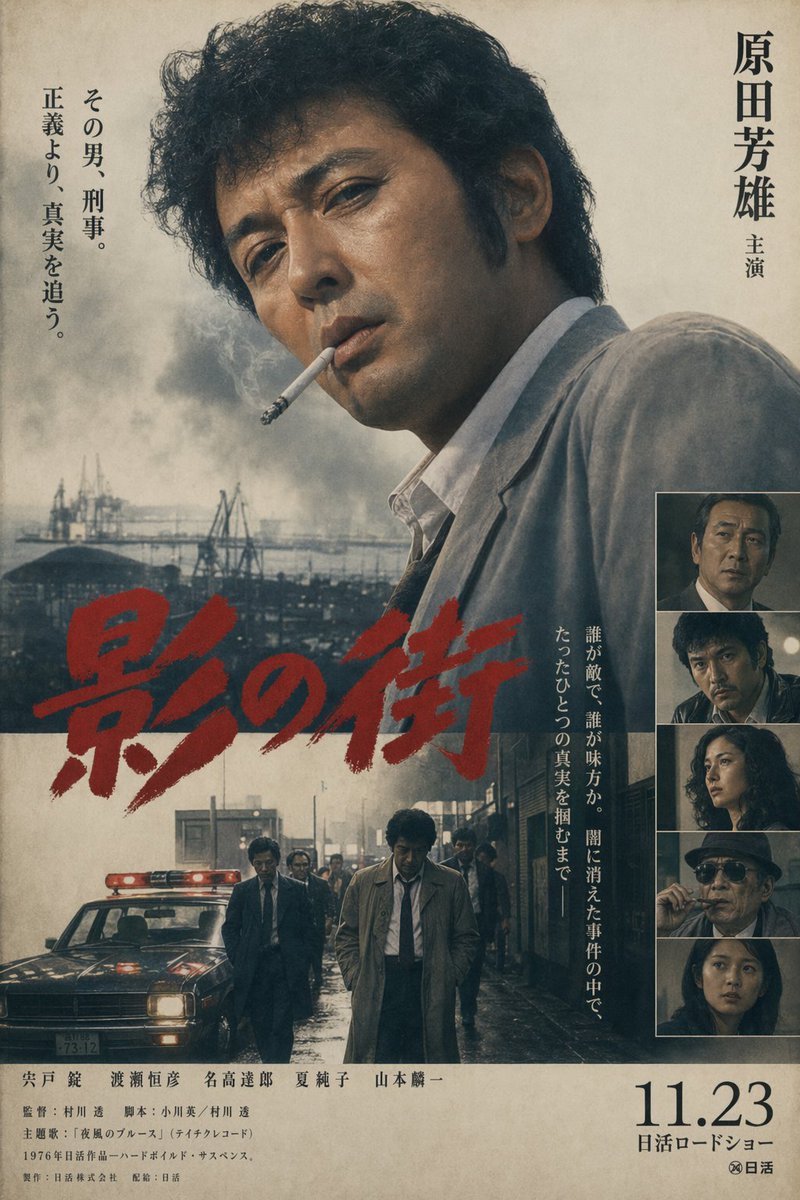
Locandina vintage di un film poliziesco giapponese.
Un'accattivante locandina cinematografica giapponese in stile retrò per un film poliziesco hard-boiled, utile per generare finte locandine cinematografiche anni '70 con tipografia e impaginazione autentiche.
Questo è un esempio di prompt GPT Image 2 per Grafica e poster . Utilizza il prompt pronto per la copia qui sotto per generare immagini simili e verifica l'attribuzione Awesome GPT Image 2 Prompts e i diritti di utilizzo commerciale prima del riutilizzo.
Free 1K preview
Generate one preview image instantly, no sign-up required.
Richiesta
prompt pronto per la copia
A vintage late-1970s Japanese crime film poster in the style of a Nikkatsu theatrical one-sheet, vertically composed on aged beige paper with visible grain, faint stains, and slightly faded ink. The main image is a large, moody half-body portrait of {argument name="lead actor name" default="Yoshio Harada"} occupying the upper right and center, turned partly away from camera, with thick curly dark hair, a serious expression, and a wrinkled light gray suit jacket over an open-collar white shirt; his face is mostly in shadow. Behind him is a bleak industrial waterfront with cranes, low factory structures, and heavy gray smoke rising into a washed-out sky. Across the lower middle, place a huge hand-brushed red Japanese title reading {argument name="title text" default="影の街"}, painted diagonally and aggressively, partially overlapping the portrait and the lower scene. In the lower half, add a second scene: a rainy urban street at dusk or night with wet reflective pavement, a dark police car at left with a glowing red roof light, and 6 men in suits and trench coats walking forward, with 1 central detective figure in a beige trench coat and loosened tie leading the group. On the far right, include a vertical strip of 5 stacked inset cast portraits framed in thin borders, each a dark cinematic still with different characters. Add vertical Japanese typography: on the upper right, the actor credit “原田芳雄 主演”; on the upper left, a 2-line tagline column reading “その男、刑事。 正義より、真実を追う。”; and near the lower right of the main image, another vertical blurb reading “誰が敵で、誰が味方か。闇に消えた事件の中で、ただひとつの真実を掴むまで—”. At the bottom, include dense small Japanese credits spanning the width, plus a large release date on the lower right reading {argument name="release date" default="11.23"} with “日活ロードショー” beneath it and a small studio mark. Use muted charcoal, sepia, smoky blue-gray, and off-white tones, with the red title as the only vivid color. The overall feeling is hard-boiled, melancholic, gritty, and cinematic, like a lost 1970s Japanese detective movie poster.Variabili di richiesta
Segnaposto per gli argomenti modificabili presenti nel prompt, con i relativi valori predefiniti.
Best for
- - Grafica e poster visual exploration
- - Image generation and reference-image edits
- - Reusable briefs that keep source attribution visible
Change these parts
- - Subject, product, character, or scene
- - Aspect ratio, camera, lighting, and background
- - Brand, text, color, and output constraints
Recommended model and settings
- - Model: gpt-image-2
- - Input mode: Testo in immagine
- - Aspect ratio: source
- - Commercial status: review original source
How to use this prompt
- 1. Copy the prompt and preserve its structure for the first test.
- 2. Replace the subject, context, and publishing channel.
- 3. Change one camera, lighting, or style variable per iteration.
- 4. Inspect the output, source, text, and rights before reuse.
Limitations, source, and reuse cautions
- - Generated output is an editable draft, not factual, legal, or rights evidence.
- - Review the linked source, people, brands, logos, text, and third-party media before commercial use.
Altri casi in questa categoria
Prioritizzazione in base a categoria, compatibilità della modalità di input, qualità e minor rischio.






Note sul riutilizzo e sulla fonte
Utilizza questo prompt in tutta sicurezza dopo aver visualizzato in anteprima il caso.
- 1.Copia il prompt oppure aprilo direttamente in Dovoo tramite il pulsante di generazione.
- 2.Regola le variabili, le proporzioni e le immagini di riferimento in base alle tue esigenze.
- 3.Prima della pubblicazione o dell'utilizzo a pagamento, verificare i diritti di fonte, i requisiti di attribuzione e i rischi relativi al marchio o all'immagine.