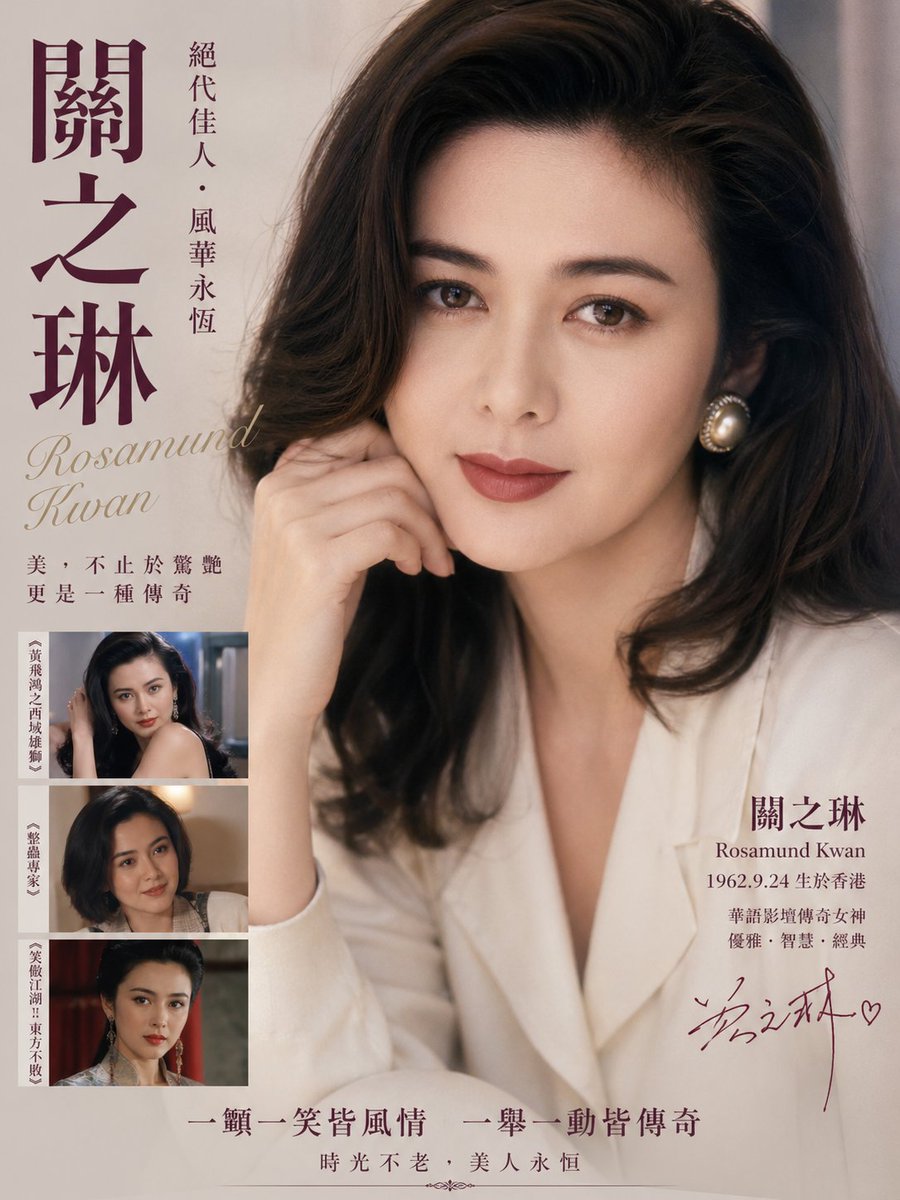
Poster vintage in omaggio a un'attrice di Hong Kong.
Questo prompt genera un poster celebrativo in stile editoriale nostalgico per una star del cinema classico di Hong Kong, ideale per illustrazioni tributo cinematografiche, copertine di riviste o design commemorativi retrò per celebrità.
Questo è un esempio di prompt GPT Image 2 per Grafica e poster . Utilizza il prompt pronto per la copia qui sotto per generare immagini simili e verifica l'attribuzione Awesome GPT Image 2 Prompts e i diritti di utilizzo commerciale prima del riutilizzo.
Free 1K preview
Generate one preview image instantly, no sign-up required.
Richiesta
prompt pronto per la copia
A vintage Hong Kong cinema tribute poster in elegant 1980s–1990s magazine style, featuring a glamorous close-up half-body portrait of {argument name="celebrity name" default="Rosamund Kwan"} seated indoors against a soft neutral beige background. She has voluminous dark brown wavy shoulder-length hair with a side part, luminous skin, a poised gentle expression, one hand raised lightly near her cheek, and wears a creamy white blazer with large round pearl earrings. Use warm diffused studio lighting, soft focus, refined film-like texture, subtle grain, and luxurious nostalgic color grading in beige, ivory, sepia, and deep plum. Design the composition like a memorial or star-profile poster with typography integrated around the portrait: on the far left, very large vertical Chinese calligraphy-style name text in deep plum reading {argument name="main Chinese name" default="Rosamund Kwan"}; to its right, a slim vertical line of smaller Chinese text reading {argument name="vertical tagline" default="絕代佳人・風華永恆"}. Below the large title on the left, place the English name in elegant italic serif script reading {argument name="English name" default="Rosamund Kwan"}. Under that, add a two-line Chinese quote in smaller serif text. In the lower left corner, include exactly 3 stacked rectangular film still thumbnails with thin borders, each showing the same actress in different roles; each thumbnail has a narrow vertical Chinese caption strip on its left edge. On the lower right beside the portrait, place a text block with the large Chinese surname and given name split across two lines, the English name beneath, then a birth line and 2 more lines of Chinese descriptive text. Add a handwritten autograph-style signature in dark plum near the bottom right. Along the bottom center, add 2 lines of Chinese slogan text in classic serif style, separated from the main layout with ample negative space. Overall look: classy, sentimental, high-end editorial poster, authentic retro Hong Kong actress homage, balanced typography, premium print design, portrait-dominant layout.Variabili di richiesta
Segnaposto per gli argomenti modificabili presenti nel prompt, con i relativi valori predefiniti.
Best for
- - Grafica e poster visual exploration
- - Image generation and reference-image edits
- - Reusable briefs that keep source attribution visible
Change these parts
- - Subject, product, character, or scene
- - Aspect ratio, camera, lighting, and background
- - Brand, text, color, and output constraints
Recommended model and settings
- - Model: gpt-image-2
- - Input mode: Testo in immagine
- - Aspect ratio: source
- - Commercial status: review original source
How to use this prompt
- 1. Copy the prompt and preserve its structure for the first test.
- 2. Replace the subject, context, and publishing channel.
- 3. Change one camera, lighting, or style variable per iteration.
- 4. Inspect the output, source, text, and rights before reuse.
Limitations, source, and reuse cautions
- - Generated output is an editable draft, not factual, legal, or rights evidence.
- - Review the linked source, people, brands, logos, text, and third-party media before commercial use.
Altri casi in questa categoria
Prioritizzazione in base a categoria, compatibilità della modalità di input, qualità e minor rischio.






Note sul riutilizzo e sulla fonte
Utilizza questo prompt in tutta sicurezza dopo aver visualizzato in anteprima il caso.
- 1.Copia il prompt oppure aprilo direttamente in Dovoo tramite il pulsante di generazione.
- 2.Regola le variabili, le proporzioni e le immagini di riferimento in base alle tue esigenze.
- 3.Prima della pubblicazione o dell'utilizzo a pagamento, verificare i diritti di fonte, i requisiti di attribuzione e i rischi relativi al marchio o all'immagine.