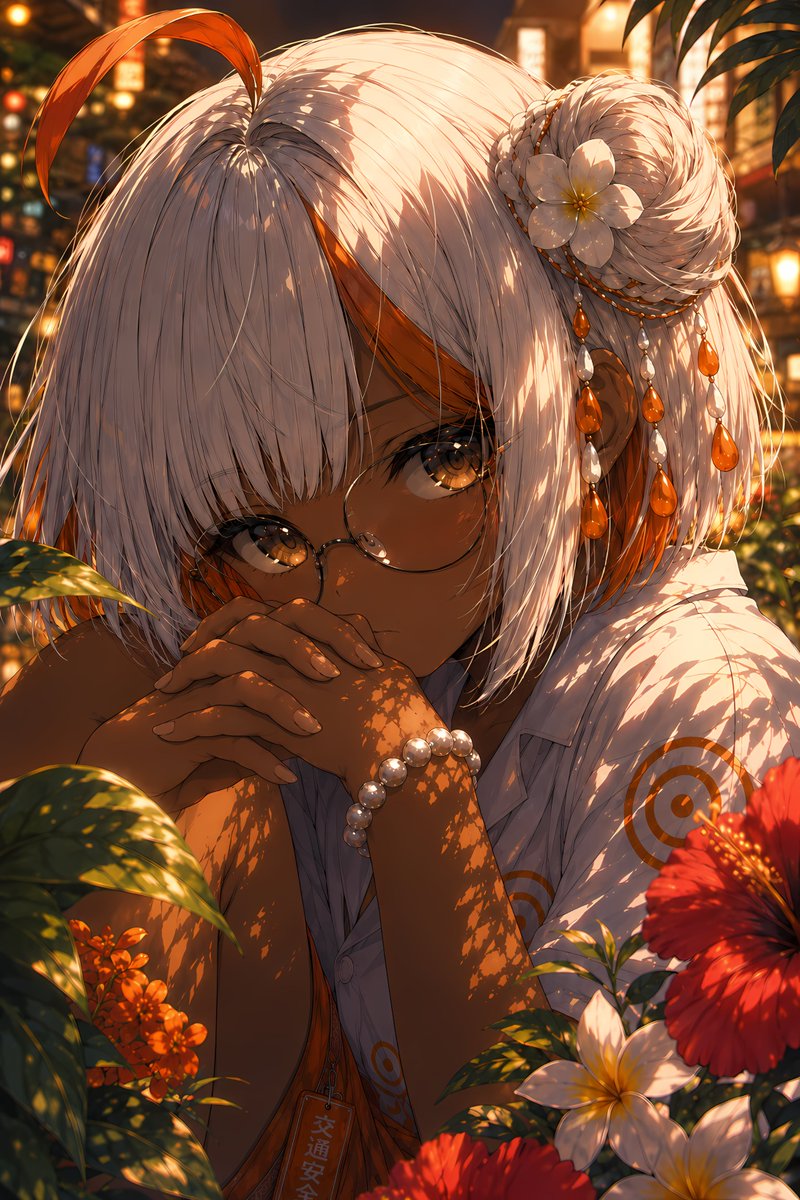
Vermilion Summer Garden Portrait
Generates a cinematic anime close-up of a tan, white-haired girl in a glowing tropical summer garden for polished character art.
Questo è un esempio di prompt GPT Image 2 per Anime e videogiochi . Utilizza il prompt pronto per la copia qui sotto per generare immagini simili e verifica l'attribuzione Awesome GPT Image 2 Prompts e i diritti di utilizzo commerciale prima del riutilizzo.
Hai bisogno del set completo di prompt? Usa il Anime e videogiochi hub tematico per ulteriori esempi correlati oppure apri il GPT Image 2 catalogo rapido per l'indice completo degli esempi, le strutture riutilizzabili e l'attribuzione delle fonti.
Free 1K preview
Generate one preview image instantly, no sign-up required.
2239/4000
Richiesta
prompt pronto per la copia
Create a highly detailed, vertical anime portrait with a mood named {argument name="art title" default="a mysterious summer garden girl"}: A close-up shot depicts a young woman with deep brown skin, bright amber eyes, and delicate round-frame glasses, with a quiet and introverted expression, her hands clasped in front of her mouth and leaning slightly forward. She has a silver-white short bob with thick bangs, and a long orange strand of hair curls upwards on the top of her head. There are orange inner highlights on the sides of her head, and a braided bun on her right side. Her hair accessories include 1 white gardenia flower, 3 strands of dangling bead chains, and multiple orange teardrop-shaped gems mixed with pearl-like beads. She is wearing a loose-fitting white short-sleeved shirt with a delicate orange circular target pattern, revealing a glimpse of an orange inner layer, a pearl bracelet on her wrist, and a small vertical pendant with Japanese characters hanging around her neck. The background is a lush tropical garden during golden hour: foreground leaves cast intricate, mottled shadows on her face, arms, hair, and shirt; visible flowers include 1 large red hibiscus in the lower right corner, 2 white gardenias in the lower right corner, and a cluster of orange small flowers in the lower left corner, with blurred warm-colored lanterns and summer streetlights in the background. Use rich crimson, amber, gold, white, and dark green, combined with cinematic backlighting, glowing bokeh, shallow depth of field, delicate hair strands, bright eyes, and soft skin shadows to create an ultra-refined Japanese illustration quality. The atmosphere evokes a hot and radiant summer evening in a hidden garden, intimate and peaceful. Customize the subject to be {argument name="character name" default="silvery white with vivid orange inner streaks"}, hair color to be {argument name="hair color" default="Silver-white with orange highlights"}, eye color to be {argument name="eye color" default="Amber gold"}, and skin color to be {argument name="skin tone" default="Deep warm brown"}. Avoid text overlays, borders, watermarks, extra characters, hand distortions, or additional flowers beyond the specified composition.Variabili di richiesta
Segnaposto per gli argomenti modificabili presenti nel prompt, con i relativi valori predefiniti.
Variabile
art title
Predefinito
a mysterious summer garden girl
Variabile
character name
Predefinito
silvery white with vivid orange inner streaks
Variabile
hair color
Predefinito
Silver-white with orange highlights
Variabile
eye color
Predefinito
Amber gold
Variabile
skin tone
Predefinito
Deep warm brown
Best for
- - Anime e videogiochi visual exploration
- - Image generation and reference-image edits
- - Reusable briefs that keep source attribution visible
Change these parts
- - Subject, product, character, or scene
- - Aspect ratio, camera, lighting, and background
- - Brand, text, color, and output constraints
Recommended model and settings
- - Model: gpt-image-2
- - Input mode: Testo in immagine
- - Aspect ratio: source
- - Commercial status: review original source
How to use this prompt
- 1. Copy the prompt and preserve its structure for the first test.
- 2. Replace the subject, context, and publishing channel.
- 3. Change one camera, lighting, or style variable per iteration.
- 4. Inspect the output, source, text, and rights before reuse.
Limitations, source, and reuse cautions
- - Generated output is an editable draft, not factual, legal, or rights evidence.
- - Review the linked source, people, brands, logos, text, and third-party media before commercial use.
Importato da Awesome GPT Image 2 Prompts . È richiesta l'attribuzione. Lo stato di utilizzo commerciale è allowed ; verificare i diritti della fonte prima dell'utilizzo a pagamento.
Altri casi in questa categoria
Prioritizzazione in base a categoria, compatibilità della modalità di input, qualità e minor rischio.



Note sul riutilizzo e sulla fonte
Utilizza questo prompt in tutta sicurezza dopo aver visualizzato in anteprima il caso.
- 1.Copia il prompt oppure aprilo direttamente in Dovoo tramite il pulsante di generazione.
- 2.Regola le variabili, le proporzioni e le immagini di riferimento in base alle tue esigenze.
- 3.Prima della pubblicazione o dell'utilizzo a pagamento, verificare i diritti di fonte, i requisiti di attribuzione e i rischi relativi al marchio o all'immagine.