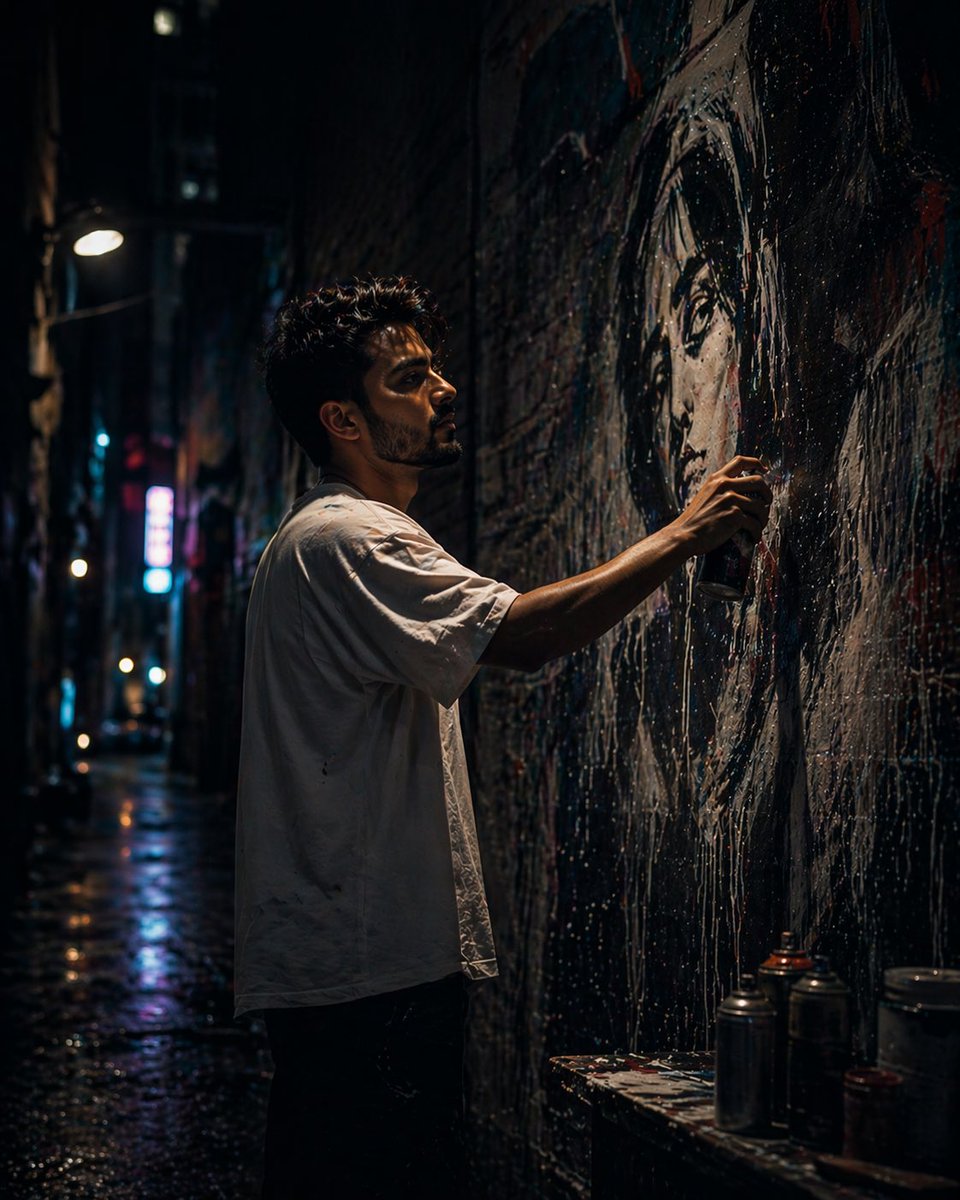
Artista di murales in vicoli urbani
Un'idea per una scena notturna cinematografica, ripresa dal basso, che ritrae un artista di strada intento a dipingere un murale iperrealistico in un vicolo urbano squallido illuminato da luci al neon.
Questo è un esempio di prompt GPT Image 2 per Ritratto e personaggio . Utilizza il prompt pronto per la copia qui sotto per generare immagini simili e verifica l'attribuzione Awesome GPT Image 2 Prompts e i diritti di utilizzo commerciale prima del riutilizzo.
Free 1K preview
Generate one preview image instantly, no sign-up required.
Free text preview doesn’t preserve reference-image consistency.
Richiesta
prompt pronto per la copia
A cinematic, ultra-realistic night scene of a {argument name="artist" default="young male street artist"} painting a large-scale {argument name="mural subject" default="narrow urban alley"} in a {argument name="setting" default="mural of a woman’s face"}. The camera angle is slightly low, creating a dramatic, powerful perspective. The artist has medium-length, slightly messy dark hair and light stubble or a short beard, giving him a rugged, creative look.

He wears a loose white t-shirt and casual jeans, slightly oversized, with a relaxed streetwear vibe. His posture is focused and engaged as he stands close to the wall, actively spray-painting.

He is creating a massive, hyper-realistic mural of a woman’s face on a textured brick wall. The mural is incredibly detailed—smooth skin tones, realistic lighting, expressive eyes, and glossy lips—appearing almost like a photograph. Fine mist from the spray paint is visible in the air, catching light and adding motion and atmosphere.

The setting is a narrow urban alley at night, surrounded by tall buildings. The environment is gritty and textured—aged brick walls, paint splashes, subtle grime, and urban wear. Neon signs and distant streetlights cast vibrant reflections in teal, magenta, and blue tones, creating a cinematic, slightly cyberpunk mood.

Lighting is dramatic and layered: cool ambient light fills the alley, while warmer neon highlights create contrast. A subtle rim light outlines the artist’s silhouette, separating him from the dark background. The mural is partially illuminated, acting as a strong focal point.

Atmosphere includes light fog or mist, enhancing depth and making the lighting glow softly. The scene feels immersive, quiet, and artistically intense.

Depth of field is moderately shallow: the artist and mural are in sharp focus, while the background fades into soft blur with bokeh highlights.

Style: hyper-realistic, cinematic photography, street art aesthetic, ultra-detailed textures, high dynamic range, subtle film grain.

Camera details: 35mm or 50mm lens, f/1.8–f/2.8 aperture, low-light photography, slight low-angle shot, natural perspective.

Composition: vertical frame (4:5 or 9:16), subject slightly off-center, mural dominating the frame for strong visual storytelling.
Generate image using uploaded image as reference
Variabili di richiesta
Segnaposto per gli argomenti modificabili presenti nel prompt, con i relativi valori predefiniti.
Best for
- - Ritratto e personaggio visual exploration
- - Image generation and reference-image edits
- - Reusable briefs that keep source attribution visible
Change these parts
- - Subject, product, character, or scene
- - Aspect ratio, camera, lighting, and background
- - Brand, text, color, and output constraints
Recommended model and settings
- - Model: gpt-image-2
- - Input mode: Immagine in immagine
- - Aspect ratio: source
- - Commercial status: review original source
How to use this prompt
- 1. Copy the prompt and preserve its structure for the first test.
- 2. Replace the subject, context, and publishing channel.
- 3. Change one camera, lighting, or style variable per iteration.
- 4. Inspect the output, source, text, and rights before reuse.
Limitations, source, and reuse cautions
- - Generated output is an editable draft, not factual, legal, or rights evidence.
- - Review the linked source, people, brands, logos, text, and third-party media before commercial use.
Altri casi in questa categoria
Prioritizzazione in base a categoria, compatibilità della modalità di input, qualità e minor rischio.






Note sul riutilizzo e sulla fonte
Utilizza questo prompt in tutta sicurezza dopo aver visualizzato in anteprima il caso.
- 1.Copia il prompt oppure aprilo direttamente in Dovoo tramite il pulsante di generazione.
- 2.Regola le variabili, le proporzioni e le immagini di riferimento in base alle tue esigenze.
- 3.Prima della pubblicazione o dell'utilizzo a pagamento, verificare i diritti di fonte, i requisiti di attribuzione e i rischi relativi al marchio o all'immagine.