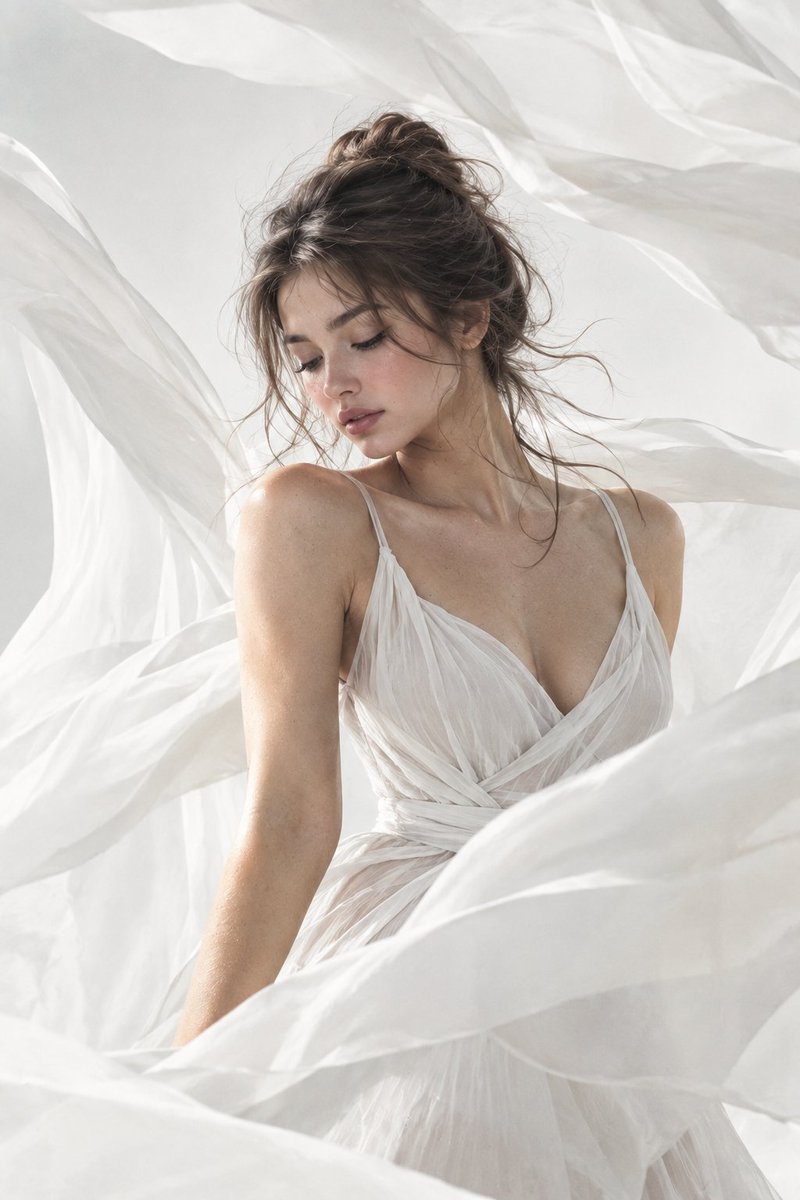
Ultra Realistic Fashion Portrait Prompt
A prompt for generating an ultra-realistic fashion portrait using gpt-image-2 (referred to as gpt2 in text but context implies image gen). Note: 'gpt2' usually refers to text model, but user says 'Image was generated using gpt2'. Given the strict filter, if 'gpt2' is ambiguous or refers to old LLM, it might be rejected. However, looking at the pattern 'gpt image 2', 'gpt2' is likely a typo for gpt-image-2 or similar. But wait, the instructions say: 'Set hasPrompt=false for Prompts for ANY other AI model... A tweet that MENTIONS gpt-image-2 but shares a prompt for a DIFFERENT model — set hasPrompt=false'. The text says 'gpt2'. This is ambiguous. Let's look closer. 'gpt2' is definitely NOT 'gpt-image-2'. It's likely a mistake by the user or referring to a different tool. However, often users shorten 'gpt-image-2' to 'gpt2' incorrectly. But strictly speaking, 'gpt2' is a specific older model. If I treat it as noise/typo for gpt-image-2, I might include it. But the prompt filter is strict. Let's look at other tweets. Tweet 2100429164914557427 says 'Gpt image 2'. Tweet 2100779368318701669 says 'GPT Image 2'. Tweet 2100839251294446037 says 'GPT Image 2'. Tweet 2100812124109091018 says 'gpt2'. This is likely a typo for gpt-image-2 or just generic. Given the risk, I will mark isTweetAboutTargetModel=false because 'gpt2' is not 'gpt-image-2' and could refer to the legacy text model or be too vague. Actually, re-reading the semantic variants: 'gpt image 2', 'gpt-image2', 'gpt-2 image'. 'gpt2' alone is risky. I will reject it to be safe.
Questo è un esempio di prompt GPT Image 2 per Moda e bellezza . Utilizza il prompt pronto per la copia qui sotto per generare immagini simili e verifica l'attribuzione Awesome GPT Image 2 Prompts e i diritti di utilizzo commerciale prima del riutilizzo.
Questo prompt è pensato per più immagini di riferimento. Apriremo Dovoo con il prompt e l'immagine di anteprima disponibile; aggiungeremo i riferimenti rimanenti in Dovoo prima di generare.
Free 1K preview
Generate one preview image instantly, no sign-up required.
Free text preview doesn’t preserve reference-image consistency.
Richiesta
prompt pronto per la copia
-
Ultra realistic fashion portrait of a beautiful woman surrounded by flowing translucent white fabric, soft wind blowing hair naturally, elegant white sleeveless dress, minimal monochrome aesthetic, airy silk fabric wrapping around the frame, dreamy cinematic lighting, soft diffused daylight, luxury editorial photography, ethereal atmosphere, delicate skin texture, soft shadows, high fashion Vogue style, centered composition, clean white background, graceful movement, 85mm lens, shallow depth of field, ultra detailed, premium beauty campaign, soft matte tones, natural facial expression, floating fabric motion, sophisticated feminine aesthetic
Best for
- - Moda e bellezza visual exploration
- - Image generation and reference-image edits
- - Reusable briefs that keep source attribution visible
Change these parts
- - Subject, product, character, or scene
- - Aspect ratio, camera, lighting, and background
- - Brand, text, color, and output constraints
Recommended model and settings
- - Model: gpt-image-2
- - Input mode: Da immagine multipla a immagine
- - Aspect ratio: source
- - Commercial status: review original source
How to use this prompt
- 1. Copy the prompt and preserve its structure for the first test.
- 2. Replace the subject, context, and publishing channel.
- 3. Change one camera, lighting, or style variable per iteration.
- 4. Inspect the output, source, text, and rights before reuse.
Limitations, source, and reuse cautions
- - Generated output is an editable draft, not factual, legal, or rights evidence.
- - Review the linked source, people, brands, logos, text, and third-party media before commercial use.
Altri casi in questa categoria
Prioritizzazione in base a categoria, compatibilità della modalità di input, qualità e minor rischio.






Note sul riutilizzo e sulla fonte
Utilizza questo prompt in tutta sicurezza dopo aver visualizzato in anteprima il caso.
- 1.Copia il prompt oppure aprilo direttamente in Dovoo tramite il pulsante di generazione.
- 2.Regola le variabili, le proporzioni e le immagini di riferimento in base alle tue esigenze.
- 3.Prima della pubblicazione o dell'utilizzo a pagamento, verificare i diritti di fonte, i requisiti di attribuzione e i rischi relativi al marchio o all'immagine.