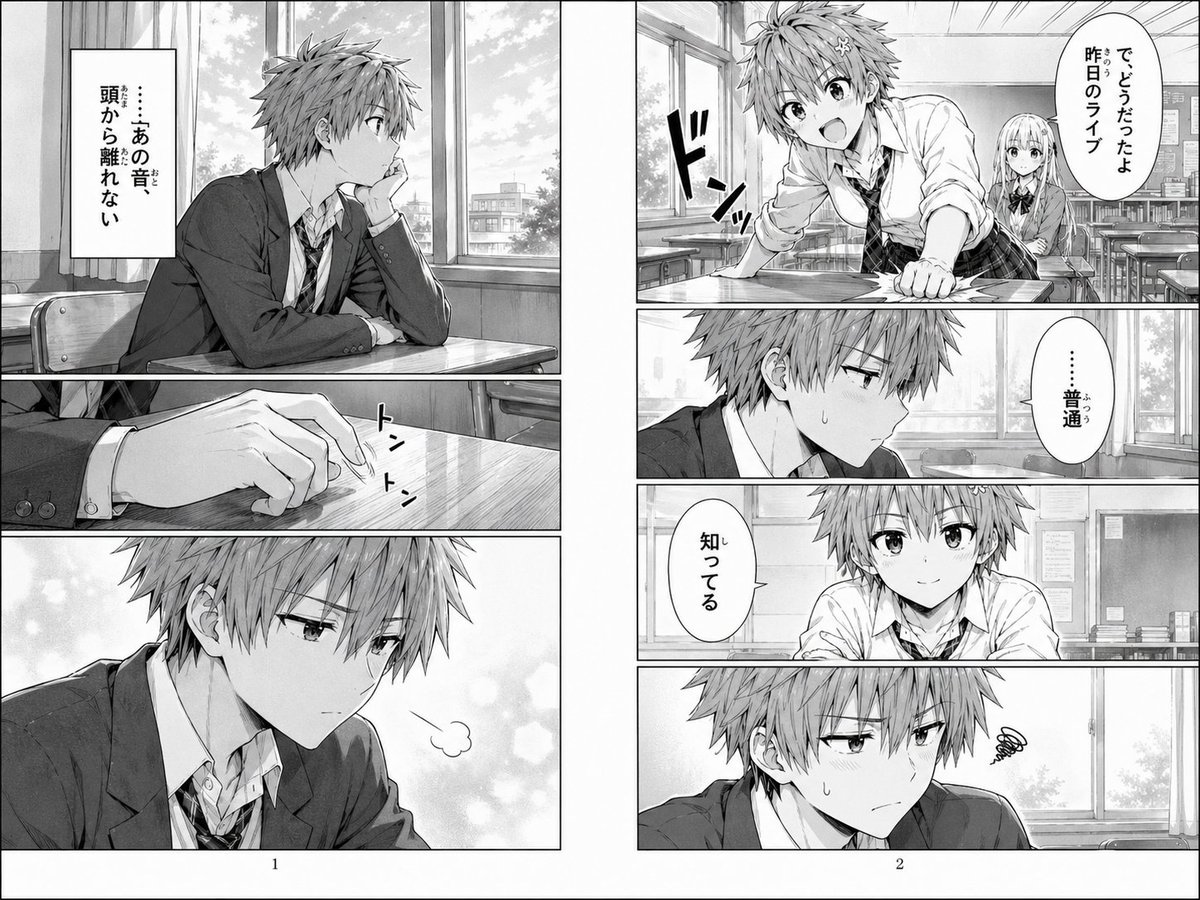
Scena manga scolastica di due pagine
Una doppia pagina in scala di grigi di un manga che mostra uno scolaro distratto in un'aula, utilizzata per generare scene manga drammatiche tramite intelligenza artificiale con dialoghi e impaginazione in giapponese.
Questo è un esempio di prompt GPT Image 2 per Illustrazione e arte . Utilizza il prompt pronto per la copia qui sotto per generare immagini simili e verifica l'attribuzione Awesome GPT Image 2 Prompts e i diritti di utilizzo commerciale prima del riutilizzo.
Hai bisogno del set completo di prompt? Usa il Illustrazione e arte hub tematico per ulteriori esempi correlati oppure apri il GPT Image 2 catalogo rapido per l'indice completo degli esempi, le strutture riutilizzabili e l'attribuzione delle fonti.
Free 1K preview
Generate one preview image instantly, no sign-up required.
3842/4000
Richiesta
prompt pronto per la copia
{
  "characters": {
    "count": 2,
    "primary": {
      "appearance": "messy short hair, school blazer, white shirt, loosened necktie, slim build, tired and distracted expression",
      "role": "male high school student"
    },
    "secondary": {
      "appearance": "long straight hair, school uniform with ribbon bow, seated behind him",
      "role": "female classmate in background"
    }
  },
  "format": {
    "layout": "facing pages",
    "page_count": 2,
    "page_numbers": [
      1,
      2
    ]
  },
  "layout": {
    "left_page": {
      "panel_count": 3,
      "panels": [
        {
          "description": "medium shot of the boy sitting alone at his desk by the window, leaning his cheek on one hand and staring outside in thought",
          "position": "top",
          "text": [
            "……あの音 頭から離れない"
          ]
        },
        {
          "description": "close-up of one hand on the wooden desktop, fingers lightly tapping",
          "position": "middle",
          "sound_effects": [
            "トン トン"
          ]
        },
        {
          "description": "close-up reaction panel of the boy turning slightly with a small breath puff, abstract soft bokeh background, Show every face clearly with natural, detailed facial features",
          "position": "bottom"
        }
      ]
    },
    "right_page": {
      "panel_count": 5,
      "panels": [
        {
          "description": "the boy is suddenly slammed or jolted forward against the desk with impact lines as a female classmate speaks from behind him; Show every face clearly with natural, detailed facial features",
          "position": "top wide",
          "sound_effects": [
            "ドンッ"
          ],
          "text": [
            "で、どうだったよ 昨日のライブ"
          ]
        },
        {
          "description": "close-up of the boy's uneasy side profile with a sweat drop, classroom window behind him",
          "position": "upper-middle",
          "text": [
            "... generally"
          ]
        },
        {
          "description": "frontal classroom shot of the boy replying flatly, Show every face clearly with natural, detailed facial features",
          "position": "middle narrow",
          "text": [
            "知ってる"
          ]
        },
        {
          "description": "close-up of the boy looking troubled and withdrawn, Show every face clearly with natural, detailed facial features, small spiral frustration symbol beside him",
          "position": "bottom"
        },
        {
          "description": "same classroom environment maintained across panels with desks, windows, and soft daylight",
          "position": "background continuity"
        }
      ]
    }
  },
  "mood": "a boy haunted by a sound he cannot forget, interrupted by casual conversation about yesterday's live show, creating a quiet but tense emotional beat",
  "setting": {
    "details": [
      "large classroom windows",
      "rows of desks and chairs",
      "trees and low buildings visible outside",
      "bulletin board and classroom wall fixtures"
    ],
    "location": "Japanese high school classroom",
    "time": "daytime"
  },
  "special_notes": [
    "include visible blurred rectangular censorship blocks over 4 faces total as shown",
    "keep monochrome manga page composition with gutters and printed page numbers",
    "preserve Japanese speech bubbles and vertical narration box"
  ],
  "style": {
    "genre": "school slice-of-life drama",
    "medium": "grayscale screentone manga",
    "reading": "right-to-left Japanese manga",
    "rendering": "clean line art, soft window light, detailed classroom backgrounds, subtle emotional atmosphere"
  },
  "text": {
    "dialogue_count": 4,
    "language": "Japanese",
    "sound_effect_count": 2
  },
  "type": "black-and-white manga page spread"
}
Best for
- - Illustrazione e arte visual exploration
- - Image generation and reference-image edits
- - Reusable briefs that keep source attribution visible
Change these parts
- - Subject, product, character, or scene
- - Aspect ratio, camera, lighting, and background
- - Brand, text, color, and output constraints
Recommended model and settings
- - Model: gpt-image-2
- - Input mode: Testo in immagine
- - Aspect ratio: source
- - Commercial status: review original source
How to use this prompt
- 1. Copy the prompt and preserve its structure for the first test.
- 2. Replace the subject, context, and publishing channel.
- 3. Change one camera, lighting, or style variable per iteration.
- 4. Inspect the output, source, text, and rights before reuse.
Limitations, source, and reuse cautions
- - Generated output is an editable draft, not factual, legal, or rights evidence.
- - Review the linked source, people, brands, logos, text, and third-party media before commercial use.
Importato da Awesome GPT Image 2 Prompts . È richiesta l'attribuzione. Lo stato di utilizzo commerciale è allowed ; verificare i diritti della fonte prima dell'utilizzo a pagamento.
Altri casi in questa categoria
Prioritizzazione in base a categoria, compatibilità della modalità di input, qualità e minor rischio.

Grumpy Rhino Storybook Illustration
Testo in immagine

Surreal 3D Chess Match Artwork
Testo in immagine

Manga Desert Radio Telescope Road Trip
Testo in immagine

Martial Arts Legend Character Bible Sheet
Testo in immagine

Female Clown Cyborg Portrait
Testo in immagine

Greyscale Puzzle Portrait with Color Accent
Testo in immagine
Note sul riutilizzo e sulla fonte
Utilizza questo prompt in tutta sicurezza dopo aver visualizzato in anteprima il caso.
- 1.Copia il prompt oppure aprilo direttamente in Dovoo tramite il pulsante di generazione.
- 2.Regola le variabili, le proporzioni e le immagini di riferimento in base alle tue esigenze.
- 3.Prima della pubblicazione o dell'utilizzo a pagamento, verificare i diritti di fonte, i requisiti di attribuzione e i rischi relativi al marchio o all'immagine.