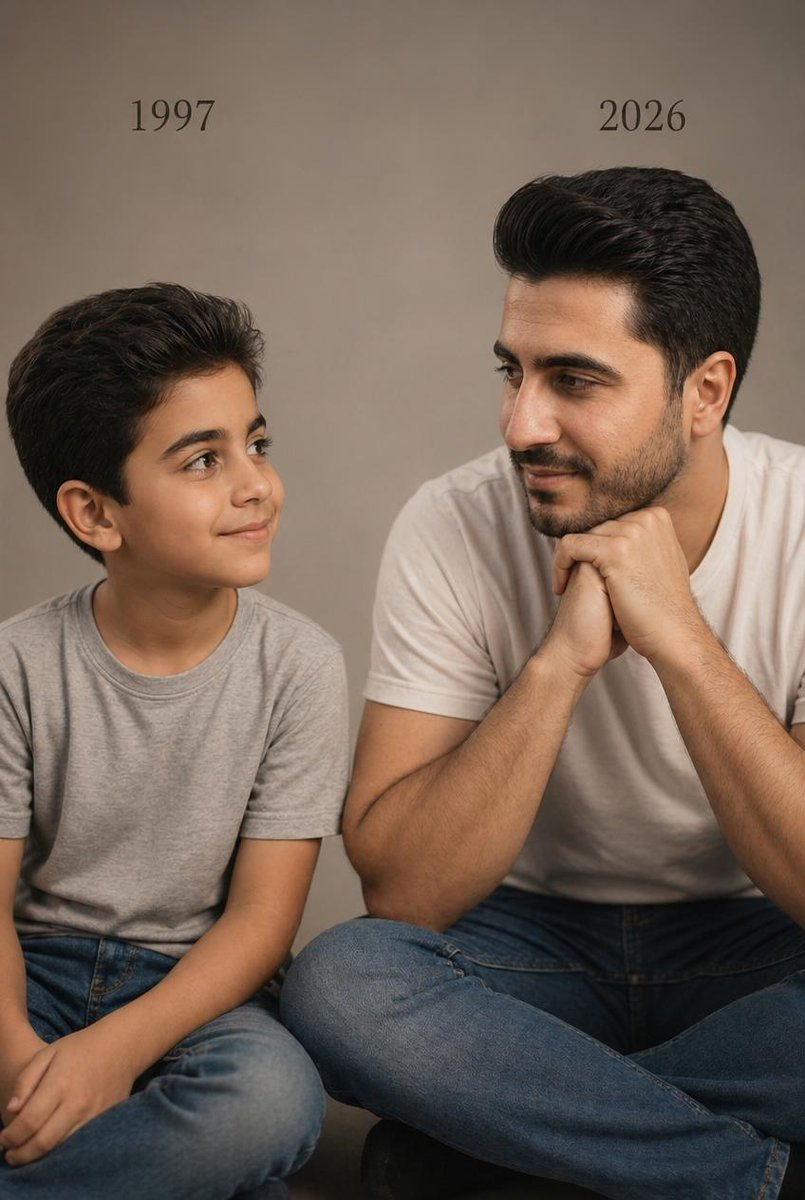
Ritratto in studio di due età
Questo prompt genera una foto in studio realistica ed emozionante dello stesso uomo, ritratto da bambino e da adulto, seduti fianco a fianco con le etichette che indicano l'anno di nascita, ideale per confronti di età e ritratti a tema ricordi.
Questo è un esempio di prompt GPT Image 2 per Ritratto e personaggio . Utilizza il prompt pronto per la copia qui sotto per generare immagini simili e verifica l'attribuzione Awesome GPT Image 2 Prompts e i diritti di utilizzo commerciale prima del riutilizzo.
Free 1K preview
Generate one preview image instantly, no sign-up required.
Richiesta
prompt pronto per la copia
A photorealistic studio portrait in a vertical 4:5 composition showing two versions of the same male person seated side by side against a plain warm beige-gray studio backdrop. On the left, a child version of {argument name="subject identity" default="the same person"} sits cross-legged, wearing a light gray crew-neck T-shirt and medium-blue jeans, with neatly styled dark brown to black hair swept back and slightly voluminous. The child is turned slightly to the right, looking toward the adult version with a soft innocent smile and relaxed posture. Above the child, place the text {argument name="left year text" default="1997"} in a simple elegant black serif font. On the right, the present-day version of the same person sits cross-legged, larger in scale and closer to camera, wearing a plain white crew-neck T-shirt and blue jeans, with matching facial structure and matching dark swept-back hair. He leans forward slightly with both hands clasped together under his chin, elbows resting near his knees, and looks left toward the child with a calm gentle smile. Above the adult, place the text {argument name="right year text" default="2026"} in the same black serif font. Keep both subjects visually consistent as the same person at two ages, emphasizing emotional connection, recognition, and quiet reflection. Use soft cinematic warm studio lighting, realistic skin texture, subtle shadows, minimal styling, professional editorial photography, sharp focus, natural proportions, and a clean uncluttered composition. The image should feel like a real photoshoot, intimate, minimal, emotional, and highly realistic.Variabili di richiesta
Segnaposto per gli argomenti modificabili presenti nel prompt, con i relativi valori predefiniti.
Best for
- - Ritratto e personaggio visual exploration
- - Image generation and reference-image edits
- - Reusable briefs that keep source attribution visible
Change these parts
- - Subject, product, character, or scene
- - Aspect ratio, camera, lighting, and background
- - Brand, text, color, and output constraints
Recommended model and settings
- - Model: gpt-image-2
- - Input mode: Testo in immagine
- - Aspect ratio: source
- - Commercial status: review original source
How to use this prompt
- 1. Copy the prompt and preserve its structure for the first test.
- 2. Replace the subject, context, and publishing channel.
- 3. Change one camera, lighting, or style variable per iteration.
- 4. Inspect the output, source, text, and rights before reuse.
Limitations, source, and reuse cautions
- - Generated output is an editable draft, not factual, legal, or rights evidence.
- - Review the linked source, people, brands, logos, text, and third-party media before commercial use.
Altri casi in questa categoria
Prioritizzazione in base a categoria, compatibilità della modalità di input, qualità e minor rischio.






Note sul riutilizzo e sulla fonte
Utilizza questo prompt in tutta sicurezza dopo aver visualizzato in anteprima il caso.
- 1.Copia il prompt oppure aprilo direttamente in Dovoo tramite il pulsante di generazione.
- 2.Regola le variabili, le proporzioni e le immagini di riferimento in base alle tue esigenze.
- 3.Prima della pubblicazione o dell'utilizzo a pagamento, verificare i diritti di fonte, i requisiti di attribuzione e i rischi relativi al marchio o all'immagine.