Sophisticated Style
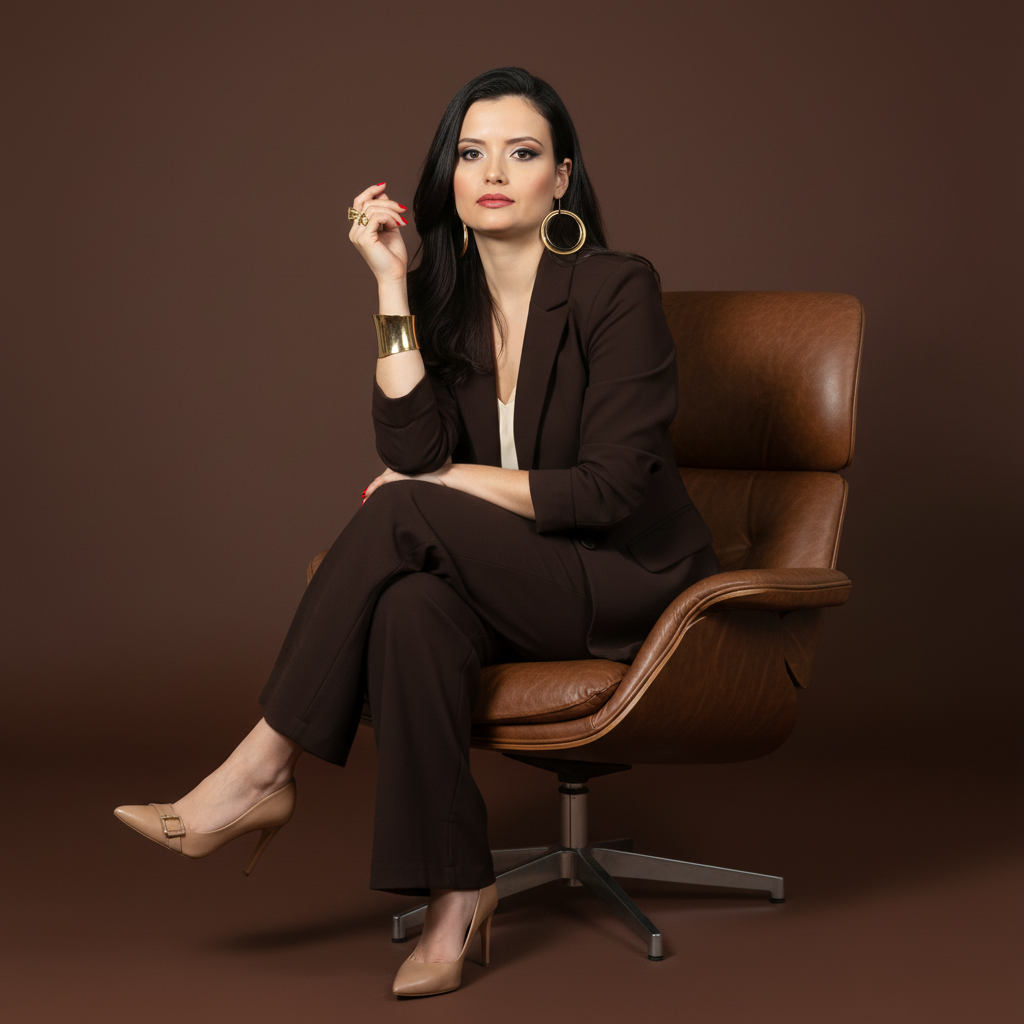
Immagine di riferimento di Nano Banana Pro con attribuzione della fonte, tratta dal repository Awesome Nano Banana Pro Prompts, con immagine di anteprima e note sulla revisione del riutilizzo.
Questo è un esempio di prompt Nano Banana Pro per Ritratto e personaggio . Utilizza il prompt pronto per la copia qui sotto per generare immagini simili e verifica l'attribuzione Awesome Nano Banana Pro Prompts e i diritti di utilizzo commerciale prima del riutilizzo.
Hai bisogno del set completo di prompt? Usa il Ritratto e personaggio hub tematico per ulteriori esempi correlati oppure apri il Nano Banana Pro catalogo rapido per l'indice completo degli esempi, le strutture riutilizzabili e l'attribuzione delle fonti.
Richiesta
prompt pronto per la copia
A full-length studio photograph with a sophisticated and professional aesthetic. It captures a female figure sitting elegantly in a modern brown leather armchair with a metal swivel base. The subject sits confidently, with her body at a slight angle, looking directly at the camera with a serene expression. One hand is resting on the knee or arm of the chair, while the other is close to her face. Her legs are crossed or elegantly positioned.

She wears a dark brown or chocolate suit (blazer and wide-leg pants) over a light (white or cream) top. On her feet are light-colored (nude or off-white) high-heeled shoes with buckle or jewel details. She wears several pieces of gold jewelry: earrings, rings, and a wide bracelet. Her nails are painted a vibrant red.

Her hair is dark, medium-length, with soft waves and swept to the side. Her makeup is polished and professional.

The background is a solid-colored studio backdrop in a shade of brown that complements the suit and armchair, creating a sophisticated, monochromatic color palette. The lighting is studio-grade, soft, and directional, coming from a front-to-side angle, shaping the face and body, highlighting the textures of the fabric and the shine of the jewelry.

Camera Settings: Captured with a prime portrait lens (e.g., 85mm or 100mm) on a full-frame camera for a flattering perspective and natural proportions. Aperture set between f/4.0 and f/5.6 to ensure sharpness across the subject. ISO 100-200 for maximum studio image quality. Shutter speed from 1/160s to 1/250s. Studio lighting with a large softbox or octabox as the main light and a reflector to fill in shadows.

Instructions for the "nano banana":

"Please use the user's reference image to capture and apply all of their facial features, facial structure, eye color, hairstyle, and skin tone with maximum fidelity. The goal is to create a professional version of the user in this portrait. The clothing (brown suit, light top, heels), jewelry, red nails, the pose sitting in the leather chair, the serene expression, the soft lighting, and the brown background should be created as described, creating a perfect fusion between the user's identity and the aesthetics of the image."
Best for
- - Ritratto e personaggio visual exploration
- - Image generation and reference-image edits
- - Reusable briefs that keep source attribution visible
Change these parts
- - Subject, product, character, or scene
- - Aspect ratio, camera, lighting, and background
- - Brand, text, color, and output constraints
Recommended model and settings
- - Model: nano-banana-pro
- - Input mode: Immagine in immagine
- - Aspect ratio: square
- - Commercial status: restricted
How to use this prompt
- 1. Copy the prompt and preserve its structure for the first test.
- 2. Replace the subject, context, and publishing channel.
- 3. Change one camera, lighting, or style variable per iteration.
- 4. Inspect the output, source, text, and rights before reuse.
Limitations, source, and reuse cautions
- - Generated output is an editable draft, not factual, legal, or rights evidence.
- - Review the linked source, people, brands, logos, text, and third-party media before commercial use.
Importato da Awesome Nano Banana Pro Prompts . È richiesta l'attribuzione. Lo stato di utilizzo commerciale è restricted ; verificare i diritti della fonte prima dell'utilizzo a pagamento.
Altri casi in questa categoria
Prioritizzazione in base a categoria, compatibilità della modalità di input, qualità e minor rischio.
Note sul riutilizzo e sulla fonte
Utilizza questo prompt in tutta sicurezza dopo aver visualizzato in anteprima il caso.
- 1.Copia il prompt oppure aprilo direttamente in Dovoo tramite il pulsante di generazione.
- 2.Regola le variabili, le proporzioni e le immagini di riferimento in base alle tue esigenze.
- 3.Prima della pubblicazione o dell'utilizzo a pagamento, verificare i diritti di fonte, i requisiti di attribuzione e i rischi relativi al marchio o all'immagine.