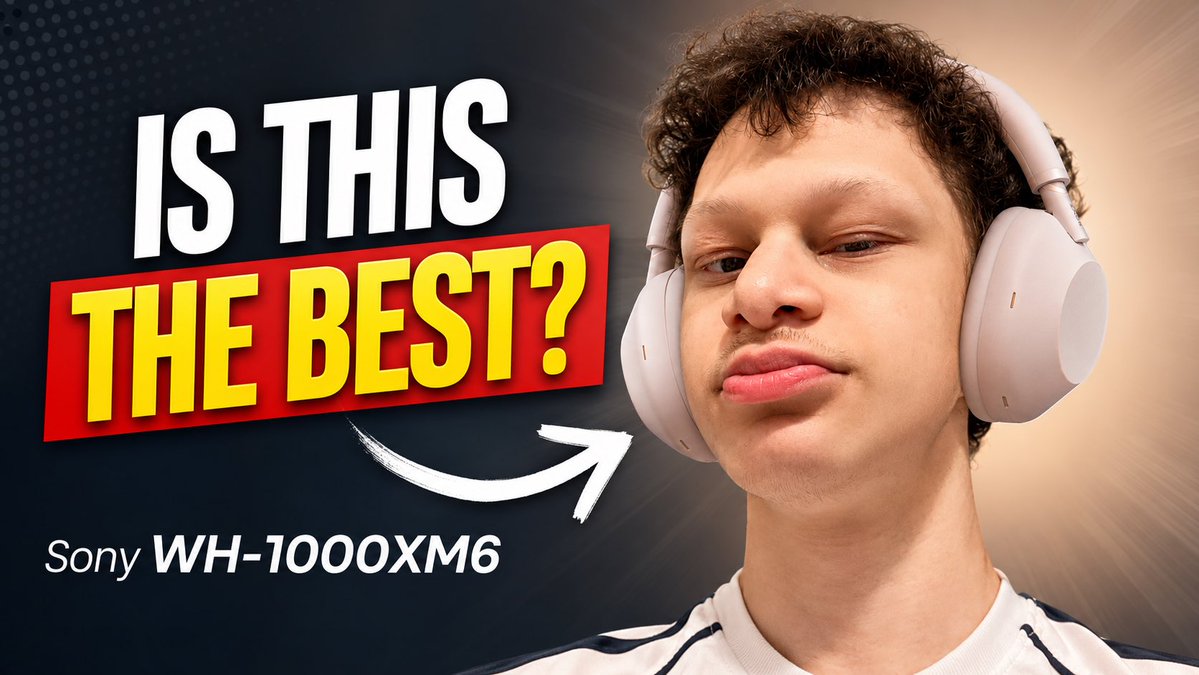
Sony Headphones Review Thumbnail
A bold YouTube thumbnail template for a tech review featuring a close-up headphone portrait, large question text, and a product label.
Questo è un esempio di prompt GPT Image 2 per Prodotto e commerciale . Utilizza il prompt pronto per la copia qui sotto per generare immagini simili e verifica l'attribuzione Awesome GPT Image 2 Prompts e i diritti di utilizzo commerciale prima del riutilizzo.
Hai bisogno del set completo di prompt? Usa il Prodotto e commerciale hub tematico per ulteriori esempi correlati oppure apri il GPT Image 2 catalogo rapido per l'indice completo degli esempi, le strutture riutilizzabili e l'attribuzione delle fonti.
Free 1K preview
Generate one preview image instantly, no sign-up required.
1251/4000
Richiesta
prompt pronto per la copia
Create a high-impact YouTube tech review thumbnail in a 16:9 landscape format. On the right half, show a close-up portrait of a young man with short curly dark hair wearing large light-gray over-ear headphones, looking confidently at the camera with a slightly raised chin and subtle smirk; crop him from the chest up, with the headphones clearly visible. On the left half, place huge bold thumbnail text reading {argument name="headline text" default="IS THIS"} in white uppercase at the top, and {argument name="main question text" default="THE BEST?"} in bright yellow uppercase inside a red rectangular banner beneath it, with strong drop shadows and a slightly tilted dynamic layout. Below the main text, add smaller white product text reading {argument name="product name" default="Sony WH-1000XM6"}. Add exactly one thick hand-drawn white curved arrow pointing from the text area toward the headphones. Use a dark navy-to-black background on the left with subtle dotted halftone texture, transitioning to a warm beige radial glow behind the person on the right. Make the design crisp, saturated, and clickable, with dramatic contrast, studio lighting, sharp facial detail, clean cutout edges, and no extra logos, watermarks, or additional text.Variabili di richiesta
Segnaposto per gli argomenti modificabili presenti nel prompt, con i relativi valori predefiniti.
Variabile
headline text
Predefinito
IS THIS
Variabile
main question text
Predefinito
THE BEST?
Variabile
product name
Predefinito
Sony WH-1000XM6
Best for
- - Prodotto e commerciale visual exploration
- - Image generation and reference-image edits
- - Reusable briefs that keep source attribution visible
Change these parts
- - Subject, product, character, or scene
- - Aspect ratio, camera, lighting, and background
- - Brand, text, color, and output constraints
Recommended model and settings
- - Model: gpt-image-2
- - Input mode: Testo in immagine
- - Aspect ratio: source
- - Commercial status: review original source
How to use this prompt
- 1. Copy the prompt and preserve its structure for the first test.
- 2. Replace the subject, context, and publishing channel.
- 3. Change one camera, lighting, or style variable per iteration.
- 4. Inspect the output, source, text, and rights before reuse.
Limitations, source, and reuse cautions
- - Generated output is an editable draft, not factual, legal, or rights evidence.
- - Review the linked source, people, brands, logos, text, and third-party media before commercial use.
Importato da Awesome GPT Image 2 Prompts . È richiesta l'attribuzione. Lo stato di utilizzo commerciale è allowed ; verificare i diritti della fonte prima dell'utilizzo a pagamento.
Altri casi in questa categoria
Prioritizzazione in base a categoria, compatibilità della modalità di input, qualità e minor rischio.


Note sul riutilizzo e sulla fonte
Utilizza questo prompt in tutta sicurezza dopo aver visualizzato in anteprima il caso.
- 1.Copia il prompt oppure aprilo direttamente in Dovoo tramite il pulsante di generazione.
- 2.Regola le variabili, le proporzioni e le immagini di riferimento in base alle tue esigenze.
- 3.Prima della pubblicazione o dell'utilizzo a pagamento, verificare i diritti di fonte, i requisiti di attribuzione e i rischi relativi al marchio o all'immagine.