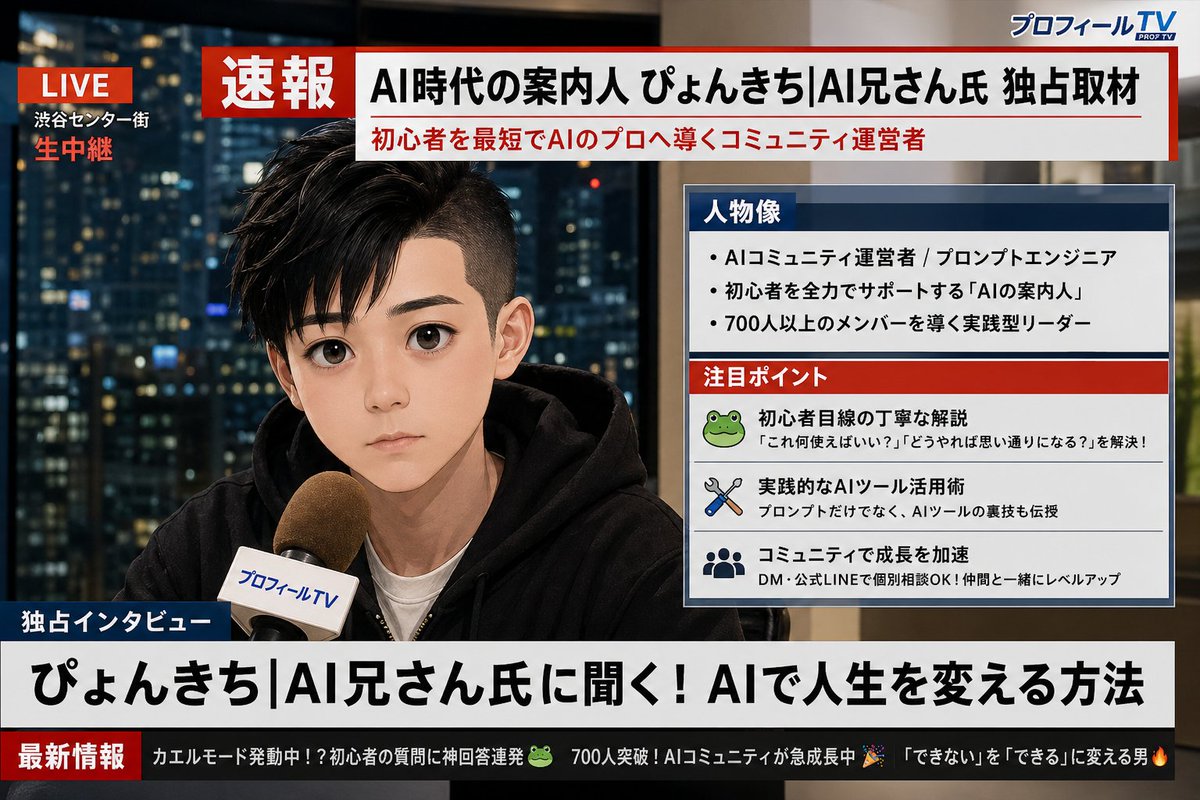
Trasformazione della trasmissione di notizie sui profili dei social media
Un prompt dettagliato che analizza lo screenshot del profilo X (Twitter) di un utente e genera una schermata di notizie dell'ultima ora realistica, in stile televisione giapponese, con protagonista l'utente.
Questo è un esempio di prompt GPT Image 2 per Ritratto e personaggio . Utilizza il prompt pronto per la copia qui sotto per generare immagini simili e verifica l'attribuzione Awesome GPT Image 2 Prompts e i diritti di utilizzo commerciale prima del riutilizzo.
Hai bisogno del set completo di prompt? Usa il Ritratto e personaggio hub tematico per ulteriori esempi correlati oppure apri il GPT Image 2 catalogo rapido per l'indice completo degli esempi, le strutture riutilizzabili e l'attribuzione delle fonti.
Free 1K preview
Generate one preview image instantly, no sign-up required.
Free text preview doesn’t preserve reference-image consistency.
1412/4000
Richiesta
prompt pronto per la copia
Analyze the uploaded X (Twitter) profile screenshot. First, extract my profile picture, display name, and bio text. Then, based on my bio and overall vibe, generate a realistic Japanese TV breaking news broadcast screen image featuring me. The character should closely resemble the person in the profile picture, shown as if being interviewed live on camera. Design it to look like a Japanese news program (similar to NHK News or News Zero style). All text must be in Japanese. Include the following elements: 1. A red "速報" banner at the top of the screen. 2. A large headline in Japanese summarizing who I am based on my bio (e.g., "AI時代の案内人 ○○氏 独占取材"). 3. A profile data box on the side of the screen (like Japanese news info panels) containing: - "人物像" section: 3 short bullet points about my personality or profession based on my bio - "注目ポイント" section: 3 small items representing my interests or skills inferred from my profile 4. A news ticker at the bottom with 2-3 humorous short updates derived from my bio and interests, written in Japanese. 5. A fictional Japanese news channel logo in the corner (e.g., "プロフィールTV" or "X速報チャンネル"). 6. A "生中継" or "LIVE" indicator in red in the upper corner. The overall look should be a photorealistic Japanese TV news broadcast screen with clean, modern Japanese typography. Ensure all Japanese text is perfectly legible and accurately reflects my profile information.
Best for
- - Ritratto e personaggio visual exploration
- - Image generation and reference-image edits
- - Reusable briefs that keep source attribution visible
Change these parts
- - Subject, product, character, or scene
- - Aspect ratio, camera, lighting, and background
- - Brand, text, color, and output constraints
Recommended model and settings
- - Model: gpt-image-2
- - Input mode: Immagine in immagine
- - Aspect ratio: source
- - Commercial status: review original source
How to use this prompt
- 1. Copy the prompt and preserve its structure for the first test.
- 2. Replace the subject, context, and publishing channel.
- 3. Change one camera, lighting, or style variable per iteration.
- 4. Inspect the output, source, text, and rights before reuse.
Limitations, source, and reuse cautions
- - Generated output is an editable draft, not factual, legal, or rights evidence.
- - Review the linked source, people, brands, logos, text, and third-party media before commercial use.
Importato da Awesome GPT Image 2 Prompts . È richiesta l'attribuzione. Lo stato di utilizzo commerciale è allowed ; verificare i diritti della fonte prima dell'utilizzo a pagamento.
Altri casi in questa categoria
Prioritizzazione in base a categoria, compatibilità della modalità di input, qualità e minor rischio.

Split Face Horror Transformation
Immagine in immagine

Vintage Digital Camera Mirror Selfie
Immagine in immagine

Dax Cinematic Character Bible Sheet
Immagine in immagine

Multi-Pose Wavy Dark Hair Portrait
Immagine in immagine

Greyscale Puzzle Portrait with Color Accent
Testo in immagine

Natural Face Realism Modifier
Testo in immagine
Note sul riutilizzo e sulla fonte
Utilizza questo prompt in tutta sicurezza dopo aver visualizzato in anteprima il caso.
- 1.Copia il prompt oppure aprilo direttamente in Dovoo tramite il pulsante di generazione.
- 2.Regola le variabili, le proporzioni e le immagini di riferimento in base alle tue esigenze.
- 3.Prima della pubblicazione o dell'utilizzo a pagamento, verificare i diritti di fonte, i requisiti di attribuzione e i rischi relativi al marchio o all'immagine.