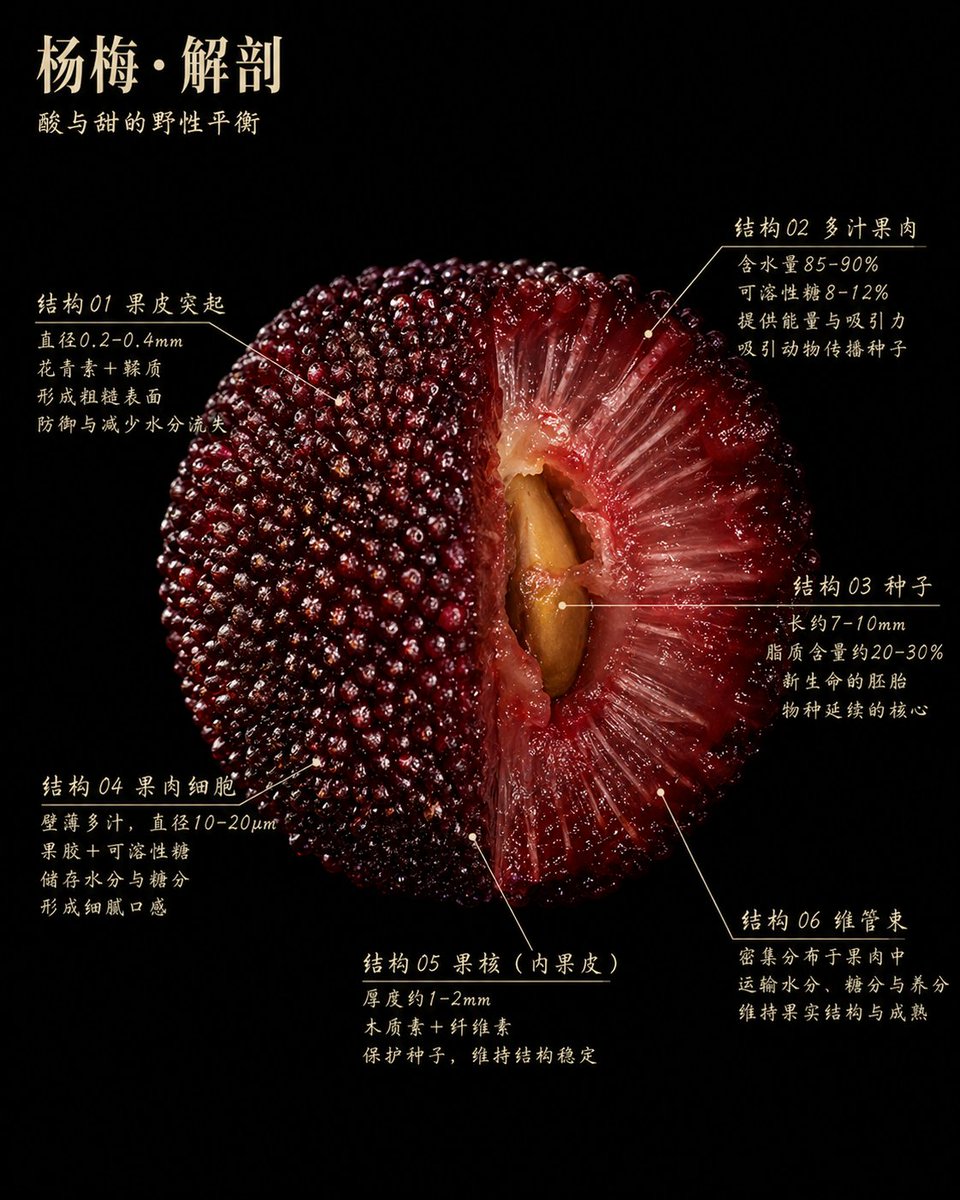
Poster scientifico sull'anatomia del mirto
Questo strumento genera una lussuosa infografica botanica su sfondo nero di una fetta di mirto della California con sei didascalie anatomiche, ideale per illustrazioni scientifiche editoriali o poster didattici di alta qualità.
Questo è un esempio di prompt GPT Image 2 per Grafica e poster . Utilizza il prompt pronto per la copia qui sotto per generare immagini simili e verifica l'attribuzione Awesome GPT Image 2 Prompts e i diritti di utilizzo commerciale prima del riutilizzo.
Free 1K preview
Generate one preview image instantly, no sign-up required.
Richiesta
prompt pronto per la copia
An ultra-detailed scientific botanical poster with a pure black background. The central focus is a massive cross-section of a Yangmei fruit, utilizing dramatic studio lighting to achieve the realism of ultra-macro food photography. The surface is moist and glossy, with tones ranging from deep crimson to wine red. The fruit is presented as a half-cut anatomical specimen, occupying most of the frame. The left half shows the complete skin covered with countless closely arranged beaded protrusions, while the right half reveals translucent red flesh with fibrous, juicy textures radiating towards the brown large seed in the central cavity. In the upper left corner, there is elegant ivory-white Chinese text with the title {argument name="headline text" default="Yangmei · Anatomy"} and the subtitle {argument name="subtitle text" default="The wild balance of sour and sweet"} below. Around the fruit are 6 Chinese-labeled areas, each with slender ivory-white guide lines and small dots pointing to precise fruit structures. Area 1 is located in the upper left and labeled “Structure 01 Skin Protrusions” with 4 lines of explanatory text. Area 2 is located in the upper right and labeled “Structure 02 Juicy Flesh” with 4 lines of explanatory text. Area 3 is located in the middle right and labeled “Structure 03 Seed” with 4 lines of explanatory text. Area 4 is located in the lower left and labeled “Structure 04 Flesh Cells” with 4 lines of explanatory text. Area 5 is located in the lower center and labeled “Structure 05 Stone (Inner Peel)” with 3 lines of explanatory text. Area 6 is located in the lower right and labeled “Structure 06 Vascular Bundle” with 3 lines of explanatory text. The text style is refined, slightly calligraphic serif Chinese font, black background with white text, similar to museum exhibit labels or high-end editorial infographics. The composition is symmetrical and natural, with minimal negative space, luxurious texture, educational, tactile realism, rich detail, high contrast, no extraneous objects, no borders, no watermarks.Variabili di richiesta
Segnaposto per gli argomenti modificabili presenti nel prompt, con i relativi valori predefiniti.
Best for
- - Grafica e poster visual exploration
- - Image generation and reference-image edits
- - Reusable briefs that keep source attribution visible
Change these parts
- - Subject, product, character, or scene
- - Aspect ratio, camera, lighting, and background
- - Brand, text, color, and output constraints
Recommended model and settings
- - Model: gpt-image-2
- - Input mode: Testo in immagine
- - Aspect ratio: source
- - Commercial status: review original source
How to use this prompt
- 1. Copy the prompt and preserve its structure for the first test.
- 2. Replace the subject, context, and publishing channel.
- 3. Change one camera, lighting, or style variable per iteration.
- 4. Inspect the output, source, text, and rights before reuse.
Limitations, source, and reuse cautions
- - Generated output is an editable draft, not factual, legal, or rights evidence.
- - Review the linked source, people, brands, logos, text, and third-party media before commercial use.
Altri casi in questa categoria
Prioritizzazione in base a categoria, compatibilità della modalità di input, qualità e minor rischio.






Note sul riutilizzo e sulla fonte
Utilizza questo prompt in tutta sicurezza dopo aver visualizzato in anteprima il caso.
- 1.Copia il prompt oppure aprilo direttamente in Dovoo tramite il pulsante di generazione.
- 2.Regola le variabili, le proporzioni e le immagini di riferimento in base alle tue esigenze.
- 3.Prima della pubblicazione o dell'utilizzo a pagamento, verificare i diritti di fonte, i requisiti di attribuzione e i rischi relativi al marchio o all'immagine.