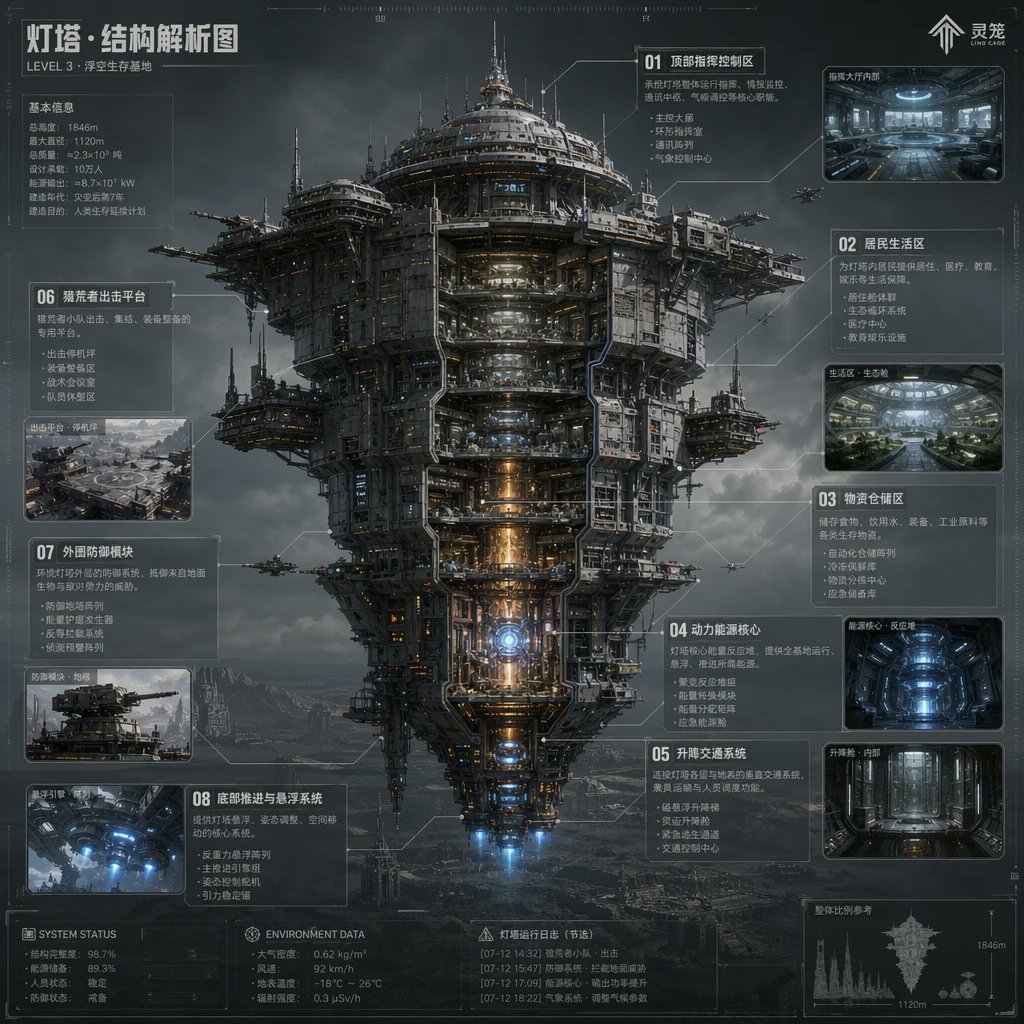
Schema della struttura di un faro fantascientifico
Questo prompt genera un poster infografico cinese futuristico e denso di dettagli, raffigurante una colossale fortezza galleggiante con sezioni trasversali, ideale per presentazioni di concept art e schede di worldbuilding.
Questo è un esempio di prompt GPT Image 2 per Illustrazione e arte . Utilizza il prompt pronto per la copia qui sotto per generare immagini simili e verifica l'attribuzione Awesome GPT Image 2 Prompts e i diritti di utilizzo commerciale prima del riutilizzo.
Free 1K preview
Generate one preview image instantly, no sign-up required.
Richiesta
prompt pronto per la copia
{
  "type": "sci-fi technical infographic poster",
  "subject": "massive floating fortress megastructure shown in a front-facing cutaway view",
  "style": "ultra-detailed hard-surface science fiction concept art, cinematic industrial realism, blueprint-inspired HUD overlay, atmospheric volumetric clouds, dark steel textures, subtle orange and blue internal lighting, high-detail labeling lines and schematic callouts",
  "setting": {
    "location": "stormy sky above a barren mountainous wasteland",
    "mood": "cold, monumental, futuristic, dystopian"
  },
  "main_structure": {
    "name": "Lighthouse · Structural Analysis Diagram",
    "subtitle": "LEVEL 3 · Floating Survival Base",
    "form": "a colossal vertically layered airborne city tower with a broad circular upper crown, dense mechanical superstructure, exposed platforms, antenna spires, docking arms, suspended side pods, and a tapered lower engine section",
    "view": "centered full-body elevation, symmetrical composition, partial internal cutaway exposing stacked interior decks and core systems",
    "materials": "gunmetal steel, weathered titanium, pipes, cables, reinforced glass, illuminated machinery",
    "lighting": "moody overcast daylight with glowing interior corridors, warm reactor core light, blue thruster light at the bottom"
  },
  "layout": {
    "composition": "single central megastructure surrounded by labeled info panels and inset images",
    "sections": [
      {
        "title": "01 Top Command and Control Area",
        "position": "upper right",
        "count": 1,
        "labels": [
          "Top Command and Control Area"
        ]
      },
      {
        "title": "02 Residential Area",
        "position": "right upper-middle",
        "count": 1,
        "labels": [
          "Residential Area"
        ]
      },
      {
        "title": "03 Logistics Storage Area",
        "position": "right middle",
        "count": 1,
        "labels": [
          "Logistics Storage Area"
        ]
      },
      {
        "title": "04 Power Core",
        "position": "right lower-middle",
        "count": 1,
        "labels": [
          "Power and energy core"
        ]
      },
      {
        "title": "05 Lifting and transportation system",
        "position": "right lower",
        "count": 1,
        "labels": [
          "Lifting and transportation system"
        ]
      },
      {
        "title": "06 Suspended shell impact sharing platform",
        "position": "left upper-middle",
        "count": 1,
        "labels": [
          "Suspended shell impact sharing platform"
        ]
      },
      {
        "title": "07 External Defense Module",
        "position": "left middle-lower",
        "count": 1,
        "labels": [
          "External Defense Module"
        ]
      },
      {
        "title": "08 Bottom Propulsion and Suspension System",
        "position": "left lower",
        "count": 1,
        "labels": [
          "Bottom Propulsion and Suspension System"
        ]
      }
    ],
    "inset_images_count": 6,
    "inset_images": [
      "upper-right command hall interior",
      "right upper-middle residential green interior",
      "right middle blue-lit storage or reactor chamber",
      "right lower vertical elevator corridor",
      "left middle platform exterior overview",
      "left lower underside thruster interior"
    ],
    "extra_panels_count": 5,
    "extra_panels": [
      "top-left basic information stats block",
      "bottom-left SYSTEM STATUS block",
      "bottom-center ENVIRONMENT DATA block",
      "Bottom Center Beacon Operation Log (Excerpt) Block",
      "bottom-right silhouette scale comparison with 1846m and 1120m markings"
    ]
  },
  "text_elements": {
    "brand_mark": "Soul",
    "top_left_heading": "Lighthouse · Structural Analysis Diagram",
    "small_subheading": "LEVEL 3 · Floating Survival Base",
    "language": "Chinese",
    "density": "heavy technical annotations, small schematic notes, thin connector lines, measurement marks, tiny interface glyphs"
  },
  "secondary_elements": {
    "aircraft_count": 6,
    "aircraft": "small escort drones or gunships flying around the structure",
    "background_details": "distant mountains, fog, layered storm clouds, faint ground structures"
  },
  "rendering": {
    "quality": "high-resolution polished concept sheet",
    "aspect_ratio": "1:1",
    "camera": "orthographic-like telephoto infographic presentation with slight cinematic depth",
    "color_palette": "charcoal gray, steel blue, cold white, amber highlights, electric blue thrusters"
  },
  "customization": {
    "headline": "{argument name=\"headline text\" default=\"Lighthouse · Structural Analysis Diagram\"}",
    "subtitle": "{argument name=\"subtitle text\" default=\"LEVEL 3 · Floating Survival Base\"}",
    "structure_name": "{argument name=\"structure name\" default=\"Lighthouse\"}",
    "primary_style": "{argument name=\"visual style\" default=\"ultra-detailed hard-surface science fiction concept art\"}",
    "environment": "{argument name=\"environment\" default=\"stormy sky above a barren mountainous wasteland\"}"
  }
}
Variabili di richiesta
Segnaposto per gli argomenti modificabili presenti nel prompt, con i relativi valori predefiniti.
Best for
- - Illustrazione e arte visual exploration
- - Image generation and reference-image edits
- - Reusable briefs that keep source attribution visible
Change these parts
- - Subject, product, character, or scene
- - Aspect ratio, camera, lighting, and background
- - Brand, text, color, and output constraints
Recommended model and settings
- - Model: gpt-image-2
- - Input mode: Testo in immagine
- - Aspect ratio: source
- - Commercial status: review original source
How to use this prompt
- 1. Copy the prompt and preserve its structure for the first test.
- 2. Replace the subject, context, and publishing channel.
- 3. Change one camera, lighting, or style variable per iteration.
- 4. Inspect the output, source, text, and rights before reuse.
Limitations, source, and reuse cautions
- - Generated output is an editable draft, not factual, legal, or rights evidence.
- - Review the linked source, people, brands, logos, text, and third-party media before commercial use.
Altri casi in questa categoria
Prioritizzazione in base a categoria, compatibilità della modalità di input, qualità e minor rischio.






Note sul riutilizzo e sulla fonte
Utilizza questo prompt in tutta sicurezza dopo aver visualizzato in anteprima il caso.
- 1.Copia il prompt oppure aprilo direttamente in Dovoo tramite il pulsante di generazione.
- 2.Regola le variabili, le proporzioni e le immagini di riferimento in base alle tue esigenze.
- 3.Prima della pubblicazione o dell'utilizzo a pagamento, verificare i diritti di fonte, i requisiti di attribuzione e i rischi relativi al marchio o all'immagine.