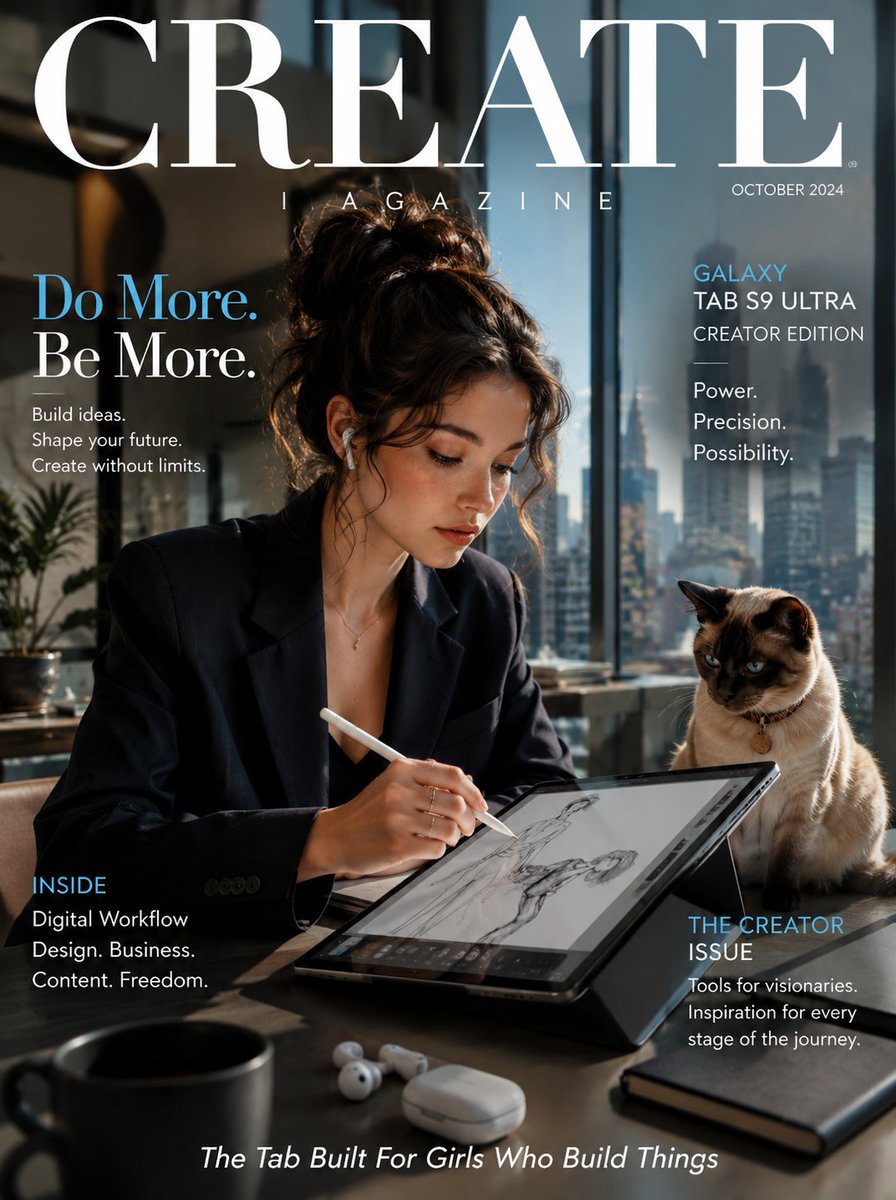
Samsung Galaxy Tab Creative Magazine Cover
A professional editorial photography prompt featuring a focused young woman sketching on a Samsung tablet alongside a curious Siamese cat in a modern co-working space.
Questo è un esempio di prompt GPT Image 2 per Prodotto e commerciale . Utilizza il prompt pronto per la copia qui sotto per generare immagini simili e verifica l'attribuzione Awesome GPT Image 2 Prompts e i diritti di utilizzo commerciale prima del riutilizzo.
Hai bisogno del set completo di prompt? Usa il Prodotto e commerciale hub tematico per ulteriori esempi correlati oppure apri il GPT Image 2 catalogo rapido per l'indice completo degli esempi, le strutture riutilizzabili e l'attribuzione delle fonti.
Free 1K preview
Generate one preview image instantly, no sign-up required.
1159/4000
Richiesta
prompt pronto per la copia
[SUBJECT]: A sharp, focused {argument name="subject" default="young woman"} in a structured blazer working on a {argument name="device" default="Samsung Galaxy Tab"}, a sleek Siamese cat sitting beside the tablet watching the screen with equal curiosity

[COLORS]: Samsung midnight navy, brushed platinum silver, cool white, soft electric blue

[KEY PROP]: Samsung Galaxy Tab S9 Ultra with S Pen hovering above the screen mid-sketch, Samsung Galaxy Buds beside it on a clean desk

[BACKGROUND]: Sleek modern co-working space with floor-to-ceiling glass, city skyline view, warm afternoon light, minimal Scandi-style furniture

[MOOD]: Ambitious, focused and modern — Samsung cinematic lifestyle editorial, creative professional aesthetic

[MAGAZINE NAME]: {argument name="magazine name" default="CREATE MAGAZINE"}

[HEADLINE]: "Do More. Be More."

[TAGLINE]: The Tab Built For Girls Who Build Things — The Creator Issue

[BRAND NAME]: SAMSUNG — Galaxy Tab S9 Ultra Creator Edition

[STYLE NOTES]: Hyper-realistic cinematic photography, shallow depth of field on tablet screen, natural window light, clean corporate editorial aesthetic with warm lifestyle feel
Variabili di richiesta
Segnaposto per gli argomenti modificabili presenti nel prompt, con i relativi valori predefiniti.
Variabile
subject
Predefinito
young woman
Variabile
device
Predefinito
Samsung Galaxy Tab
Variabile
magazine name
Predefinito
CREATE MAGAZINE
Best for
- - Prodotto e commerciale visual exploration
- - Image generation and reference-image edits
- - Reusable briefs that keep source attribution visible
Change these parts
- - Subject, product, character, or scene
- - Aspect ratio, camera, lighting, and background
- - Brand, text, color, and output constraints
Recommended model and settings
- - Model: gpt-image-2
- - Input mode: Testo in immagine
- - Aspect ratio: source
- - Commercial status: review original source
How to use this prompt
- 1. Copy the prompt and preserve its structure for the first test.
- 2. Replace the subject, context, and publishing channel.
- 3. Change one camera, lighting, or style variable per iteration.
- 4. Inspect the output, source, text, and rights before reuse.
Limitations, source, and reuse cautions
- - Generated output is an editable draft, not factual, legal, or rights evidence.
- - Review the linked source, people, brands, logos, text, and third-party media before commercial use.
Importato da Awesome GPT Image 2 Prompts . È richiesta l'attribuzione. Lo stato di utilizzo commerciale è allowed ; verificare i diritti della fonte prima dell'utilizzo a pagamento.
Altri casi in questa categoria
Prioritizzazione in base a categoria, compatibilità della modalità di input, qualità e minor rischio.

Orange Rooftop Fashion Photo Prompt
Testo in immagine

Luxury Travel Fashion Portrait Prompt
Testo in immagine

Matte Black B.AI Keyboard Keycap
Testo in immagine

Gray Denim Lace-Up Top Prompt for GPT Image 2
Testo in immagine

Hiker in Red Jacket
Testo in immagine

GPT Image 2 Real-Life Character Street Snap
Testo in immagine
Note sul riutilizzo e sulla fonte
Utilizza questo prompt in tutta sicurezza dopo aver visualizzato in anteprima il caso.
- 1.Copia il prompt oppure aprilo direttamente in Dovoo tramite il pulsante di generazione.
- 2.Regola le variabili, le proporzioni e le immagini di riferimento in base alle tue esigenze.
- 3.Prima della pubblicazione o dell'utilizzo a pagamento, verificare i diritti di fonte, i requisiti di attribuzione e i rischi relativi al marchio o all'immagine.