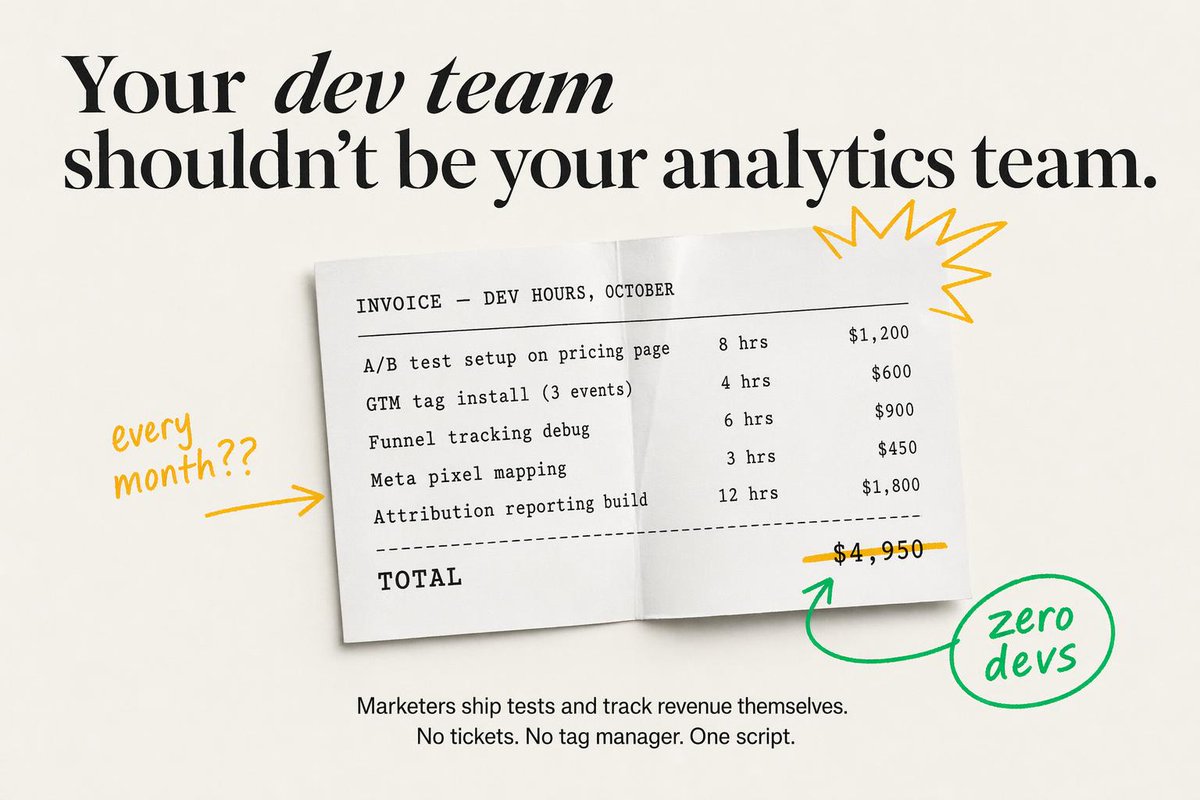
Annuncio SaaS minimale con mockup di fattura
Questo prompt genera un annuncio di marketing statico di alta qualità con una fattura basata sulle ore di sviluppo, una tipografia editoriale di forte impatto e annotazioni disegnate a mano, ideale per landing page di SaaS o creatività a pagamento sui social media.
Questo è un esempio di prompt GPT Image 2 per Prodotto e commerciale . Utilizza il prompt pronto per la copia qui sotto per generare immagini simili e verifica l'attribuzione Awesome GPT Image 2 Prompts e i diritti di utilizzo commerciale prima del riutilizzo.
Free 1K preview
Generate one preview image instantly, no sign-up required.
Richiesta
prompt pronto per la copia
Create a minimalist static SaaS ad on a warm off-white background with elegant editorial typography and clean, high-fidelity text rendering. At the top, place a large black serif headline in two lines reading: "{argument name="headline text" default="Your dev team shouldn’t be your analytics team."}" The words “dev team” should appear in italic serif while the rest remains bold high-contrast serif, with generous spacing and a luxury magazine-style layout. Centered below, show a slightly tilted white paper invoice sheet with a soft drop shadow and a subtle vertical fold crease down the middle, as if photographed from above. The invoice uses black monospaced typewriter-style text and reads exactly: “INVOICE — DEV HOURS, OCTOBER” as the header, then 5 line items with hours and prices aligned in columns: “A/B test setup on pricing page 8 hrs $1,200”, “GTM tag install (3 events) 4 hrs $600”, “Funnel tracking debug 6 hrs $900”, “Meta pixel mapping 3 hrs $450”, and “Attribution reporting build 12 hrs $1,800”. Under the 5 items, add a dashed divider line, then a bold monospaced “TOTAL” on the lower left and the total price “$4,950” on the lower right. Draw a hand-drawn yellow line striking through the total price. Add 4 doodle-style annotation elements around the invoice: on the left, handwritten yellow text saying “every month??” with a yellow arrow pointing right toward the paper; on the upper right of the paper, a yellow starburst scribble; below the total, a green curved arrow pointing up toward the crossed-out price; and on the lower right, a green hand-drawn circle containing the handwritten words “zero devs,” connected to the green arrow. At the bottom center of the ad, add a smaller black sans-serif body copy in 2 lines reading: “{argument name="body text" default="Marketers ship tests and track revenue themselves.\nNo tickets. No tag manager. One script."}" Keep the composition airy, premium, and conversion-focused, blending modern startup ad design with tactile paper realism and playful marker annotations.Variabili di richiesta
Segnaposto per gli argomenti modificabili presenti nel prompt, con i relativi valori predefiniti.
Best for
- - Prodotto e commerciale visual exploration
- - Image generation and reference-image edits
- - Reusable briefs that keep source attribution visible
Change these parts
- - Subject, product, character, or scene
- - Aspect ratio, camera, lighting, and background
- - Brand, text, color, and output constraints
Recommended model and settings
- - Model: gpt-image-2
- - Input mode: Testo in immagine
- - Aspect ratio: source
- - Commercial status: review original source
How to use this prompt
- 1. Copy the prompt and preserve its structure for the first test.
- 2. Replace the subject, context, and publishing channel.
- 3. Change one camera, lighting, or style variable per iteration.
- 4. Inspect the output, source, text, and rights before reuse.
Limitations, source, and reuse cautions
- - Generated output is an editable draft, not factual, legal, or rights evidence.
- - Review the linked source, people, brands, logos, text, and third-party media before commercial use.
Altri casi in questa categoria
Prioritizzazione in base a categoria, compatibilità della modalità di input, qualità e minor rischio.






Note sul riutilizzo e sulla fonte
Utilizza questo prompt in tutta sicurezza dopo aver visualizzato in anteprima il caso.
- 1.Copia il prompt oppure aprilo direttamente in Dovoo tramite il pulsante di generazione.
- 2.Regola le variabili, le proporzioni e le immagini di riferimento in base alle tue esigenze.
- 3.Prima della pubblicazione o dell'utilizzo a pagamento, verificare i diritti di fonte, i requisiti di attribuzione e i rischi relativi al marchio o all'immagine.