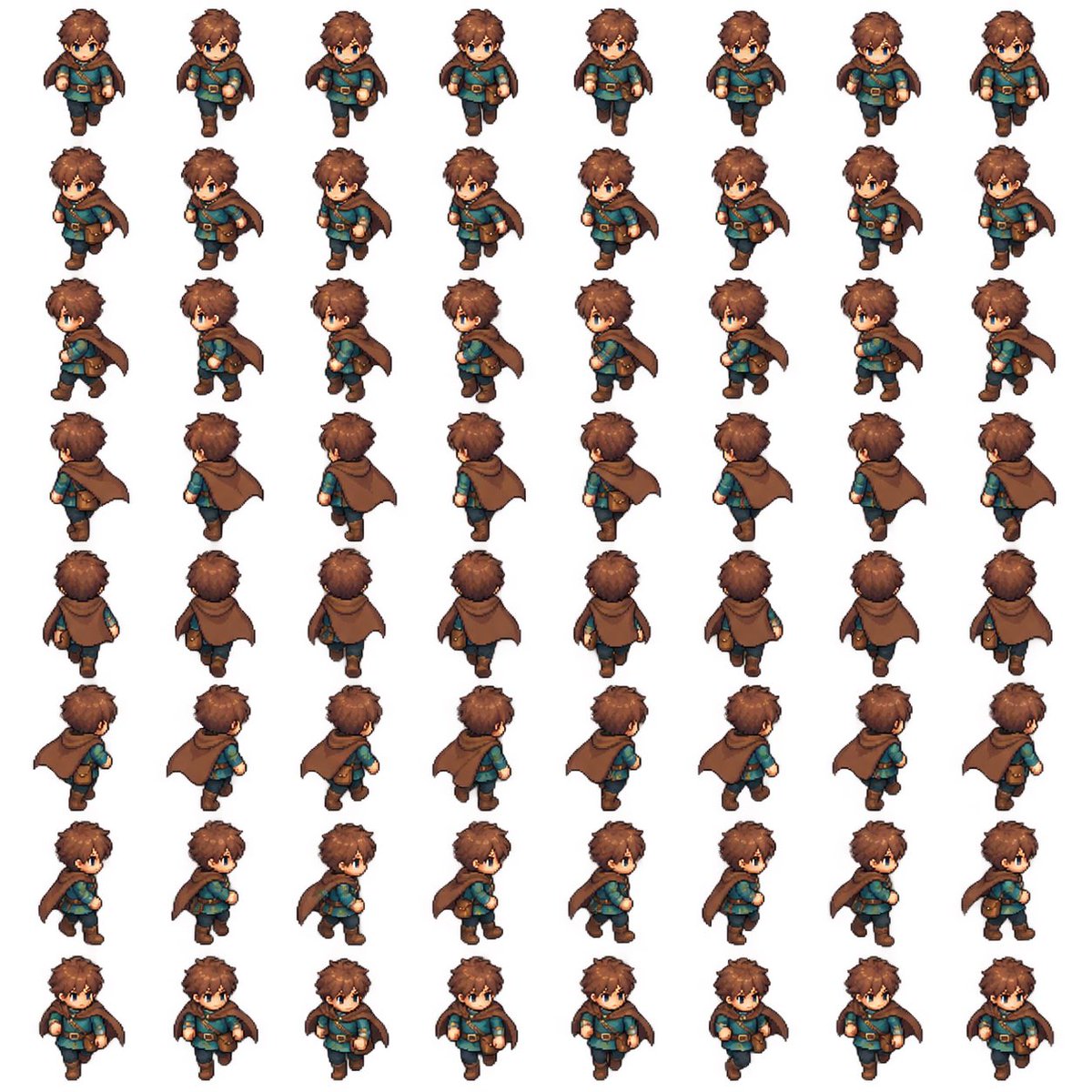
8-Direction RPG Hero Sprite Sheet
Generates a consistent 64-frame pixel-art walking sprite sheet for a fantasy Zelda-like game character.
Questo è un esempio di prompt GPT Image 2 per Anime e videogiochi . Utilizza il prompt pronto per la copia qui sotto per generare immagini simili e verifica l'attribuzione Awesome GPT Image 2 Prompts e i diritti di utilizzo commerciale prima del riutilizzo.
Hai bisogno del set completo di prompt? Usa il Anime e videogiochi hub tematico per ulteriori esempi correlati oppure apri il GPT Image 2 catalogo rapido per l'indice completo degli esempi, le strutture riutilizzabili e l'attribuzione delle fonti.
Free 1K preview
Generate one preview image instantly, no sign-up required.
2223/4000
Richiesta
prompt pronto per la copia
Goal: Create a complete 2D pixel-art RPG walking sprite sheet for a Zelda-like game character, ready to cut into animation frames.

Canvas: Square white background, clean sprite-sheet presentation, evenly spaced grid with no borders, no labels, no shadows outside the sprites. Use a consistent top-down three-quarter RPG perspective.

Layout: Arrange exactly 64 discrete character sprites in an 8 columns by 8 rows grid. Each row is one walking direction and each column is one animation frame. Keep identical scale, centered alignment, and consistent spacing across all cells.

Directions and frame count: Include exactly 8 walking directions with 8 frames each: 1 front-facing walking toward camera, 2 front-right diagonal, 3 right side profile, 4 back-right diagonal, 5 back-facing walking away, 6 back-left diagonal, 7 left side profile, 8 front-left diagonal. The character identity, proportions, outfit, hair, face, cape, pouch, boots, and colors must remain consistent in all 64 frames. Animate legs, arms, cape swing, and body bob naturally without changing the character design.

Character details: A cute young fantasy adventurer boy named {argument name="character name" default="brown-haired cape adventurer"}, chibi proportions with a large head and small body, tousled {argument name="hair color" default="warm brown"} hair, blue eyes, fair skin, determined neutral expression, teal tunic, brown leather belt with gold buckle, dark trousers, brown boots, small brown satchel pouch at the hip, and a flowing {argument name="cape color" default="brown"} cloak fastened around the shoulders. Outfit style should feel like a classic action-adventure RPG hero.

Visual style: High-quality pixel art with crisp edges, hand-painted sprite detail, subtle cel shading, warm fantasy colors, readable silhouette, small-game-character scale, polished indie RPG look. Use a consistent light source and consistent pixel density across every frame.

Constraints: Exactly 64 sprites total, exactly 8 rows and 8 columns, no text, no UI, no weapon, no extra characters, no background scenery, no duplicated wrong-facing limbs, no flipped-inconsistent accessories, no changes in head shape or outfit between frames, no cropping.
Variabili di richiesta
Segnaposto per gli argomenti modificabili presenti nel prompt, con i relativi valori predefiniti.
Variabile
character name
Predefinito
brown-haired cape adventurer
Variabile
hair color
Predefinito
warm brown
Variabile
cape color
Predefinito
brown
Best for
- - Anime e videogiochi visual exploration
- - Image generation and reference-image edits
- - Reusable briefs that keep source attribution visible
Change these parts
- - Subject, product, character, or scene
- - Aspect ratio, camera, lighting, and background
- - Brand, text, color, and output constraints
Recommended model and settings
- - Model: gpt-image-2
- - Input mode: Testo in immagine
- - Aspect ratio: source
- - Commercial status: review original source
How to use this prompt
- 1. Copy the prompt and preserve its structure for the first test.
- 2. Replace the subject, context, and publishing channel.
- 3. Change one camera, lighting, or style variable per iteration.
- 4. Inspect the output, source, text, and rights before reuse.
Limitations, source, and reuse cautions
- - Generated output is an editable draft, not factual, legal, or rights evidence.
- - Review the linked source, people, brands, logos, text, and third-party media before commercial use.
Importato da Awesome GPT Image 2 Prompts . È richiesta l'attribuzione. Lo stato di utilizzo commerciale è allowed ; verificare i diritti della fonte prima dell'utilizzo a pagamento.
Altri casi in questa categoria
Prioritizzazione in base a categoria, compatibilità della modalità di input, qualità e minor rischio.

Anime Girl Heterochromia Portrait
Testo in immagine

Hell Hound Character Sheet Infographic
Testo in immagine

Cute Speech Bubble Mascot Profile Icon
Testo in immagine

Autumn Cozy Casual Outfit Prompt
Testo in immagine

Cute Focus Desk Flat Lay and Kawaii Illustration
Testo in immagine

Street Selfie with Cat in Matching Cap
Testo in immagine
Note sul riutilizzo e sulla fonte
Utilizza questo prompt in tutta sicurezza dopo aver visualizzato in anteprima il caso.
- 1.Copia il prompt oppure aprilo direttamente in Dovoo tramite il pulsante di generazione.
- 2.Regola le variabili, le proporzioni e le immagini di riferimento in base alle tue esigenze.
- 3.Prima della pubblicazione o dell'utilizzo a pagamento, verificare i diritti di fonte, i requisiti di attribuzione e i rischi relativi al marchio o all'immagine.