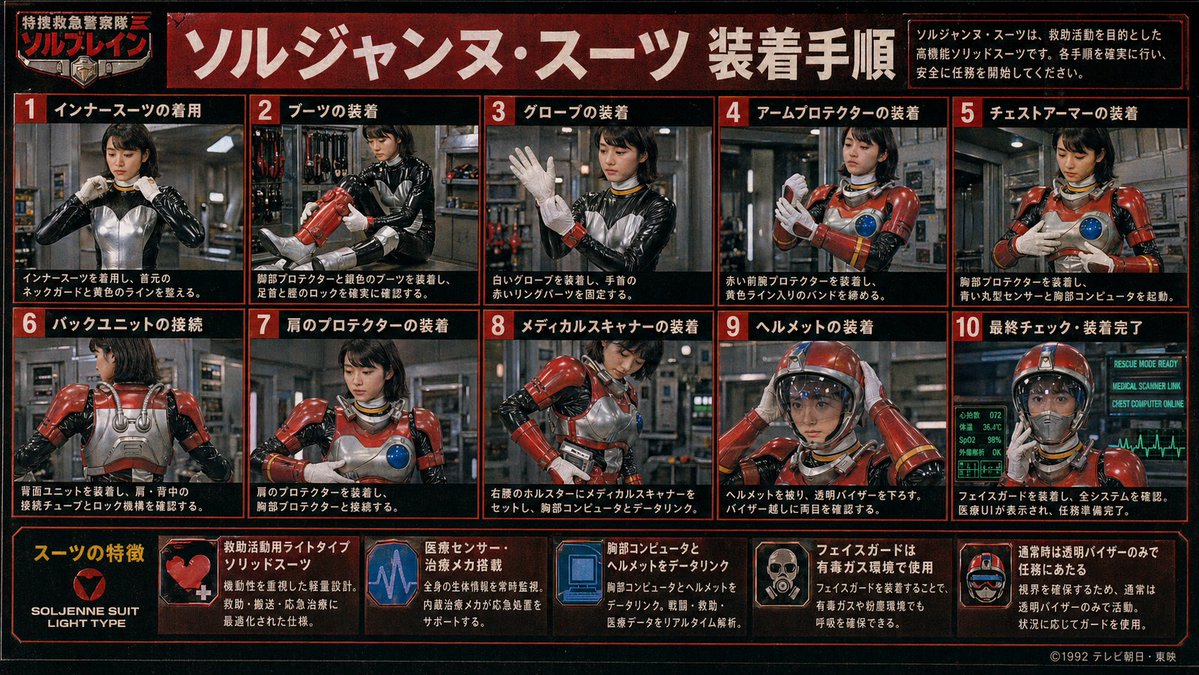
Poster della procedura per la tuta Tokusatsu in stile retrò
Un denso poster vintage giapponese di istruzioni per una serie di supereroi, che mostra un'agente di soccorso femminile indossare passo dopo passo una tuta corazzata rossa, ideale per ricreare manuali tokusatsu retrò e grafiche di oggetti di scena per serie TV di fantasia.
Questo è un esempio di prompt GPT Image 2 per Grafica e poster . Utilizza il prompt pronto per la copia qui sotto per generare immagini simili e verifica l'attribuzione Awesome GPT Image 2 Prompts e i diritti di utilizzo commerciale prima del riutilizzo.
Free 1K preview
Generate one preview image instantly, no sign-up required.
Richiesta
prompt pronto per la copia
{
  "type": "retro Japanese tokusatsu instruction poster",
  "theme": "1980s-1990s emergency hero equipment manual",
  "subject": {
    "character": "female rescue operative in a glossy black undersuit with metallic silver torso panel, red armored rescue suit components, yellow accent lines, blue circular chest sensor, white gloves, red helmet with clear visor",
    "franchise_style": "fictional TV hero series promotional board",
    "organization_name": "特捜救急警察隊 ソルブレイン",
    "suit_name": "{argument name=\"suit name\" default=\"ソルジャンヌ・スーツ\"}"
  },
  "style": {
    "print": "aged TV magazine or studio prop display board",
    "color_palette": [
      "black",
      "deep red",
      "orange-red borders",
      "white Japanese text",
      "steel gray",
      "emergency red armor",
      "blue monitor glow"
    ],
    "texture": "heavy film grain, mild blur, low-resolution analog broadcast look, slight vignette, worn poster surface",
    "lighting": "industrial indoor lighting with metallic reflections"
  },
  "layout": {
    "format": "landscape poster with red border grid",
    "header": {
      "title": "{argument name=\"headline text\" default=\"ソルジャンヌ・スーツ 装着手順\"}",
      "left_badge": "特捜救急警察隊 ソルブレイン",
      "right_note": "ソルジャンヌ・スーツは、救助活動を目的とした高機能ソリッドスーツです。各手順を確実に行い、安全に任務を開始してください。"
    },
    "sections": [
      {
        "title": "Installation Procedure",
        "position": "upper and middle area in a 2-row grid",
        "count": 10,
        "panels": [
          {
            "number": 1,
            "label": "インナースーツの着用",
            "scene": "front view, operative adjusts the collar/neck guard of the black and silver inner suit"
          },
          {
            "number": 2,
            "label": "ブーツの装着",
            "scene": "operative fitting red armored boots and checking shin and ankle locks"
          },
          {
            "number": 3,
            "label": "グローブの装着",
            "scene": "operative raises one hand while putting on white gloves and securing red wrist ring parts"
          },
          {
            "number": 4,
            "label": "アームプロテクターの装着",
            "scene": "operative fastening red forearm protectors and tightening yellow striped bands"
          },
          {
            "number": 5,
            "label": "チェストアーマーの装着",
            "scene": "operative attaching chest armor, blue circular sensor visible on the breastplate"
          },
          {
            "number": 6,
            "label": "バックユニットの接続",
            "scene": "rear view showing silver back unit, shoulder tubes, and connection locks"
          },
          {
            "number": 7,
            "label": "肩のプロテクターの装着",
            "scene": "front three-quarter view, red shoulder armor being mounted and aligned to chest armor"
          },
          {
            "number": 8,
            "label": "メディカルスキャナーの装着",
            "scene": "operative setting a medical scanner device into a right-waist holster and linking it to the chest computer"
          },
          {
            "number": 9,
            "label": "ヘルメットの装着",
            "scene": "operative placing red helmet on her head and lowering the transparent visor"
          },
          {
            "number": 10,
            "label": "最終チェック・装着完了",
            "scene": "fully suited operative facing forward with glowing diagnostic monitors behind her indicating readiness"
          }
        ]
      },
      {
        "title": "スーツの特徴",
        "position": "bottom strip",
        "count": 6,
        "items": [
          {
            "label": "SOLJENNE SUIT LIGHT TYPE",
            "icon": "heart-like red emblem on black background"
          },
          {
            "label": "救助活動用ライトタイプソリッドスーツ",
            "icon": "red armor close-up with white medical cross"
          },
          {
            "label": "医療センサー・治療メカ搭載",
            "icon": "purple-blue heartbeat monitor graphic"
          },
          {
            "label": "胸部コンピュータとヘルメットをデータリンク",
            "icon": "blue computer display graphic"
          },
          {
            "label": "フェイスガードは有毒ガス環境で使用",
            "icon": "small portrait showing face guard deployment"
          },
          {
            "label": "通常時は透明バイザーのみで任務にあたる",
            "icon": "helmet diagram with clear visor"
          }
        ]
      }
    ],
    "footer": {
      "left": "feature strip integrated into bottom row",
      "right": "{argument name=\"copyright text\" default=\"©1992 テレビ朝日・東映\"}"
    }
  },
  "environment": {
    "main_panels": "industrial equipment room or rescue base interior with pipes, lockers, tools, and metallic walls",
    "final_panel": "green-blue medical and system status monitors with ECG line and status text such as RESCUE MODE READY"
  },
  "composition_notes": "all 10 procedure panels show the same operative step by step; face is soft, low-detail, and partially blurred like a vintage printed guide; each panel framed with thick red borders on black background; bold white Japanese text with red numbered boxes; dense infographic layout filling the entire image",
  "generation_notes": "create a convincing Japanese practical-effects superhero manual poster, not modern clean vector design; prioritize photographic tokusatsu stills arranged as an instruction chart, with authentic period typography and prop-like realism"
}
Variabili di richiesta
Segnaposto per gli argomenti modificabili presenti nel prompt, con i relativi valori predefiniti.
Best for
- - Grafica e poster visual exploration
- - Image generation and reference-image edits
- - Reusable briefs that keep source attribution visible
Change these parts
- - Subject, product, character, or scene
- - Aspect ratio, camera, lighting, and background
- - Brand, text, color, and output constraints
Recommended model and settings
- - Model: gpt-image-2
- - Input mode: Testo in immagine
- - Aspect ratio: source
- - Commercial status: review original source
How to use this prompt
- 1. Copy the prompt and preserve its structure for the first test.
- 2. Replace the subject, context, and publishing channel.
- 3. Change one camera, lighting, or style variable per iteration.
- 4. Inspect the output, source, text, and rights before reuse.
Limitations, source, and reuse cautions
- - Generated output is an editable draft, not factual, legal, or rights evidence.
- - Review the linked source, people, brands, logos, text, and third-party media before commercial use.
Altri casi in questa categoria
Prioritizzazione in base a categoria, compatibilità della modalità di input, qualità e minor rischio.






Note sul riutilizzo e sulla fonte
Utilizza questo prompt in tutta sicurezza dopo aver visualizzato in anteprima il caso.
- 1.Copia il prompt oppure aprilo direttamente in Dovoo tramite il pulsante di generazione.
- 2.Regola le variabili, le proporzioni e le immagini di riferimento in base alle tue esigenze.
- 3.Prima della pubblicazione o dell'utilizzo a pagamento, verificare i diritti di fonte, i requisiti di attribuzione e i rischi relativi al marchio o all'immagine.