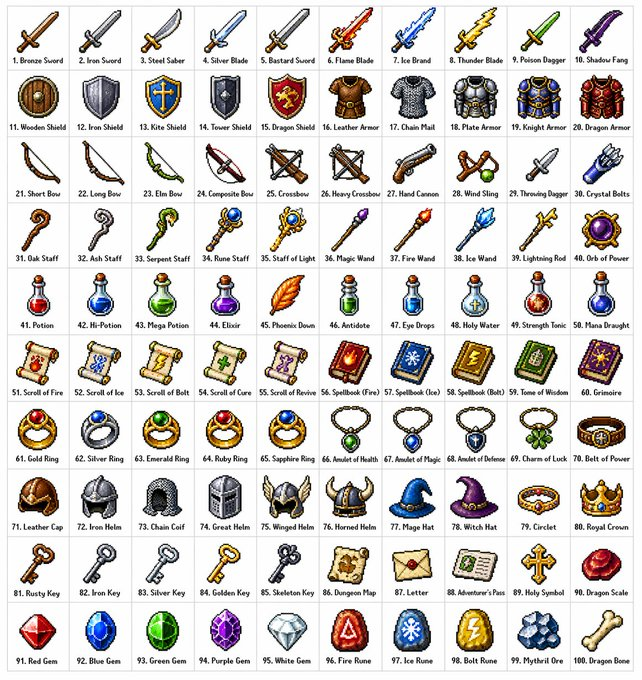
Richiesta di griglia degli oggetti per giochi di ruolo retrò
Istruzioni dettagliate per la creazione di una griglia 10x10 di 100 oggetti fantasy diversi per giochi di ruolo, in un classico stile pixel art a 16 o 32 bit, organizzati per categoria.
Questo è un esempio di prompt GPT Image 2 per Anime e videogiochi . Utilizza il prompt pronto per la copia qui sotto per generare immagini simili e verifica l'attribuzione Awesome GPT Image 2 Prompts e i diritti di utilizzo commerciale prima del riutilizzo.
Hai bisogno del set completo di prompt? Usa il Anime e videogiochi hub tematico per ulteriori esempi correlati oppure apri il GPT Image 2 catalogo rapido per l'indice completo degli esempi, le strutture riutilizzabili e l'attribuzione delle fonti.
Free 1K preview
Generate one preview image instantly, no sign-up required.
1363/4000
Richiesta
prompt pronto per la copia
Create a {argument name="grid size" default="10x10"} grid containing {argument name="item count" default="100"} different fantasy role-playing game (RPG) items in a {argument name="art style" default="classic pixel art style"} (16-bit or 32-bit sprite style, similar to Japanese RPGs from the SNES/GBA era). Each item should occupy a square tile individually with a short, clear label below. The grid should be neatly arranged on a white background. Ensure each item is visually unique and every label is spelled correctly. Use clean pixel edges, a limited palette for each sprite, and subtle dithering for shadows. Use the following row themes: Row 1: Swords and blades; Row 2: Shields and armor; Row 3: Bows, crossbows, and ranged weapons; Row 4: Staves, wands, and magical implements; Row 5: Potions, elixirs, and bottles; Row 6: Scrolls, grimoires, and spellbooks; Row 7: Rings, amulets, and enchanted accessories; Row 8: Helmets, crowns, and headgear; Row 9: Keys, relics, and quest items; Row 10: Gems, runes, and crafting materials. Display each tile as a centered item sprite on a clean background square, presented in the form of classic inventory icons—similar to what you'd see in a fantasy RPG menu. Maintain consistency and coherence in the overall style, reminiscent of beloved retro fantasy RPGs—charming and refined, yet clear even at small sizes.Variabili di richiesta
Segnaposto per gli argomenti modificabili presenti nel prompt, con i relativi valori predefiniti.
Variabile
grid size
Predefinito
10x10
Variabile
item count
Predefinito
100
Variabile
art style
Predefinito
classic pixel art style
Best for
- - Anime e videogiochi visual exploration
- - Image generation and reference-image edits
- - Reusable briefs that keep source attribution visible
Change these parts
- - Subject, product, character, or scene
- - Aspect ratio, camera, lighting, and background
- - Brand, text, color, and output constraints
Recommended model and settings
- - Model: gpt-image-2
- - Input mode: Testo in immagine
- - Aspect ratio: source
- - Commercial status: review original source
How to use this prompt
- 1. Copy the prompt and preserve its structure for the first test.
- 2. Replace the subject, context, and publishing channel.
- 3. Change one camera, lighting, or style variable per iteration.
- 4. Inspect the output, source, text, and rights before reuse.
Limitations, source, and reuse cautions
- - Generated output is an editable draft, not factual, legal, or rights evidence.
- - Review the linked source, people, brands, logos, text, and third-party media before commercial use.
Importato da Awesome GPT Image 2 Prompts . È richiesta l'attribuzione. Lo stato di utilizzo commerciale è allowed ; verificare i diritti della fonte prima dell'utilizzo a pagamento.
Altri casi in questa categoria
Prioritizzazione in base a categoria, compatibilità della modalità di input, qualità e minor rischio.

Manga Desert Radio Telescope Road Trip
Testo in immagine

Surreal 3D Chess Match Artwork
Testo in immagine

Female Clown Cyborg Portrait
Testo in immagine

Imperial Research Bunker on Volcanic Planet
Testo in immagine

Android Quantum Lab Workstation
Testo in immagine

Greyscale Puzzle Portrait with Color Accent
Testo in immagine
Note sul riutilizzo e sulla fonte
Utilizza questo prompt in tutta sicurezza dopo aver visualizzato in anteprima il caso.
- 1.Copia il prompt oppure aprilo direttamente in Dovoo tramite il pulsante di generazione.
- 2.Regola le variabili, le proporzioni e le immagini di riferimento in base alle tue esigenze.
- 3.Prima della pubblicazione o dell'utilizzo a pagamento, verificare i diritti di fonte, i requisiti di attribuzione e i rischi relativi al marchio o all'immagine.