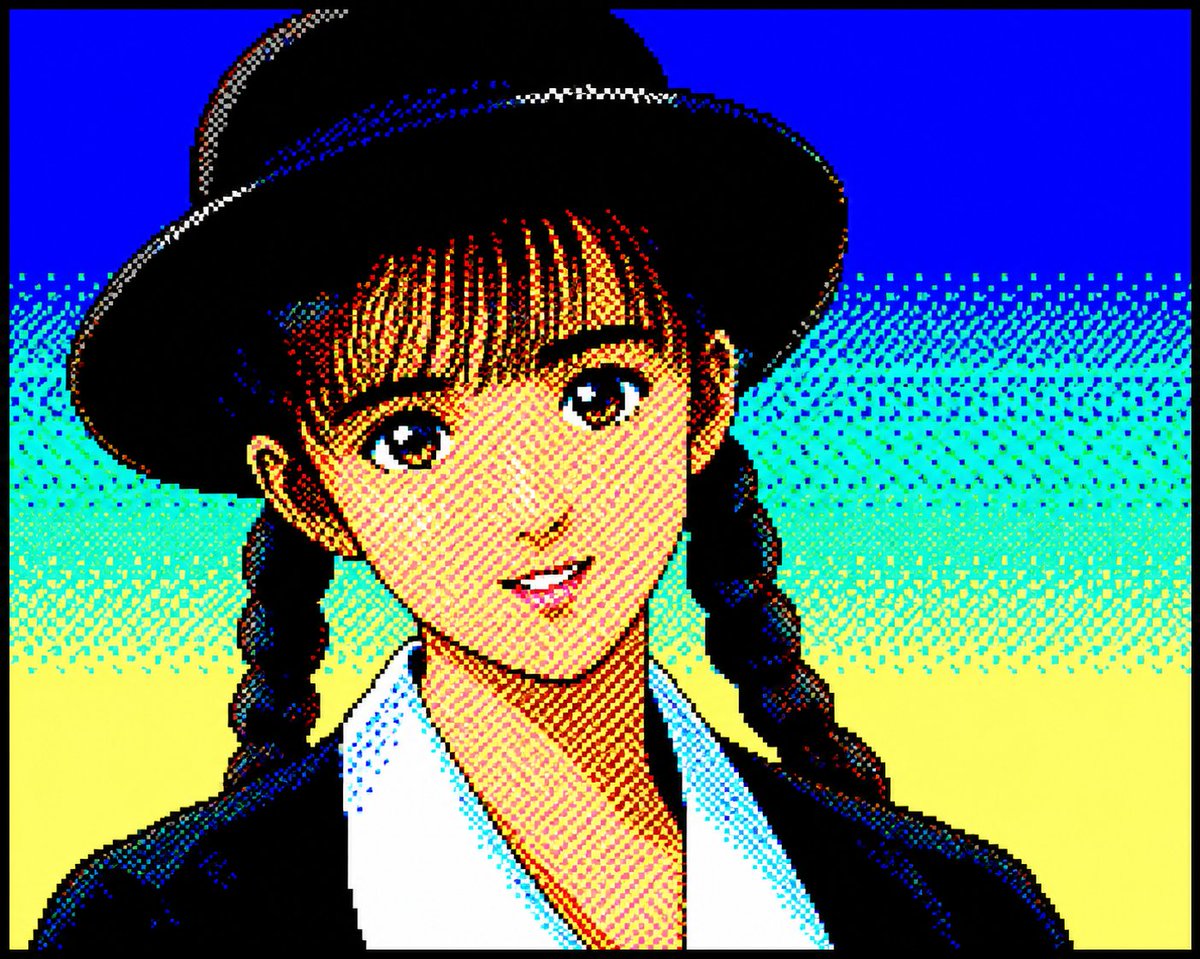
Retro PC-88 8-Bit Anime Portrait
Converts portrait photos into authentic late-1980s Japanese PC-88 pixel art using a strict 8-color RGB palette and dithered shading.
Questo è un esempio di prompt GPT Image 2 per Ritratto e personaggio . Utilizza il prompt pronto per la copia qui sotto per generare immagini simili e verifica l'attribuzione Awesome GPT Image 2 Prompts e i diritti di utilizzo commerciale prima del riutilizzo.
Hai bisogno del set completo di prompt? Usa il Ritratto e personaggio hub tematico per ulteriori esempi correlati oppure apri il GPT Image 2 catalogo rapido per l'indice completo degli esempi, le strutture riutilizzabili e l'attribuzione delle fonti.
Free 1K preview
Generate one preview image instantly, no sign-up required.
930/4000
Richiesta
prompt pronto per la copia
Convert the attached portrait photo into anime artwork while preserving recognizability.

Preserve:

- facial proportions
- hairstyle silhouette
- expression
- recognizability
- clothing silhouette

PC-88 RGB rules:

- use only 8-color RGB palette
- black, blue, red, magenta, green, cyan, yellow, white
- no gradients
- no antialiasing
- strong dithering
- checkerboard shading
- 640x200 appearance
- large color blocks
- hard outlines
- slight CRT feeling

Character rendering:

- simplified facial construction
- reduce facial detail lines
- large hair highlight areas
- fewer shading layers
- preserve likeness over redesign

Composition:

- character-focused
- simple supporting background
- empty space around character
- 4:3 feeling

Avoid:

- game UI
- dialogue boxes
- excessive background density
- modern anime rendering

Goal:

Authentic late-1980s Japanese PC88 character artwork while preserving the original person.
Best for
- - Ritratto e personaggio visual exploration
- - Image generation and reference-image edits
- - Reusable briefs that keep source attribution visible
Change these parts
- - Subject, product, character, or scene
- - Aspect ratio, camera, lighting, and background
- - Brand, text, color, and output constraints
Recommended model and settings
- - Model: gpt-image-2
- - Input mode: Testo in immagine
- - Aspect ratio: source
- - Commercial status: review original source
How to use this prompt
- 1. Copy the prompt and preserve its structure for the first test.
- 2. Replace the subject, context, and publishing channel.
- 3. Change one camera, lighting, or style variable per iteration.
- 4. Inspect the output, source, text, and rights before reuse.
Limitations, source, and reuse cautions
- - Generated output is an editable draft, not factual, legal, or rights evidence.
- - Review the linked source, people, brands, logos, text, and third-party media before commercial use.
Importato da Awesome GPT Image 2 Prompts . È richiesta l'attribuzione. Lo stato di utilizzo commerciale è allowed ; verificare i diritti della fonte prima dell'utilizzo a pagamento.
Altri casi in questa categoria
Prioritizzazione in base a categoria, compatibilità della modalità di input, qualità e minor rischio.

Cute Speech Bubble Mascot Profile Icon
Testo in immagine

GPT Image 2 Real-Life Character Street Snap
Testo in immagine

Studio Portrait of Woman with Sunglasses
Testo in immagine

Street Selfie with Cat in Matching Cap
Testo in immagine

Morning Bed Stretching Legs Prompt
Testo in immagine
GPT Image 2 Prompt for Mirror Selfie with Flowers
Testo in immagine
Note sul riutilizzo e sulla fonte
Utilizza questo prompt in tutta sicurezza dopo aver visualizzato in anteprima il caso.
- 1.Copia il prompt oppure aprilo direttamente in Dovoo tramite il pulsante di generazione.
- 2.Regola le variabili, le proporzioni e le immagini di riferimento in base alle tue esigenze.
- 3.Prima della pubblicazione o dell'utilizzo a pagamento, verificare i diritti di fonte, i requisiti di attribuzione e i rischi relativi al marchio o all'immagine.