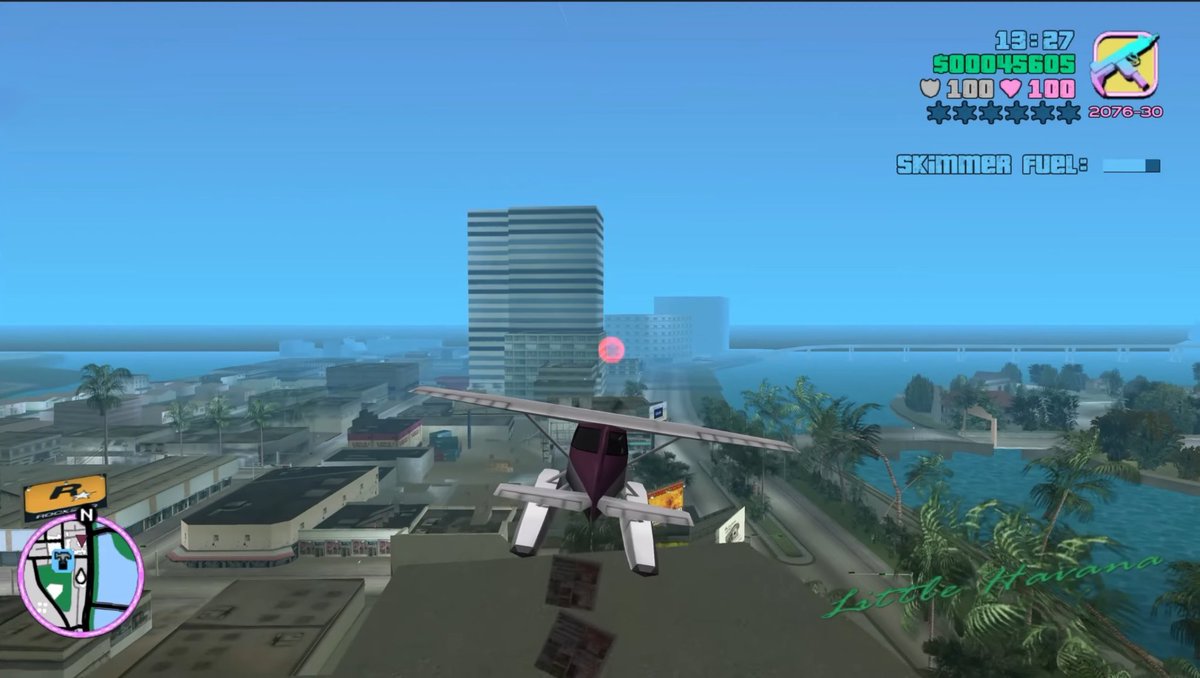
Screenshot di un idrovolante in stile retrò open-world
Questo prompt genera uno screenshot nostalgico di un gioco open-world dell'era PS2, raffigurante un idrovolante che sorvola una città tropicale con un'interfaccia utente completamente retrò, utile per ricreare immagini di videogiochi classici.
Questo è un esempio di prompt GPT Image 2 per Anime e videogiochi . Utilizza il prompt pronto per la copia qui sotto per generare immagini simili e verifica l'attribuzione Awesome GPT Image 2 Prompts e i diritti di utilizzo commerciale prima del riutilizzo.
Free 1K preview
Generate one preview image instantly, no sign-up required.
Richiesta
prompt pronto per la copia
A third-person gameplay screenshot styled exactly like an early-2000s open-world crime game, showing a small white and burgundy seaplane flying low over a tropical coastal city. The camera is positioned directly behind the aircraft, centered on its tail, with the plane heading toward a cluster of mid-rise buildings near the waterfront. The city below has flat-roofed buildings, palm-lined streets, canals, and bright turquoise water, with a hazy blue sky and light atmospheric fog that softens the distance. A tall striped office tower stands near the center background, and a glowing pink checkpoint ring floats in front of the buildings. On the right side, a curving shoreline and canal are lined with dense palm trees. Add a retro video game HUD in the top-right corner with the time reading 13:27, green money text reading 500045605, two lines of white health and armor values both reading 100, a row of 6 wanted stars with 2 lit and 4 unlit, a small weapon icon in a rounded square, and ammo text reading 2076-30. Beneath that, display the mission text “SKIMMER FUEL!” with a small horizontal blue progress bar. In the bottom-left corner, include a circular minimap with a pink border, black streets, pale land, blue water, a north marker labeled N, and a small player arrow. In the bottom-right corner, overlay the location name {argument name="location name" default="Little Havana"} in elegant green cursive script. Use low-polygon vehicles and buildings, simple textures, soft shadows, saturated tropical colors, slight screen blur, and the unmistakable nostalgic look of a PlayStation 2-era action game screenshot with a 16:9 frame.Variabili di richiesta
Segnaposto per gli argomenti modificabili presenti nel prompt, con i relativi valori predefiniti.
Best for
- - Anime e videogiochi visual exploration
- - Image generation and reference-image edits
- - Reusable briefs that keep source attribution visible
Change these parts
- - Subject, product, character, or scene
- - Aspect ratio, camera, lighting, and background
- - Brand, text, color, and output constraints
Recommended model and settings
- - Model: gpt-image-2
- - Input mode: Testo in immagine
- - Aspect ratio: source
- - Commercial status: review original source
How to use this prompt
- 1. Copy the prompt and preserve its structure for the first test.
- 2. Replace the subject, context, and publishing channel.
- 3. Change one camera, lighting, or style variable per iteration.
- 4. Inspect the output, source, text, and rights before reuse.
Limitations, source, and reuse cautions
- - Generated output is an editable draft, not factual, legal, or rights evidence.
- - Review the linked source, people, brands, logos, text, and third-party media before commercial use.
Altri casi in questa categoria
Prioritizzazione in base a categoria, compatibilità della modalità di input, qualità e minor rischio.






Note sul riutilizzo e sulla fonte
Utilizza questo prompt in tutta sicurezza dopo aver visualizzato in anteprima il caso.
- 1.Copia il prompt oppure aprilo direttamente in Dovoo tramite il pulsante di generazione.
- 2.Regola le variabili, le proporzioni e le immagini di riferimento in base alle tue esigenze.
- 3.Prima della pubblicazione o dell'utilizzo a pagamento, verificare i diritti di fonte, i requisiti di attribuzione e i rischi relativi al marchio o all'immagine.