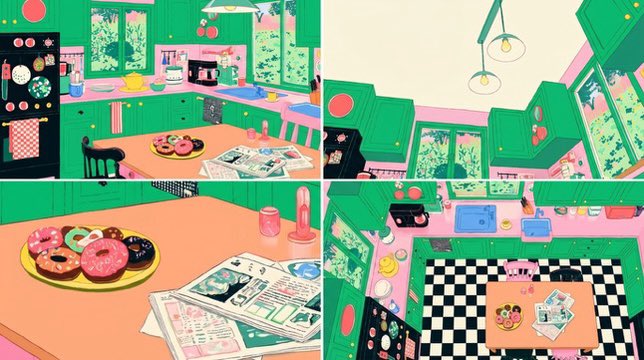
Four-Panel Retro Kitchen Scene
Generates a colorful four-view retro kitchen concept sheet for background design, animation planning, or scene exploration.
Questo è un esempio di prompt GPT Image 2 per Illustrazione e arte . Utilizza il prompt pronto per la copia qui sotto per generare immagini simili e verifica l'attribuzione Awesome GPT Image 2 Prompts e i diritti di utilizzo commerciale prima del riutilizzo.
Hai bisogno del set completo di prompt? Usa il Illustrazione e arte hub tematico per ulteriori esempi correlati oppure apri il GPT Image 2 catalogo rapido per l'indice completo degli esempi, le strutture riutilizzabili e l'attribuzione delle fonti.
Free 1K preview
Generate one preview image instantly, no sign-up required.
2912/4000
Richiesta
prompt pronto per la copia
Goal: Create a colorful four-panel scene-design concept sheet for a cozy retro kitchen, in a whimsical flat 2D illustration style inspired by 1980s/1990s animation background art.

Canvas: Wide horizontal image, 16:9 aspect ratio, divided into exactly 4 rectangular panels by thin white gutters: two panels across the top row and two panels across the bottom row.

Setting: A bright, playful retro kitchen with {argument name="cabinet color" default="emerald green"} cabinets, pink trim, peach countertops, leafy trees visible outside the windows, and a warm pastel palette. Use clean ink lines, slightly imperfect hand-drawn perspective, screen-print-like colors, and cozy lived-in details.

Panel layout and contents:
- Panel 1, top left: wide eye-level view of the kitchen. Show green upper and lower cabinets, a black refrigerator covered with round magnets and stickers, a pink-and-white checkered towel, two tall windows with greenery outside, a peach counter, small appliances, a sink area, pendant lighting, and a central peach table. On the table are exactly 3 main objects: a plate of donuts, an open newspaper, and a pink bottle or condiment container. Include two mismatched chairs, one black and one pink.
- Panel 2, top right: upward-looking corner view emphasizing ceiling, pendant lights, upper cabinets, tall windows, and angled kitchen architecture. Show exactly 2 hanging pendant bulbs and cabinet doors tilted in perspective, with greenery visible through the windows.
- Panel 3, bottom left: close-up tabletop still life. Show a large peach tabletop with exactly 3 main object groups: a yellow plate holding assorted donuts, a spread of newspapers/magazines, and two pink table items consisting of one small cup/can and one tall bottle. The donut plate should contain exactly 7 visible donuts or pastries in varied colors, including pink frosted, chocolate, cream, and plain rings.
- Panel 4, bottom right: high overhead floor-plan view of the same kitchen. Show a black-and-white checkerboard floor, green cabinetry around the perimeter, pink countertops, windows, refrigerator, sink, stove, and the central table. On the table repeat exactly 3 object groups: donut plate, newspaper pile, and pink bottles/cups. Include exactly 2 chairs, one pink and one black.

Visual style: Saturated candy colors, teal-green cabinetry, bubblegum pink accents, peach table surfaces, black-and-white checkerboard floor, cream walls, simplified shapes, charmingly skewed perspective, retro anime background feel, crisp outlines, no photorealism.

Text: Newspapers may contain tiny illegible decorative print only; do not include readable headlines, logos, captions, watermarks, or UI elements.

Constraints: Keep all 4 panels consistent as views of the same kitchen scene. Preserve the cheerful retro color palette and hand-drawn illustrative look. Do not add people, pets, speech bubbles, or extra panels.
Variabili di richiesta
Segnaposto per gli argomenti modificabili presenti nel prompt, con i relativi valori predefiniti.
Variabile
cabinet color
Predefinito
emerald green
Best for
- - Illustrazione e arte visual exploration
- - Image generation and reference-image edits
- - Reusable briefs that keep source attribution visible
Change these parts
- - Subject, product, character, or scene
- - Aspect ratio, camera, lighting, and background
- - Brand, text, color, and output constraints
Recommended model and settings
- - Model: gpt-image-2
- - Input mode: Testo in immagine
- - Aspect ratio: source
- - Commercial status: review original source
How to use this prompt
- 1. Copy the prompt and preserve its structure for the first test.
- 2. Replace the subject, context, and publishing channel.
- 3. Change one camera, lighting, or style variable per iteration.
- 4. Inspect the output, source, text, and rights before reuse.
Limitations, source, and reuse cautions
- - Generated output is an editable draft, not factual, legal, or rights evidence.
- - Review the linked source, people, brands, logos, text, and third-party media before commercial use.
Importato da Awesome GPT Image 2 Prompts . È richiesta l'attribuzione. Lo stato di utilizzo commerciale è allowed ; verificare i diritti della fonte prima dell'utilizzo a pagamento.
Altri casi in questa categoria
Prioritizzazione in base a categoria, compatibilità della modalità di input, qualità e minor rischio.

Cute Focus Desk Flat Lay and Kawaii Illustration
Testo in immagine

Boisterous Shrimpers Entering Pub
Testo in immagine

Tuxedo Cat Photo and Line Art Diptych
Testo in immagine

Cute Speech Bubble Mascot Profile Icon
Testo in immagine

Playful Morning Selfie Portrait
Testo in immagine

Autumn Cozy Casual Outfit Prompt
Testo in immagine
Note sul riutilizzo e sulla fonte
Utilizza questo prompt in tutta sicurezza dopo aver visualizzato in anteprima il caso.
- 1.Copia il prompt oppure aprilo direttamente in Dovoo tramite il pulsante di generazione.
- 2.Regola le variabili, le proporzioni e le immagini di riferimento in base alle tue esigenze.
- 3.Prima della pubblicazione o dell'utilizzo a pagamento, verificare i diritti di fonte, i requisiti di attribuzione e i rischi relativi al marchio o all'immagine.