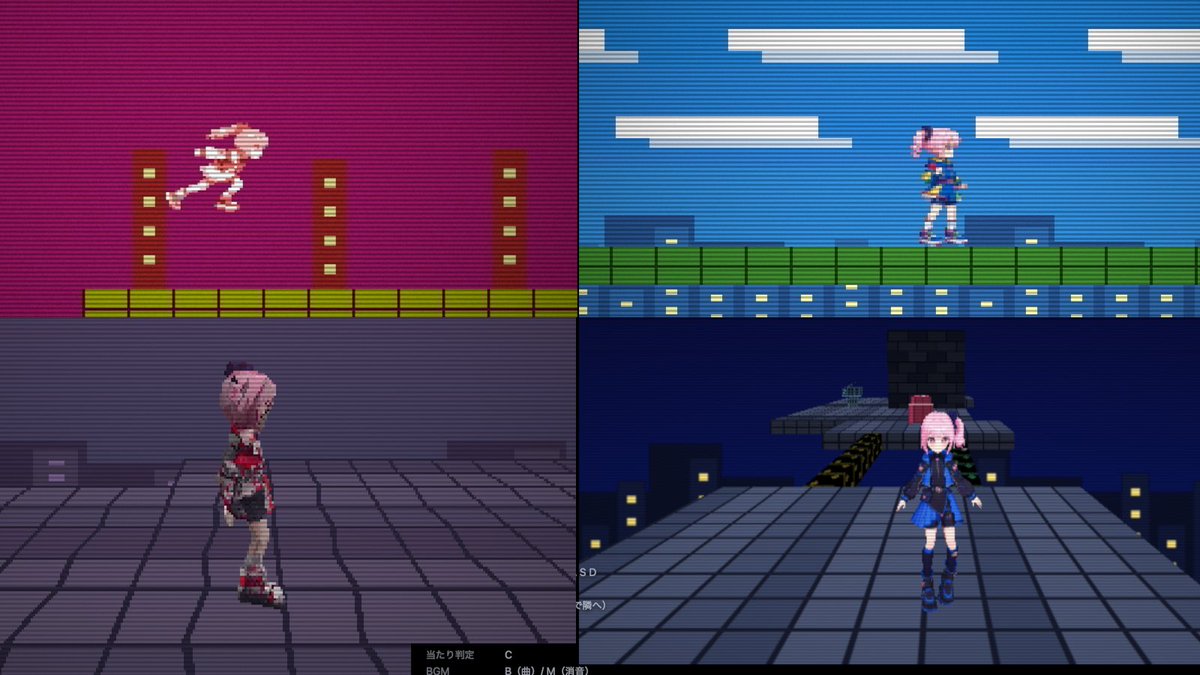
Console Generations Rooftop Game Collage
Generates a four-panel retro game comparison screenshot showing one rooftop stage across 8-bit, 16-bit, PS1, and PS2-inspired styles.
Questo è un esempio di prompt GPT Image 2 per Anime e videogiochi . Utilizza il prompt pronto per la copia qui sotto per generare immagini simili e verifica l'attribuzione Awesome GPT Image 2 Prompts e i diritti di utilizzo commerciale prima del riutilizzo.
Hai bisogno del set completo di prompt? Usa il Anime e videogiochi hub tematico per ulteriori esempi correlati oppure apri il GPT Image 2 catalogo rapido per l'indice completo degli esempi, le strutture riutilizzabili e l'attribuzione delle fonti.
Free 1K preview
Generate one preview image instantly, no sign-up required.
2624/4000
Richiesta
prompt pronto per la copia
Create a 16:9 promotional screenshot collage for a retro puzzle-action game called {argument name="game title" default="ConsoleChaos"}, showing the same side-scrolling rooftop stage rendered in four different console-generation styles at once. Divide the canvas into an exact 2x2 grid with thin black borders between panels, like a technical pilot comparison screen. Use strong CRT scanlines across the entire image, low-resolution pixel-art aesthetics, slightly blurry capture artifacts, and dark cyberpunk city colors.

Top-left panel: 8-bit / Famicom-style side-view platformer. Magenta-purple night sky, flat pixelated buildings, yellow-green tiled ground, three simple brown vertical towers with small pale windows. A tiny pink-haired anime girl sprite in white/pink is mid-jump moving right. Very limited palette, chunky pixels, high contrast.

Top-right panel: 16-bit / Super Famicom-style side-view platformer. Bright blue sky with long flat white clouds, green rooftop fence/platform, blue building facade with rows of yellow-lit windows. The same pink-haired anime girl sprite stands on the platform facing right, wearing a blue outfit. Cleaner sprites and more colors than the top-left panel.

Bottom-left panel: early PlayStation-style 3D view. Third-person camera behind and slightly to the side of a low-poly pink-haired anime girl character standing on a gray tiled rooftop. Purple foggy night skyline, blocky buildings with a few lit windows, visible polygon edges and jagged texture warping. Add a black UI strip along the bottom with tiny white Japanese debug-like text and button hints.

Bottom-right panel: PlayStation 2-style 3D view. Third-person 3D rooftop scene at night with a larger, smoother anime girl character facing the camera, pink twin-tail hair, dark blue/black outfit with blue skirt and boots. She stands on a broad gray tiled rooftop with city buildings and yellow-lit windows below, a raised platform and blocky obstacle behind her, plus a small red object on the platform. Dark navy sky, more detailed geometry than bottom-left but still retro game-like. Include faint tiny white UI/debug text near the lower left edge.

Character details: use one recurring heroine, {argument name="character name" default="pink-haired anime girl"}, with pastel pink hair and a blue/black futuristic school-uniform-inspired outfit in the later-generation panels. Keep the four render styles clearly distinct: 8-bit, 16-bit, PS1 low-poly, and PS2-era 3D. Do not add a title logo or extra explanatory captions; this should look like a captured development comparison image rather than a polished poster.
Variabili di richiesta
Segnaposto per gli argomenti modificabili presenti nel prompt, con i relativi valori predefiniti.
Variabile
game title
Predefinito
ConsoleChaos
Variabile
character name
Predefinito
pink-haired anime girl
Best for
- - Anime e videogiochi visual exploration
- - Image generation and reference-image edits
- - Reusable briefs that keep source attribution visible
Change these parts
- - Subject, product, character, or scene
- - Aspect ratio, camera, lighting, and background
- - Brand, text, color, and output constraints
Recommended model and settings
- - Model: gpt-image-2
- - Input mode: Testo in immagine
- - Aspect ratio: source
- - Commercial status: review original source
How to use this prompt
- 1. Copy the prompt and preserve its structure for the first test.
- 2. Replace the subject, context, and publishing channel.
- 3. Change one camera, lighting, or style variable per iteration.
- 4. Inspect the output, source, text, and rights before reuse.
Limitations, source, and reuse cautions
- - Generated output is an editable draft, not factual, legal, or rights evidence.
- - Review the linked source, people, brands, logos, text, and third-party media before commercial use.
Importato da Awesome GPT Image 2 Prompts . È richiesta l'attribuzione. Lo stato di utilizzo commerciale è allowed ; verificare i diritti della fonte prima dell'utilizzo a pagamento.
Altri casi in questa categoria
Prioritizzazione in base a categoria, compatibilità della modalità di input, qualità e minor rischio.

Anime Girl Heterochromia Portrait
Testo in immagine

Street Selfie with Cat in Matching Cap
Testo in immagine

MotoGP POV Cornering Shot
Testo in immagine

Orange Rooftop Fashion Photo Prompt
Testo in immagine

GPT Image 2 Real-Life Character Street Snap
Testo in immagine

Luxury Travel Fashion Portrait Prompt
Testo in immagine
Note sul riutilizzo e sulla fonte
Utilizza questo prompt in tutta sicurezza dopo aver visualizzato in anteprima il caso.
- 1.Copia il prompt oppure aprilo direttamente in Dovoo tramite il pulsante di generazione.
- 2.Regola le variabili, le proporzioni e le immagini di riferimento in base alle tue esigenze.
- 3.Prima della pubblicazione o dell'utilizzo a pagamento, verificare i diritti di fonte, i requisiti di attribuzione e i rischi relativi al marchio o all'immagine.