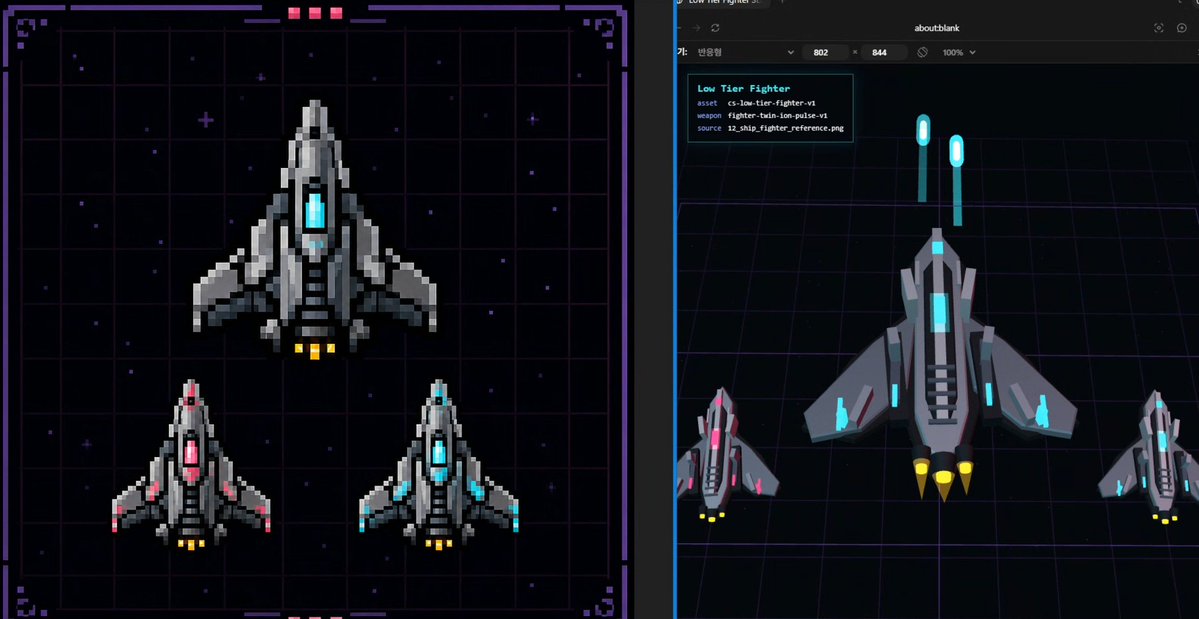
Foglio di risorse per Pixel Fighter in 3D
Genera un'immagine di riferimento a schermo diviso di un'astronave fantascientifica, confrontando gli sprite dei caccia in pixel art con un'anteprima di conversione 3D low-poly in stile Three.js.
Questo è un esempio di prompt GPT Image 2 per Anime e videogiochi . Utilizza il prompt pronto per la copia qui sotto per generare immagini simili e verifica l'attribuzione Awesome GPT Image 2 Prompts e i diritti di utilizzo commerciale prima del riutilizzo.
Free 1K preview
Generate one preview image instantly, no sign-up required.
Richiesta
prompt pronto per la copia
{
  "type": "split-screen sci-fi asset design benchmark sheet",
  "style": "dark cyberpunk game-development concept art, combining pixel-art reference and Three.js low-poly conversion preview",
  "canvas": "wide 16:9 image divided vertically into two equal panels with a thin dark separator",
  "subject": {
    "asset name": "{argument name=\"asset name\" default=\"Low Tier Fighter\"}",
    "vehicle": "small futuristic fighter spaceship",
    "faction style": "industrial gray armor plates with angular wings and cyan energy cores",
    "primary material": "matte and metallic dark gray hull with lighter gray highlights",
    "accent color": "{argument name=\"accent color\" default=\"cyan\"}",
    "thruster color": "{argument name=\"thruster color\" default=\"yellow\"}",
    "overall form": "top-down triangular spacecraft with pointed nose, central glowing cockpit/core, layered side fins, vented black intake slats, two to three rear engine nozzles"
  },
  "left panel": {
    "title": "pixel-art 2D reference board",
    "position": "left half",
    "background": "nearly black starfield over a purple neon grid, framed by a decorative sci-fi HUD border with corner brackets, small magenta status blocks at the top and bottom",
    "rendering": "crisp pixel art with chunky square pixels, no anti-aliasing, retro arcade spaceship sprite design",
    "count": 3,
    "ships": [
      {
        "description": "one large main fighter centered in the upper half, gray hull, cyan glowing center core, yellow engine flames"
      },
      {
        "description": "one smaller fighter in the lower left, same silhouette, pink/magenta glowing center and pink wing accents, yellow engine flames"
      },
      {
        "description": "one smaller fighter in the lower right, same silhouette, cyan glowing center and cyan wing accents, yellow engine flames"
      }
    ]
  },
  "right panel": {
    "title": "3D conversion preview",
    "position": "right half",
    "background": "dark browser-like viewport with an about:blank address area at the top, black 3D scene floor with purple perspective grid lines, subtle blue vertical viewport edge",
    "rendering": "low-poly Three.js style 3D models, flat shaded geometry, clean beveled silhouettes, top/front angled view",
    "count": 3,
    "ships": [
      {
        "description": "one large low-poly fighter centered, gray angular hull, cyan cockpit and cyan side lights, black vent strips, three yellow cone thrusters"
      },
      {
        "description": "one smaller magenta-accent fighter at bottom left, matching the 2D reference variant"
      },
      {
        "description": "one smaller cyan-accent fighter at bottom right, matching the 2D reference variant"
      }
    ],
    "floating elements": {
      "count": 2,
      "description": "two vertical cyan glowing capsule markers hovering above the main ship like reference beacons or UI measurement markers"
    },
    "info card": {
      "position": "upper left of right panel",
      "lines count": 4,
      "text lines": [
        "Low Tier Fighter",
        "asset  cs-low-tier-fighter-v1",
        "weapon  fighter-train-ion-pulse-v1",
        "source  12_ship_fighter_reference.png"
      ]
    }
  },
  "composition": "show a direct visual comparison between the 2D pixel sprite design on the left and its simplified 3D asset interpretation on the right, suitable as a design baseline for game asset production",
  "quality": "sharp, high contrast, neon sci-fi palette, readable UI text, balanced spacing, professional game dev presentation"
}
Variabili di richiesta
Segnaposto per gli argomenti modificabili presenti nel prompt, con i relativi valori predefiniti.
Best for
- - Anime e videogiochi visual exploration
- - Image generation and reference-image edits
- - Reusable briefs that keep source attribution visible
Change these parts
- - Subject, product, character, or scene
- - Aspect ratio, camera, lighting, and background
- - Brand, text, color, and output constraints
Recommended model and settings
- - Model: gpt-image-2
- - Input mode: Testo in immagine
- - Aspect ratio: source
- - Commercial status: review original source
How to use this prompt
- 1. Copy the prompt and preserve its structure for the first test.
- 2. Replace the subject, context, and publishing channel.
- 3. Change one camera, lighting, or style variable per iteration.
- 4. Inspect the output, source, text, and rights before reuse.
Limitations, source, and reuse cautions
- - Generated output is an editable draft, not factual, legal, or rights evidence.
- - Review the linked source, people, brands, logos, text, and third-party media before commercial use.
Altri casi in questa categoria
Prioritizzazione in base a categoria, compatibilità della modalità di input, qualità e minor rischio.






Note sul riutilizzo e sulla fonte
Utilizza questo prompt in tutta sicurezza dopo aver visualizzato in anteprima il caso.
- 1.Copia il prompt oppure aprilo direttamente in Dovoo tramite il pulsante di generazione.
- 2.Regola le variabili, le proporzioni e le immagini di riferimento in base alle tue esigenze.
- 3.Prima della pubblicazione o dell'utilizzo a pagamento, verificare i diritti di fonte, i requisiti di attribuzione e i rischi relativi al marchio o all'immagine.