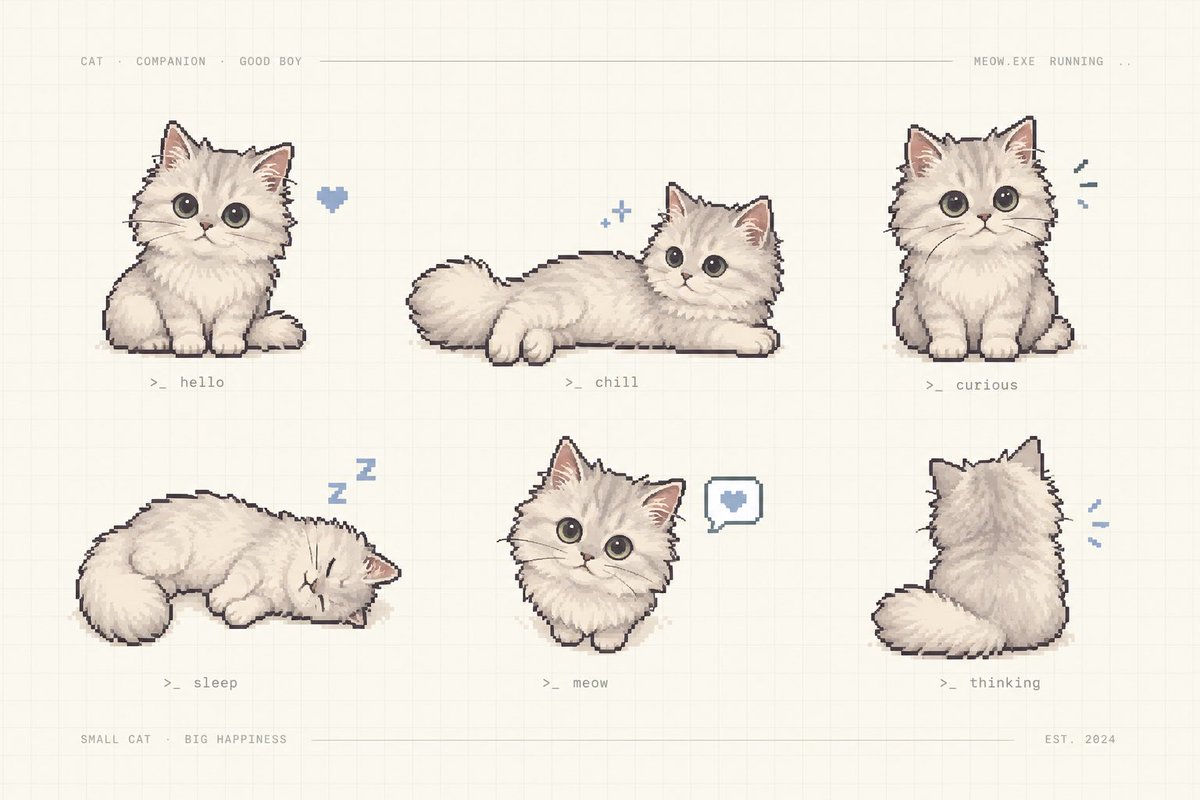
Pixel Art Kitten Companion Sheet
A cozy retro pixel-art sheet showing six labeled poses of a fluffy cream kitten companion for game assets or character design.
Questo è un esempio di prompt GPT Image 2 per Anime e videogiochi . Utilizza il prompt pronto per la copia qui sotto per generare immagini simili e verifica l'attribuzione Awesome GPT Image 2 Prompts e i diritti di utilizzo commerciale prima del riutilizzo.
Hai bisogno del set completo di prompt? Usa il Anime e videogiochi hub tematico per ulteriori esempi correlati oppure apri il GPT Image 2 catalogo rapido per l'indice completo degli esempi, le strutture riutilizzabili e l'attribuzione delle fonti.
Free 1K preview
Generate one preview image instantly, no sign-up required.
2205/4000
Richiesta
prompt pronto per la copia
Goal: Create a charming pixel-art character sheet of {argument name="character name" default="a fluffy cream kitten"} as a cute virtual companion, arranged like a retro game asset preview.

Canvas: Horizontal 3:2 composition on a warm off-white paper background with a faint square grid, subtle beige texture, and thin pale divider lines near the top and bottom.

Layout: Show exactly 6 separate kitten sprites in a clean 3-column by 2-row grid with generous spacing. Add tiny monospaced gray interface text across the top: “CAT · COMPANION · GOOD BOY” on the left, a long thin horizontal line through the middle, and “MEOW.EXE RUNNING ..” on the right. Add bottom text: “SMALL CAT · BIG HAPPINESS” on the left, a thin line across the center, and “EST. 2024” on the right.

Subject details: The kitten is extremely fluffy, cream-white with soft beige shading, round oversized dark gray eyes, small pink nose, triangular ears with pink inner ears, tiny paws, plush tail, and a slightly dark pixel-outline. Use hand-painted pixel art with soft dithering and a cozy pastel palette.

Exactly 6 poses and labels:
1. Top left: sitting front-facing kitten, a small blue pixel heart floating to its right, label “>_ hello”.
2. Top center: kitten lying stretched horizontally with tail to the left and head to the right, two tiny blue sparkle icons above, label “>_ chill”.
3. Top right: sitting front-facing kitten looking curious, three small blue motion marks to its right, label “>_ curious”.
4. Bottom left: kitten curled up sleeping with eyes closed, blue “Z z” symbols above, label “>_ sleep”.
5. Bottom center: small front-facing kitten bust/sitting pose with a speech bubble containing a blue heart to its right, label “>_ meow”.
6. Bottom right: kitten viewed from behind, fluffy tail curled left, small blue motion marks to its right, label “>_ thinking”.

Visual style: Nostalgic cozy pixel art, soft hand-drawn shading, muted cream, gray, beige, pink, and powder-blue accents; all labels in tiny gray terminal-style monospaced text.

Constraints: Keep the image uncluttered, no photorealism, no extra kittens, no additional labels beyond the specified interface text and six pose labels, no watermark.
Variabili di richiesta
Segnaposto per gli argomenti modificabili presenti nel prompt, con i relativi valori predefiniti.
Variabile
character name
Predefinito
a fluffy cream kitten
Best for
- - Anime e videogiochi visual exploration
- - Image generation and reference-image edits
- - Reusable briefs that keep source attribution visible
Change these parts
- - Subject, product, character, or scene
- - Aspect ratio, camera, lighting, and background
- - Brand, text, color, and output constraints
Recommended model and settings
- - Model: gpt-image-2
- - Input mode: Testo in immagine
- - Aspect ratio: source
- - Commercial status: review original source
How to use this prompt
- 1. Copy the prompt and preserve its structure for the first test.
- 2. Replace the subject, context, and publishing channel.
- 3. Change one camera, lighting, or style variable per iteration.
- 4. Inspect the output, source, text, and rights before reuse.
Limitations, source, and reuse cautions
- - Generated output is an editable draft, not factual, legal, or rights evidence.
- - Review the linked source, people, brands, logos, text, and third-party media before commercial use.
Importato da Awesome GPT Image 2 Prompts . È richiesta l'attribuzione. Lo stato di utilizzo commerciale è allowed ; verificare i diritti della fonte prima dell'utilizzo a pagamento.
Altri casi in questa categoria
Prioritizzazione in base a categoria, compatibilità della modalità di input, qualità e minor rischio.

Anime Girl Heterochromia Portrait
Testo in immagine

Hell Hound Character Sheet Infographic
Testo in immagine

Cute Speech Bubble Mascot Profile Icon
Testo in immagine

Autumn Cozy Casual Outfit Prompt
Testo in immagine

Cute Focus Desk Flat Lay and Kawaii Illustration
Testo in immagine

Street Selfie with Cat in Matching Cap
Testo in immagine
Note sul riutilizzo e sulla fonte
Utilizza questo prompt in tutta sicurezza dopo aver visualizzato in anteprima il caso.
- 1.Copia il prompt oppure aprilo direttamente in Dovoo tramite il pulsante di generazione.
- 2.Regola le variabili, le proporzioni e le immagini di riferimento in base alle tue esigenze.
- 3.Prima della pubblicazione o dell'utilizzo a pagamento, verificare i diritti di fonte, i requisiti di attribuzione e i rischi relativi al marchio o all'immagine.