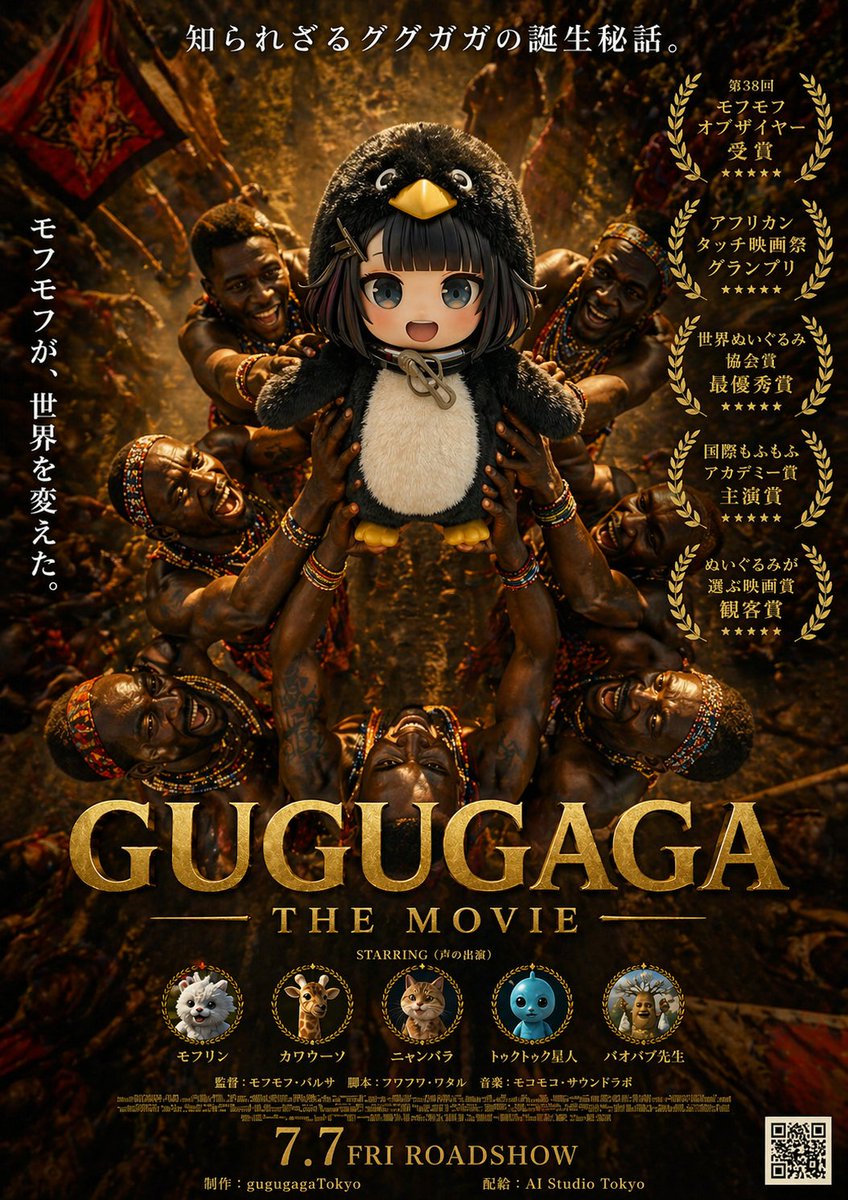
Locandina epica del film Gugugaga
Questo prompt genera un poster cinematografico parodia e drammatico con un pinguino di peluche idolatrato da figure tribali, nello stile di un poster cinematografico pluripremiato, perfetto per i social media o per il marketing di un film fittizio.
Questo è un esempio di prompt GPT Image 2 per Grafica e poster . Utilizza il prompt pronto per la copia qui sotto per generare immagini simili e verifica l'attribuzione Awesome GPT Image 2 Prompts e i diritti di utilizzo commerciale prima del riutilizzo.
Free 1K preview
Generate one preview image instantly, no sign-up required.
Richiesta
prompt pronto per la copia
A dramatic fictional movie poster for {argument name="movie title" default="GUGUGAGA"}, designed like an epic prestige film one-sheet with dark golden-brown cinematic lighting and a serious award-winning tone. The composition is vertical and symmetrical. In the center, a plush black-and-white penguin mascot with a round body, big glossy eyes, a yellow beak, and small yellow feet is held aloft in a ritual-like presentation by multiple African tribal warriors surrounding it from all sides. Exactly 6 visible warriors are arranged around the penguin, with muscular arms reaching inward and upward to support the mascot, creating a radial halo of hands and bodies. Their skin is richly lit with warm highlights, and they wear colorful beaded necklaces, bracelets, headbands, and traditional adornments. The background is a dense, dimly lit ceremonial setting with warm firelight, earthy shadows, fabric banners, and a textured amber glow, giving the scene an ancient, mythic atmosphere. At the very top, centered Japanese copy reads: 「知られざるググガガの誕生秘話。」 On the left side, a vertical Japanese tagline reads: 「モフモフが、世界を変えた。」 On the right side, place exactly 5 stacked gold laurel award blocks with Japanese text, each framed by laurel wreaths. The 5 award texts are: 「第38回 モフモフ オブザイヤー 受賞」, 「アフリカン タッチ映画祭 グランプリ」, 「世界ぬいぐるみ 協会賞 最優秀賞」, 「国際もふもふ アカデミー賞 主演賞」, and 「ぬいぐるみが 選ぶ映画賞 観客賞」. Across the lower middle, place the huge metallic gold serif title {argument name="movie title" default="GUGUGAGA"}, with smaller gold serif subtitle beneath it reading {argument name="subtitle text" default="THE MOVIE"}. Below that, add a small centered line reading: STARRING (声の出演). Along the lower section, include exactly 5 circular cast medallions with tiny laurel-like frames and labels beneath them. The 5 cast items are: a fluffy white pomeranian-like dog labeled 「モフリン」, a giraffe labeled 「カワウーソン」, an orange tabby cat labeled 「ニャンバラ」, a blue round toy-like character labeled 「トゥクトゥク星人」, and a scholarly baboon or monkey figure labeled 「バオバブ先生」. Beneath the cast row, add small Japanese-style credit lines including director, screenplay, and music in a fine poster-credit style. At the bottom center, display a large gold release date line reading {argument name="release date" default="7.7 FRI ROADSHOW"}. Along the bottom edge, include small production and distribution credits reading 「制作:gugugagaTokyo」 and 「配給:AI Studio Tokyo」. Put a black-and-white QR code in the bottom-right corner. Use ultra-detailed photorealistic poster rendering, dramatic contrast, gilded typography, luxurious texture, prestige cinema marketing design, and a tongue-in-cheek parody of an Oscar-bait adventure drama.Variabili di richiesta
Segnaposto per gli argomenti modificabili presenti nel prompt, con i relativi valori predefiniti.
Best for
- - Grafica e poster visual exploration
- - Image generation and reference-image edits
- - Reusable briefs that keep source attribution visible
Change these parts
- - Subject, product, character, or scene
- - Aspect ratio, camera, lighting, and background
- - Brand, text, color, and output constraints
Recommended model and settings
- - Model: gpt-image-2
- - Input mode: Testo in immagine
- - Aspect ratio: source
- - Commercial status: review original source
How to use this prompt
- 1. Copy the prompt and preserve its structure for the first test.
- 2. Replace the subject, context, and publishing channel.
- 3. Change one camera, lighting, or style variable per iteration.
- 4. Inspect the output, source, text, and rights before reuse.
Limitations, source, and reuse cautions
- - Generated output is an editable draft, not factual, legal, or rights evidence.
- - Review the linked source, people, brands, logos, text, and third-party media before commercial use.
Altri casi in questa categoria
Prioritizzazione in base a categoria, compatibilità della modalità di input, qualità e minor rischio.






Note sul riutilizzo e sulla fonte
Utilizza questo prompt in tutta sicurezza dopo aver visualizzato in anteprima il caso.
- 1.Copia il prompt oppure aprilo direttamente in Dovoo tramite il pulsante di generazione.
- 2.Regola le variabili, le proporzioni e le immagini di riferimento in base alle tue esigenze.
- 3.Prima della pubblicazione o dell'utilizzo a pagamento, verificare i diritti di fonte, i requisiti di attribuzione e i rischi relativi al marchio o all'immagine.