Documentary Photo Sequence of Penguin Story
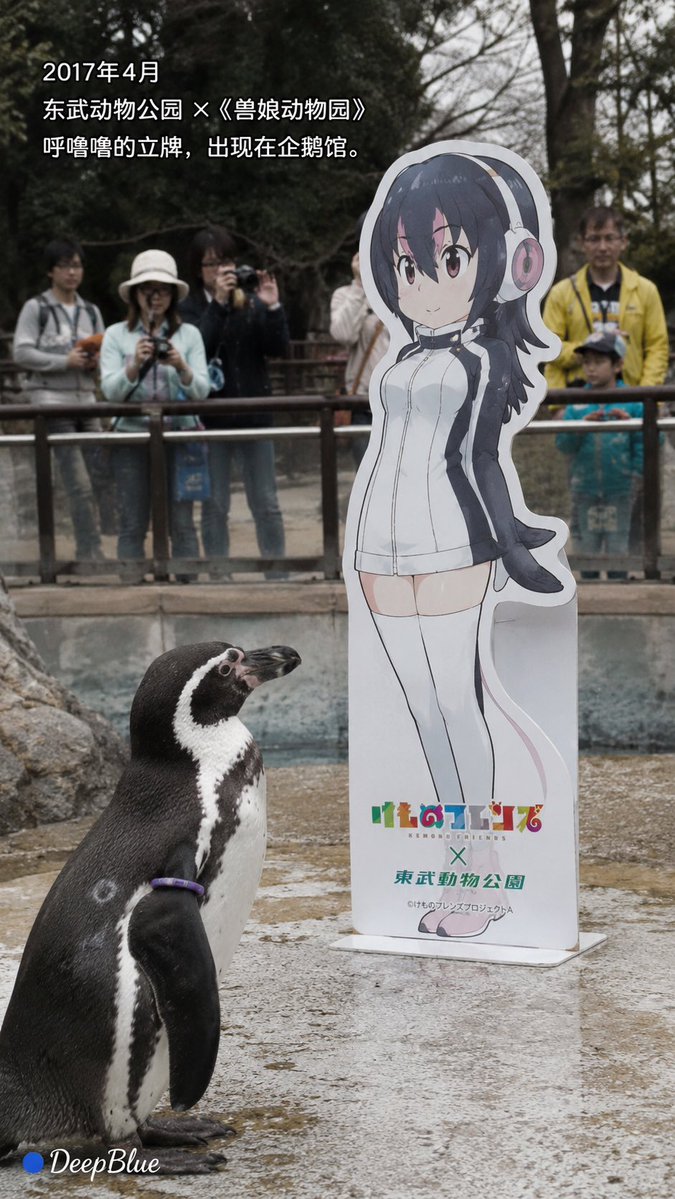
A documentary-style photo sequence based on the real story of Grape-kun, a penguin who bonded with an anime character cutout.
Questo è un esempio di prompt GPT Image 2 per Paesaggio e natura . Utilizza il prompt pronto per la copia qui sotto per generare immagini simili e verifica l'attribuzione Awesome GPT Image 2 Prompts e i diritti di utilizzo commerciale prima del riutilizzo.
Hai bisogno del set completo di prompt? Usa il Paesaggio e natura hub tematico per ulteriori esempi correlati oppure apri il GPT Image 2 catalogo rapido per l'indice completo degli esempi, le strutture riutilizzabili e l'attribuzione delle fonti.
Free 1K preview
Generate one preview image instantly, no sign-up required.
2571/4000
Richiesta
prompt pronto per la copia
Realistic news documentary photography, {argument name="location" default="Real Humboldt penguin Grape-kun"}; realistic {argument name="penguin name" default="Humboldt penguin Grape-kun"}, adult male, black and white feathers, purple individual identification ring naturally visible; realistic penguin habitat, pool, rocks, metal fence, trees, visitors; {argument name="character" default="Kemono Friends character Hululu"} cardboard standee, realistic cardboard material and base; natural environmental light, candid shot, realistic feather texture, slight natural grain, low saturation, natural atmosphere, restrained and gentle.

[Image 1 | April 2017]
During the collaboration between Kemono Friends and Tobu Zoo, Hululu's standee appeared in the penguin area; Grape-kun naturally appeared near the standee; visitors watched and took pictures through the fence; a realistic zoo scene.
Text:
“April 2017”
“Tobu Zoo x Kemono Friends”
“Hululu's standee appeared in the penguin habitat.”

[Image 2 | Observation]
Grape-kun stood quietly next to Hululu's standee, his body naturally facing the standee and continuously observing it; showing the behavior noticed by visitors and the zoo at the time; no anthropomorphism, no human-like emotional expression; natural background blur, like a casually captured news photo.
Text:
“Grape-kun seemed particularly interested in this standee.”
“‘Love’ is people's interpretation of his behavior.”

[Image 3 | Retention]
After the collaboration ended, the standees of other characters were removed, but Hululu's standee remained in the penguin area; natural voids were left in other locations; Grape-kun still appeared near the standee; quiet penguin habitat, natural soft light.
Text:
“The collaboration has ended.”
“Other standees were removed, and Hululu was left behind.”

[Image 4 | Farewell]
Time point after Grape-kun passed away on October 12, 2017; the penguin habitat is quiet and empty, Grape-kun is no longer there, but Hululu's standee still exists; pool, rocks, fence, and empty activity space; soft natural light, expressing absence through space, not showing death scenes.
Text:
“October 12, 2017”
“Grape-kun passed away at the age of 21.”
“We do not know what he considered that standee to be.”

Strictly based on real events, no fictionalization of Grape-kun's psychology, dialogue, memories, or motivations; “falling in love with 2D” or “liking Hululu” are human interpretations of his behavior.

Each corner has a “● DeepBlue” logo; the circle is #0B3D91 dark blue, and DeepBlue is white natural handwritten font.
Variabili di richiesta
Segnaposto per gli argomenti modificabili presenti nel prompt, con i relativi valori predefiniti.
Variabile
location
Predefinito
Real Humboldt penguin Grape-kun
Variabile
penguin name
Predefinito
Humboldt penguin Grape-kun
Variabile
character
Predefinito
Kemono Friends character Hululu
Best for
- - Paesaggio e natura visual exploration
- - Image generation and reference-image edits
- - Reusable briefs that keep source attribution visible
Change these parts
- - Subject, product, character, or scene
- - Aspect ratio, camera, lighting, and background
- - Brand, text, color, and output constraints
Recommended model and settings
- - Model: gpt-image-2
- - Input mode: Testo in immagine
- - Aspect ratio: source
- - Commercial status: review original source
How to use this prompt
- 1. Copy the prompt and preserve its structure for the first test.
- 2. Replace the subject, context, and publishing channel.
- 3. Change one camera, lighting, or style variable per iteration.
- 4. Inspect the output, source, text, and rights before reuse.
Limitations, source, and reuse cautions
- - Generated output is an editable draft, not factual, legal, or rights evidence.
- - Review the linked source, people, brands, logos, text, and third-party media before commercial use.
Importato da Awesome GPT Image 2 Prompts . È richiesta l'attribuzione. Lo stato di utilizzo commerciale è allowed ; verificare i diritti della fonte prima dell'utilizzo a pagamento.
Altri casi in questa categoria
Prioritizzazione in base a categoria, compatibilità della modalità di input, qualità e minor rischio.

GPT Image 2 Real-Life Character Street Snap
Testo in immagine

Street Selfie with Cat in Matching Cap
Testo in immagine

Gray Denim Lace-Up Top Prompt for GPT Image 2
Testo in immagine

Hiker in Red Jacket
Testo in immagine

MotoGP POV Cornering Shot
Testo in immagine

GPT Image 2 Prompt: Garden Dappled Light
Testo in immagine
Note sul riutilizzo e sulla fonte
Utilizza questo prompt in tutta sicurezza dopo aver visualizzato in anteprima il caso.
- 1.Copia il prompt oppure aprilo direttamente in Dovoo tramite il pulsante di generazione.
- 2.Regola le variabili, le proporzioni e le immagini di riferimento in base alle tue esigenze.
- 3.Prima della pubblicazione o dell'utilizzo a pagamento, verificare i diritti di fonte, i requisiti di attribuzione e i rischi relativi al marchio o all'immagine.