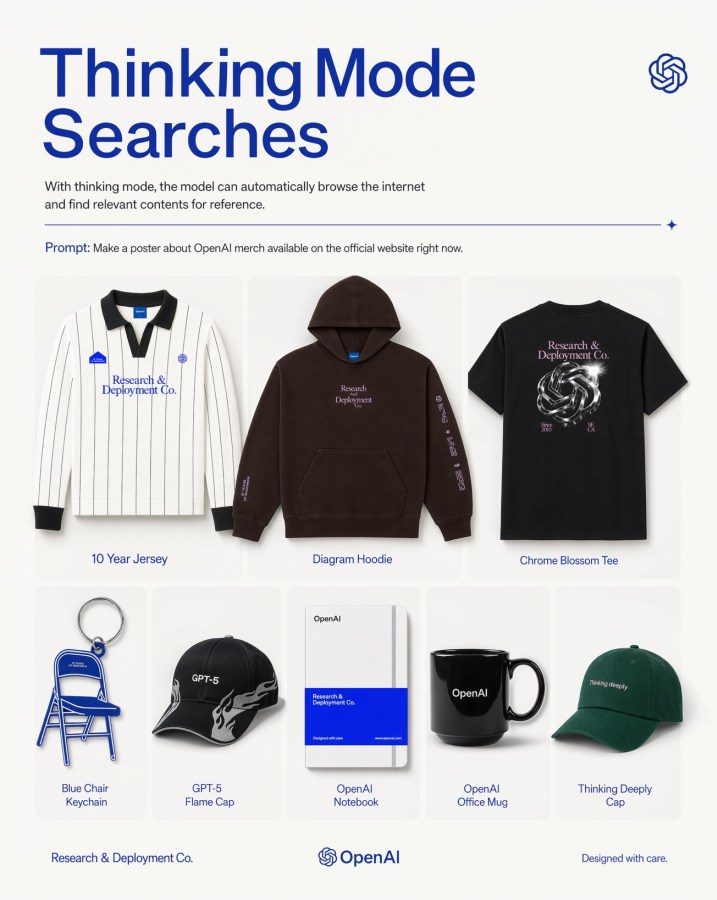
Griglia di poster per il merchandising OpenAI
Un poster editoriale moderno che presenta otto articoli di merchandising a tema OpenAI in una griglia di prodotti pulita, ideale per la promozione di un marchio tecnologico o per le immagini di marketing sui social media.
Questo è un esempio di prompt GPT Image 2 per Prodotto e commerciale . Utilizza il prompt pronto per la copia qui sotto per generare immagini simili e verifica l'attribuzione Awesome GPT Image 2 Prompts e i diritti di utilizzo commerciale prima del riutilizzo.
Free 1K preview
Generate one preview image instantly, no sign-up required.
Richiesta
prompt pronto per la copia
A clean, minimalist promotional poster on an off-white background in a modern tech-brand style. At the top left, a very large bold sans-serif headline in deep cobalt blue reads {argument name="headline text" default="Thinking Mode Searches"} split across two lines. Beneath it, a smaller gray explanatory sentence says that with thinking mode, the model can automatically browse the internet and find relevant contents for reference. At the top right, place a small blue OpenAI knot logo. Below the intro text, add a thin horizontal blue divider line ending with a tiny sparkle icon on the right. Under that, include a prompt line in small text with the word “Prompt:” in blue followed by the sentence {argument name="prompt text" default="Make a poster about OpenAI merch available on the official website right now."}. The main body is a centered 3-by-2 product grid with 8 total merchandise items shown as clean catalog cutouts with soft shadows inside rounded pale cards. Top row has 3 larger products: 1) a white long-sleeve striped rugby-style jersey with black collar and cuffs, small blue patches, and blue chest text “Research & Deployment Co.”, labeled “10 Year Jersey”; 2) a dark brown pullover hoodie with front pocket, small centered chest text “Research Deployment Co.” and sleeve print, labeled “Diagram Hoodie”; 3) a black T-shirt viewed from the back with a metallic knot graphic and pale pink text “Research & Deployment Co.”, labeled “Chrome Blossom Tee”. Bottom row has 5 smaller products: 4) a blue folding chair keychain shaped like a chair, labeled “Blue Chair Keychain”; 5) a black baseball cap with white flame graphics and “GPT-5” on the front, labeled “GPT-5 Flame Cap”; 6) a white notebook with a bold blue lower band and minimal OpenAI branding, labeled “OpenAI Notebook”; 7) a glossy black mug with “OpenAI” in white, labeled “OpenAI Office Mug”; 8) a dark green baseball cap with small white text “Thinking deeply”, labeled “Thinking Deeply Cap”. Keep all item labels centered below each product in small blue sans-serif text. Along the bottom footer, place “Research & Deployment Co.” on the left, the OpenAI knot logo plus wordmark centered, and “Designed with care.” on the right. Use a balanced editorial layout, lots of whitespace, premium product-ad poster aesthetics, subtle shadows, crisp studio lighting, and a restrained palette of off-white, blue, black, brown, and green.Variabili di richiesta
Segnaposto per gli argomenti modificabili presenti nel prompt, con i relativi valori predefiniti.
Best for
- - Prodotto e commerciale visual exploration
- - Image generation and reference-image edits
- - Reusable briefs that keep source attribution visible
Change these parts
- - Subject, product, character, or scene
- - Aspect ratio, camera, lighting, and background
- - Brand, text, color, and output constraints
Recommended model and settings
- - Model: gpt-image-2
- - Input mode: Testo in immagine
- - Aspect ratio: source
- - Commercial status: review original source
How to use this prompt
- 1. Copy the prompt and preserve its structure for the first test.
- 2. Replace the subject, context, and publishing channel.
- 3. Change one camera, lighting, or style variable per iteration.
- 4. Inspect the output, source, text, and rights before reuse.
Limitations, source, and reuse cautions
- - Generated output is an editable draft, not factual, legal, or rights evidence.
- - Review the linked source, people, brands, logos, text, and third-party media before commercial use.
Altri casi in questa categoria
Prioritizzazione in base a categoria, compatibilità della modalità di input, qualità e minor rischio.






Note sul riutilizzo e sulla fonte
Utilizza questo prompt in tutta sicurezza dopo aver visualizzato in anteprima il caso.
- 1.Copia il prompt oppure aprilo direttamente in Dovoo tramite il pulsante di generazione.
- 2.Regola le variabili, le proporzioni e le immagini di riferimento in base alle tue esigenze.
- 3.Prima della pubblicazione o dell'utilizzo a pagamento, verificare i diritti di fonte, i requisiti di attribuzione e i rischi relativi al marchio o all'immagine.