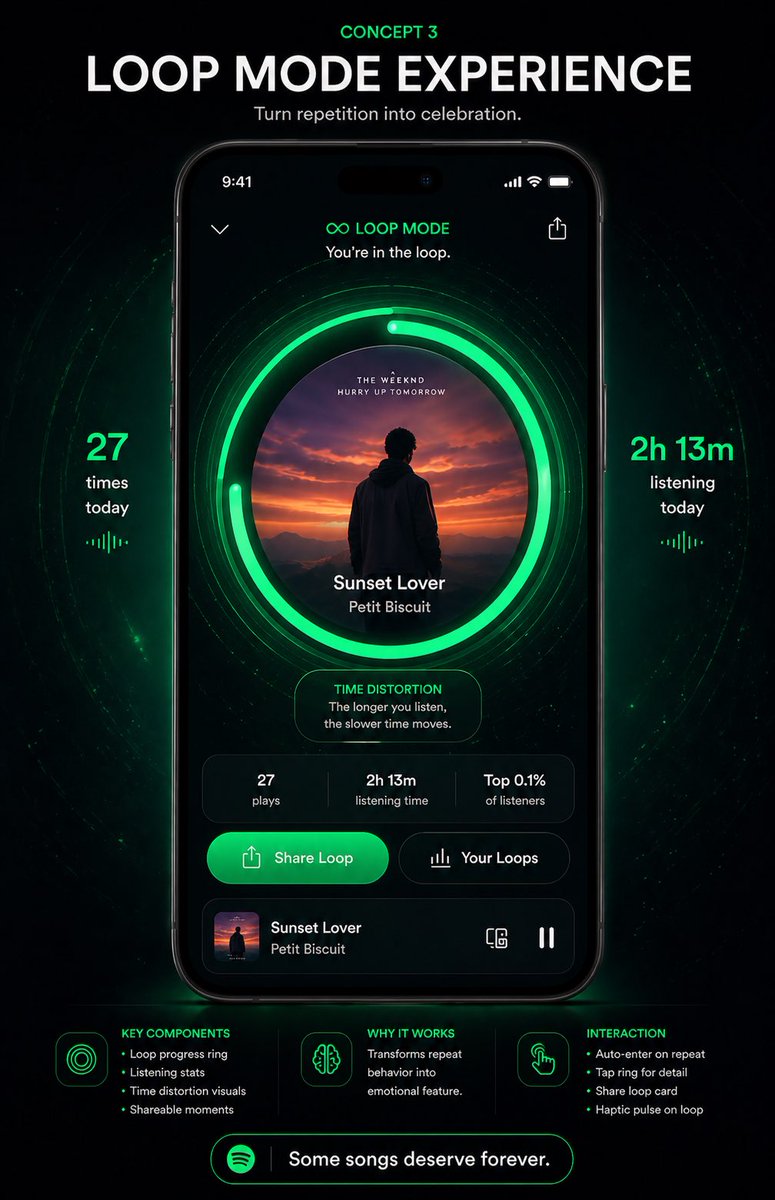
Poster dell'app musicale Neon Loop Mode
Un poster concettuale per un'app mobile futuristica in stile Spotify, che mostra un'interfaccia utente con esperienza di ascolto in loop, ideale per presentazioni di redesign, concept di prodotto e case study sui social media.
Questo è un esempio di prompt GPT Image 2 per Prodotto e commerciale . Utilizza il prompt pronto per la copia qui sotto per generare immagini simili e verifica l'attribuzione Awesome GPT Image 2 Prompts e i diritti di utilizzo commerciale prima del riutilizzo.
Free 1K preview
Generate one preview image instantly, no sign-up required.
Richiesta
prompt pronto per la copia
{
  "type": "music app concept poster",
  "brand": "Spotify-inspired premium UI concept",
  "theme": "futuristic neon green on black, immersive repetition as celebration",
  "poster": {
    "background": "deep black with subtle cosmic texture, faint particles, and concentric glowing green wave rings radiating behind the phone",
    "aspect_ratio": "portrait 9:16",
    "style": "high-end product presentation, sleek app redesign mockup, dramatic glow, crisp typography, polished UI, premium tech advertising"
  },
  "headline": {
    "kicker": "{argument name=\"concept label\" default=\"CONCEPT 3\"}",
    "title": "{argument name=\"headline text\" default=\"LOOP MODE EXPERIENCE\"}",
    "subtitle": "{argument name=\"tagline\" default=\"Turn repetition into celebration.\"}"
  },
  "centerpiece": {
    "device": "front-facing modern smartphone centered vertically",
    "screen": {
      "status_bar": "9:41 time, signal, wifi, battery",
      "top_controls": [
        "back chevron left",
        "share icon right"
      ],
      "mode_header": {
        "icon": "infinity symbol",
        "title": "LOOP MODE",
        "subtitle": "You're in the loop."
      },
      "main_visual": {
        "artwork_shape": "large centered circle",
        "artwork": "sunset scene with a silhouetted person facing distant mountains and orange-purple sky",
        "ring_system": {
          "count": 3,
          "description": "1 album-art circle plus 2 bright segmented neon-green loop progress rings around it, with additional faint concentric halo lines"
        },
        "track_info": {
          "title": "{argument name=\"song title\" default=\"Sunset Lover\"}",
          "artist": "{argument name=\"artist name\" default=\"Petit Biscuit\"}"
        }
      },
      "insight_card": {
        "title": "TIME DISTORTION",
        "text": "The longer you listen, the slower time moves."
      },
      "stats_row": {
        "count": 3,
        "items": [
          "27 plays",
          "2h 13m listening time",
          "Top 0.1% of listeners"
        ]
      },
      "action_buttons": {
        "count": 2,
        "items": [
          "Share Loop",
          "Your Loops"
        ]
      },
      "mini_player": {
        "thumbnail": "same sunset album art",
        "title": "Sunset Lover",
        "artist": "Petit Biscuit",
        "right_icons": [
          "device/connect icon",
          "pause icon"
        ]
      }
    }
  },
  "side_metrics": {
    "count": 2,
    "left": {
      "value": "27",
      "label": "times today",
      "decoration": "small vertical equalizer glyph below"
    },
    "right": {
      "value": "2h 13m",
      "label": "listening today",
      "decoration": "small vertical equalizer glyph below"
    }
  },
  "bottom_info": {
    "sections": [
      {
        "title": "KEY COMPONENTS",
        "position": "bottom left",
        "count": 4,
        "labels": [
          "Loop progress ring",
          "Listening stats",
          "Time distortion visuals",
          "Shareable moments"
        ]
      },
      {
        "title": "WHY IT WORKS",
        "position": "bottom center",
        "count": 1,
        "labels": [
          "Transforms repeat behavior into emotional feature."
        ]
      },
      {
        "title": "INTERACTION",
        "position": "bottom right",
        "count": 4,
        "labels": [
          "Auto-enter on repeat",
          "Tap ring for detail",
          "Share loop card",
          "Haptic pulse on loop"
        ]
      }
    ],
    "footer_pill": {
      "icon": "Spotify-like circular logo",
      "text": "Some songs deserve forever."
    }
  },
  "colors": {
    "primary": "electric Spotify green glow",
    "secondary": "black, charcoal, dark gray",
    "accent": "white typography and subtle emerald highlights"
  },
  "lighting": "strong green bloom around progress rings and beneath the phone, with soft vignette edges"
}
Variabili di richiesta
Segnaposto per gli argomenti modificabili presenti nel prompt, con i relativi valori predefiniti.
Best for
- - Prodotto e commerciale visual exploration
- - Image generation and reference-image edits
- - Reusable briefs that keep source attribution visible
Change these parts
- - Subject, product, character, or scene
- - Aspect ratio, camera, lighting, and background
- - Brand, text, color, and output constraints
Recommended model and settings
- - Model: gpt-image-2
- - Input mode: Testo in immagine
- - Aspect ratio: source
- - Commercial status: review original source
How to use this prompt
- 1. Copy the prompt and preserve its structure for the first test.
- 2. Replace the subject, context, and publishing channel.
- 3. Change one camera, lighting, or style variable per iteration.
- 4. Inspect the output, source, text, and rights before reuse.
Limitations, source, and reuse cautions
- - Generated output is an editable draft, not factual, legal, or rights evidence.
- - Review the linked source, people, brands, logos, text, and third-party media before commercial use.
Altri casi in questa categoria
Prioritizzazione in base a categoria, compatibilità della modalità di input, qualità e minor rischio.






Note sul riutilizzo e sulla fonte
Utilizza questo prompt in tutta sicurezza dopo aver visualizzato in anteprima il caso.
- 1.Copia il prompt oppure aprilo direttamente in Dovoo tramite il pulsante di generazione.
- 2.Regola le variabili, le proporzioni e le immagini di riferimento in base alle tue esigenze.
- 3.Prima della pubblicazione o dell'utilizzo a pagamento, verificare i diritti di fonte, i requisiti di attribuzione e i rischi relativi al marchio o all'immagine.