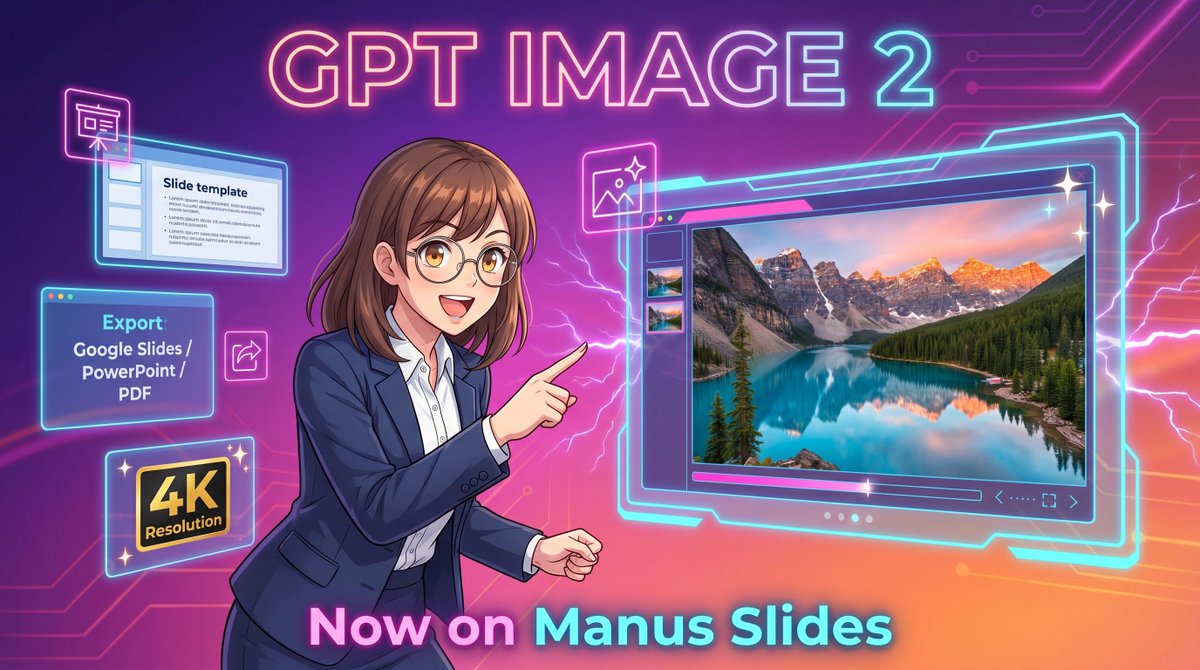
Poster promozionale Neon GPT Image 2
Questo prompt genera un banner promozionale futuristico in stile anime per la generazione di immagini tramite intelligenza artificiale in software di presentazione, ideale per annunci di prodotti e marketing sui social media.
Questo è un esempio di prompt GPT Image 2 per Grafica e poster . Utilizza il prompt pronto per la copia qui sotto per generare immagini simili e verifica l'attribuzione Awesome GPT Image 2 Prompts e i diritti di utilizzo commerciale prima del riutilizzo.
Free 1K preview
Generate one preview image instantly, no sign-up required.
Richiesta
prompt pronto per la copia
A vibrant futuristic promotional illustration in a wide 16:9 composition, styled like polished anime-tech advertising art. The background is a glowing purple-to-pink-to-orange gradient with neon circuit traces running across the top right and left edges, plus electric lightning effects behind the character and around the interface elements. At the top center, place large luminous headline text reading {argument name="headline text" default="GPT IMAGE 2"} in a bold rounded sans-serif font with a pink, cyan, and violet neon glow. In the center-left foreground, show a half-body anime-style businesswoman with {argument name="hair color" default="medium brown"} shoulder-length hair with soft bangs and slightly curled ends, wearing thin glasses, a navy business suit, and a white button-up shirt. Show every face clearly with natural, detailed facial features, but her pose is energetic and confident: she faces right and points with her right index finger toward a large floating software window. On the right half of the image, show a large glowing futuristic image-generation interface outlined in cyan neon, with a main preview panel displaying a highly detailed 4K photoreal mountain lake landscape at sunset: turquoise water, evergreen forest, dramatic rocky peaks with snow, and warm pink-orange sky reflections. Include 3 small vertical thumbnail previews along the left side of this interface, a slim control bar below the main image, and tiny navigation icons in the lower right of the panel. Around the woman on the left side, add 4 floating neon-outlined feature cards: a top-left slide editor window with the visible title “Slide template” and simple bullet lines, a mid-left export box with the visible text “Export” and “Google Slides / PowerPoint / PDF”, a bottom-left black-and-gold badge reading “4K Resolution”, and a small square image icon near the woman’s pointing hand. Add 3 sparkle stars around the large interface for a glossy premium look. At the bottom center, place large glowing gradient text reading {argument name="bottom text" default="Now on Manus Slides"}. Make the entire scene sleek, high-contrast, glossy, and commercial, with crisp line art, soft cel shading, neon rim lighting, and a clean tech-launch poster aesthetic.Variabili di richiesta
Segnaposto per gli argomenti modificabili presenti nel prompt, con i relativi valori predefiniti.
Best for
- - Grafica e poster visual exploration
- - Image generation and reference-image edits
- - Reusable briefs that keep source attribution visible
Change these parts
- - Subject, product, character, or scene
- - Aspect ratio, camera, lighting, and background
- - Brand, text, color, and output constraints
Recommended model and settings
- - Model: gpt-image-2
- - Input mode: Testo in immagine
- - Aspect ratio: source
- - Commercial status: review original source
How to use this prompt
- 1. Copy the prompt and preserve its structure for the first test.
- 2. Replace the subject, context, and publishing channel.
- 3. Change one camera, lighting, or style variable per iteration.
- 4. Inspect the output, source, text, and rights before reuse.
Limitations, source, and reuse cautions
- - Generated output is an editable draft, not factual, legal, or rights evidence.
- - Review the linked source, people, brands, logos, text, and third-party media before commercial use.
Altri casi in questa categoria
Prioritizzazione in base a categoria, compatibilità della modalità di input, qualità e minor rischio.






Note sul riutilizzo e sulla fonte
Utilizza questo prompt in tutta sicurezza dopo aver visualizzato in anteprima il caso.
- 1.Copia il prompt oppure aprilo direttamente in Dovoo tramite il pulsante di generazione.
- 2.Regola le variabili, le proporzioni e le immagini di riferimento in base alle tue esigenze.
- 3.Prima della pubblicazione o dell'utilizzo a pagamento, verificare i diritti di fonte, i requisiti di attribuzione e i rischi relativi al marchio o all'immagine.