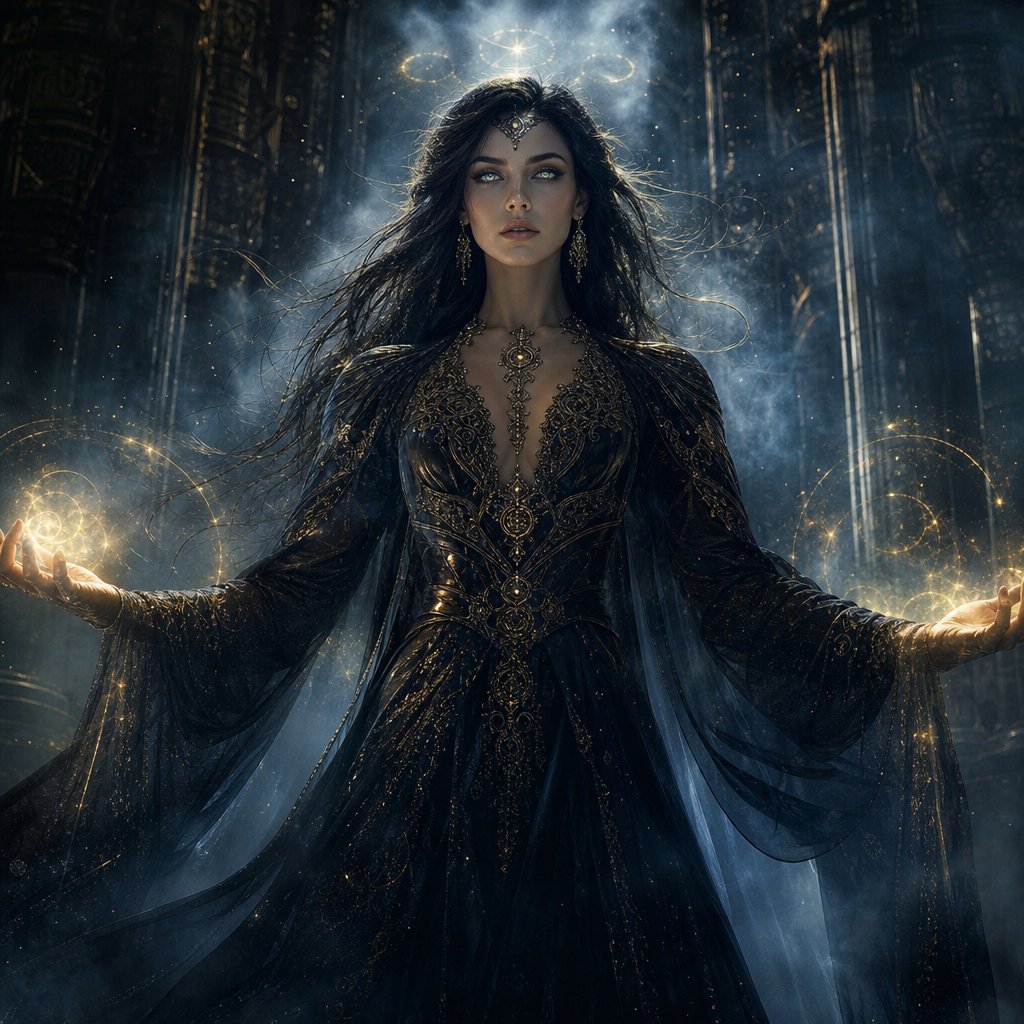
Mystic Woman Extraordinary Cinematic Portrait
A premium cinematic fantasy prompt for creating an ultra-realistic portrait of a mysterious woman in an enchanted, mist-filled landscape.
Questo è un esempio di prompt GPT Image 2 per Ritratto e personaggio . Utilizza il prompt pronto per la copia qui sotto per generare immagini simili e verifica l'attribuzione Awesome GPT Image 2 Prompts e i diritti di utilizzo commerciale prima del riutilizzo.
Hai bisogno del set completo di prompt? Usa il Ritratto e personaggio hub tematico per ulteriori esempi correlati oppure apri il GPT Image 2 catalogo rapido per l'indice completo degli esempi, le strutture riutilizzabili e l'attribuzione delle fonti.
Free 1K preview
Generate one preview image instantly, no sign-up required.
1641/4000
Richiesta
prompt pronto per la copia
Create an extraordinary ultra-realistic cinematic portrait of a {argument name="subject" default="mysterious woman"} with an otherworldly mystical presence. She stands in an {argument name="setting" default="ancient enchanted landscape"} surrounded by drifting silver mist, floating glowing particles, subtle celestial symbols, and enormous shadowy stone structures disappearing into the darkness. Her expression is calm, powerful, and enigmatic, with piercing luminous eyes and long flowing hair gently moving in an unseen wind.

She wears an {argument name="outfit" default="elegant dark mystical gown"} with intricate ancient-inspired patterns, delicate metallic details, and translucent flowing fabric that catches the surrounding light. A faint supernatural aura surrounds her body, with subtle golden-blue energy swirling around her hands.

Use dramatic volumetric lighting, deep shadows, cinematic contrast, realistic skin texture, highly detailed eyes, individual hair strands, atmospheric fog, realistic fabric, shallow depth of field, and sophisticated fantasy cinematography. Make her look powerful rather than frightening, like an ancient guardian who has just awakened after centuries.

Composition: woman dominating the frame, slightly low camera angle, close-to-medium shot, symmetrical cinematic framing, powerful silhouette, dramatic background depth.

Color palette: midnight black, deep blue, silver, subtle antique gold.

Style: ultra-realistic, premium cinematic fantasy, photorealistic, 8K detail, movie-poster quality, sophisticated visual effects, natural anatomy, realistic lighting, no text, no watermark, no logos.
Variabili di richiesta
Segnaposto per gli argomenti modificabili presenti nel prompt, con i relativi valori predefiniti.
Variabile
subject
Predefinito
mysterious woman
Variabile
setting
Predefinito
ancient enchanted landscape
Variabile
outfit
Predefinito
elegant dark mystical gown
Best for
- - Ritratto e personaggio visual exploration
- - Image generation and reference-image edits
- - Reusable briefs that keep source attribution visible
Change these parts
- - Subject, product, character, or scene
- - Aspect ratio, camera, lighting, and background
- - Brand, text, color, and output constraints
Recommended model and settings
- - Model: gpt-image-2
- - Input mode: Testo in immagine
- - Aspect ratio: source
- - Commercial status: review original source
How to use this prompt
- 1. Copy the prompt and preserve its structure for the first test.
- 2. Replace the subject, context, and publishing channel.
- 3. Change one camera, lighting, or style variable per iteration.
- 4. Inspect the output, source, text, and rights before reuse.
Limitations, source, and reuse cautions
- - Generated output is an editable draft, not factual, legal, or rights evidence.
- - Review the linked source, people, brands, logos, text, and third-party media before commercial use.
Importato da Awesome GPT Image 2 Prompts . È richiesta l'attribuzione. Lo stato di utilizzo commerciale è allowed ; verificare i diritti della fonte prima dell'utilizzo a pagamento.
Altri casi in questa categoria
Prioritizzazione in base a categoria, compatibilità della modalità di input, qualità e minor rischio.



Note sul riutilizzo e sulla fonte
Utilizza questo prompt in tutta sicurezza dopo aver visualizzato in anteprima il caso.
- 1.Copia il prompt oppure aprilo direttamente in Dovoo tramite il pulsante di generazione.
- 2.Regola le variabili, le proporzioni e le immagini di riferimento in base alle tue esigenze.
- 3.Prima della pubblicazione o dell'utilizzo a pagamento, verificare i diritti di fonte, i requisiti di attribuzione e i rischi relativi al marchio o all'immagine.