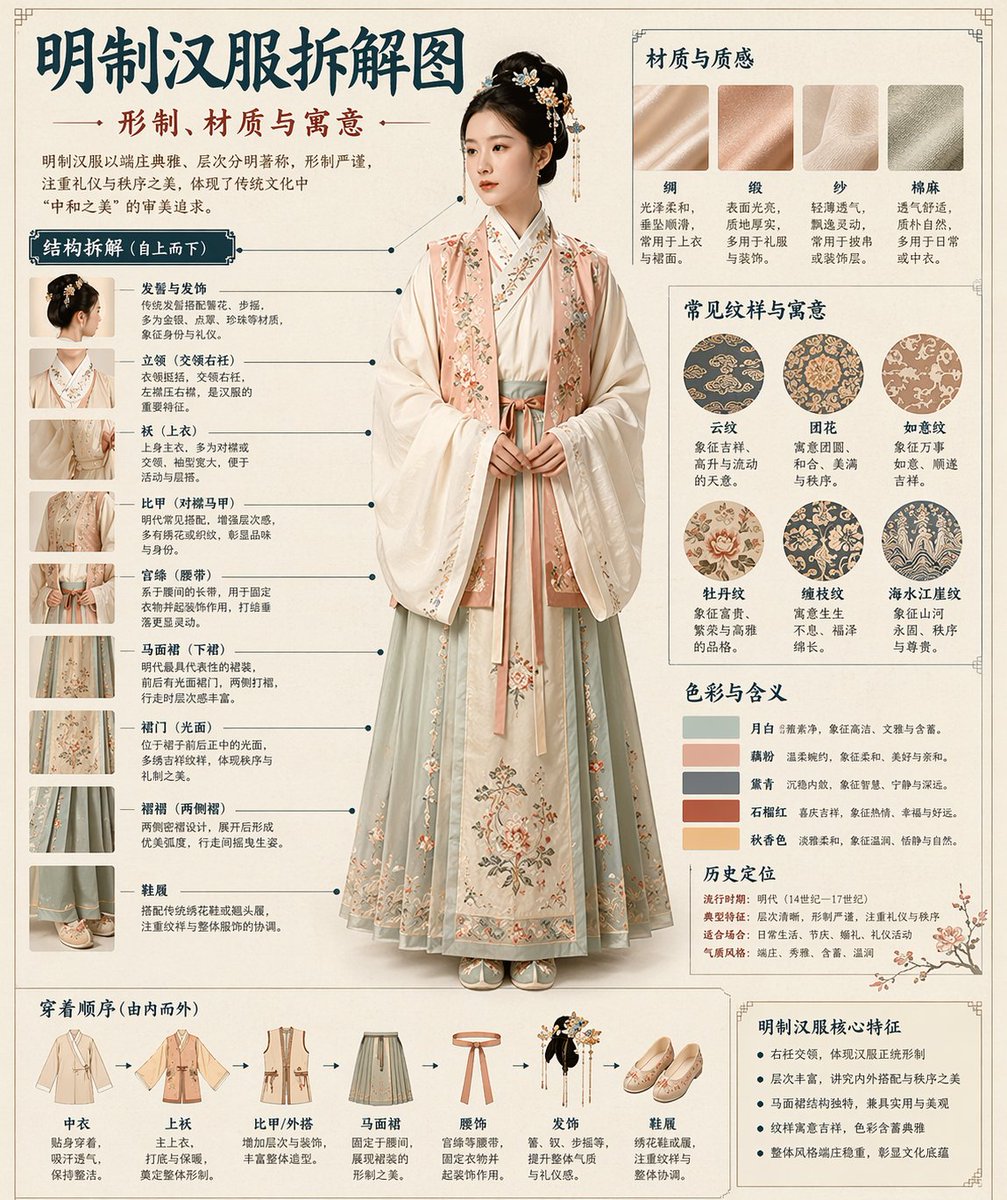
Analisi dell'infografica in stile museale
Un modello completo per la creazione di infografiche tecniche in stile museale per oggetti tradizionali come Hanfu o manufatti.
Questo è un esempio di prompt GPT Image 2 per Grafica e poster . Utilizza il prompt pronto per la copia qui sotto per generare immagini simili e verifica l'attribuzione Awesome GPT Image 2 Prompts e i diritti di utilizzo commerciale prima del riutilizzo.
Hai bisogno del set completo di prompt? Usa il Grafica e poster hub tematico per ulteriori esempi correlati oppure apri il GPT Image 2 catalogo rapido per l'indice completo degli esempi, le strutture riutilizzabili e l'attribuzione delle fonti.
Free 1K preview
Generate one preview image instantly, no sign-up required.
1788/4000
Richiesta
prompt pronto per la copia
Please automatically generate a "Museum Guide-style Chinese Breakdown Infographic" based on the [Theme: {argument name="theme" default="Hanfu"}].

Requirements: The entire image must combine a realistic main visual, structural breakdown, Chinese annotations, material descriptions, pattern meanings, color symbolism, and a summary of core features. You need to automatically determine the most suitable subject, clothing system, artifact structure, era style, key components, material craftsmanship, color scheme, and layout based on the [Theme] without further user input.

The overall style should be: National Museum exhibition board, historical clothing guide, or cultural museum special infographic, rather than a common poster, ancient-style photo, e-commerce details page, or anime illustration. The background should use paper textures like off-white, silk white, or light tea color. The overall look should be high-end, restrained, professional, and collectible.

The layout is fixed as:
- Top: Chinese main title + sub-title + introduction
- Left: Structural breakdown area with Chinese leader lines marking key components and matching close-ups
- Top Right: Material/Craftsmanship/Texture area showing real texture samples with descriptions
- Middle Right: Pattern/Color/Meaning area showing the main color palette, pattern samples, and cultural explanations
- Bottom: Wearing order / Composition flowchart + summary of core features

If the theme is suitable for person display, use a full-body standing pose of a real person as the central subject; if it's more suitable for artifacts, use a central subject breakdown, but maintain the complete Chinese infographic format. All text must be in Simplified Chinese, clear, neat, and readable without garbled characters or typos.
Variabili di richiesta
Segnaposto per gli argomenti modificabili presenti nel prompt, con i relativi valori predefiniti.
Variabile
theme
Predefinito
Hanfu
Best for
- - Grafica e poster visual exploration
- - Image generation and reference-image edits
- - Reusable briefs that keep source attribution visible
Change these parts
- - Subject, product, character, or scene
- - Aspect ratio, camera, lighting, and background
- - Brand, text, color, and output constraints
Recommended model and settings
- - Model: gpt-image-2
- - Input mode: Testo in immagine
- - Aspect ratio: source
- - Commercial status: review original source
How to use this prompt
- 1. Copy the prompt and preserve its structure for the first test.
- 2. Replace the subject, context, and publishing channel.
- 3. Change one camera, lighting, or style variable per iteration.
- 4. Inspect the output, source, text, and rights before reuse.
Limitations, source, and reuse cautions
- - Generated output is an editable draft, not factual, legal, or rights evidence.
- - Review the linked source, people, brands, logos, text, and third-party media before commercial use.
Importato da Awesome GPT Image 2 Prompts . È richiesta l'attribuzione. Lo stato di utilizzo commerciale è allowed ; verificare i diritti della fonte prima dell'utilizzo a pagamento.
Altri casi in questa categoria
Prioritizzazione in base a categoria, compatibilità della modalità di input, qualità e minor rischio.

Fashion Studio Portrait with Blue Rim Lighting
Testo in immagine

Spring Editorial Fashion Collage
Testo in immagine

Glitch Aesthetic Surreal Portrait
Testo in immagine

Pink Hijab Mirror Selfie Portrait
Testo in immagine

Android Quantum Lab Workstation
Testo in immagine

Overhead Pepperoni Pizza Photo
Testo in immagine
Note sul riutilizzo e sulla fonte
Utilizza questo prompt in tutta sicurezza dopo aver visualizzato in anteprima il caso.
- 1.Copia il prompt oppure aprilo direttamente in Dovoo tramite il pulsante di generazione.
- 2.Regola le variabili, le proporzioni e le immagini di riferimento in base alle tue esigenze.
- 3.Prima della pubblicazione o dell'utilizzo a pagamento, verificare i diritti di fonte, i requisiti di attribuzione e i rischi relativi al marchio o all'immagine.