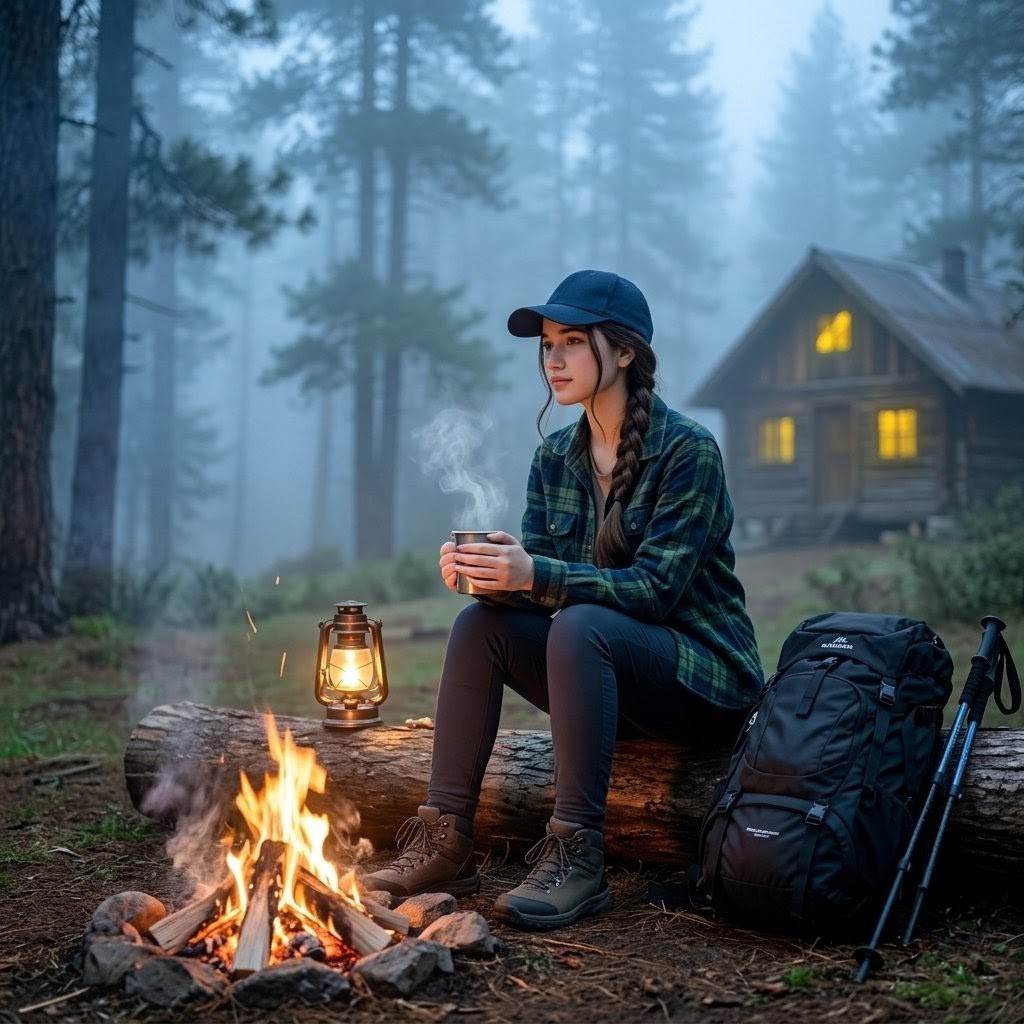
Misty Forest Camping Portrait
Generates a cinematic realistic camping portrait of a woman by a campfire in a foggy pine forest with warm cabin lights.
Questo è un esempio di prompt GPT Image 2 per Ritratto e personaggio . Utilizza il prompt pronto per la copia qui sotto per generare immagini simili e verifica l'attribuzione Awesome GPT Image 2 Prompts e i diritti di utilizzo commerciale prima del riutilizzo.
Hai bisogno del set completo di prompt? Usa il Ritratto e personaggio hub tematico per ulteriori esempi correlati oppure apri il GPT Image 2 catalogo rapido per l'indice completo degli esempi, le strutture riutilizzabili e l'attribuzione delle fonti.
Free 1K preview
Generate one preview image instantly, no sign-up required.
1610/4000
Richiesta
prompt pronto per la copia
Create a realistic cinematic square photo of {argument name="subject" default="a Pakistani woman"} camping in a misty pine forest at early morning or blue-hour dusk. She is seated on a rough fallen log beside a small campfire, holding a metal warm cup with visible steam rising, looking slightly to the left in a calm reflective pose. She wears a navy baseball cap, a green-and-blue plaid flannel overshirt, dark fitted hiking pants, gray-brown hiking boots, and her long dark hair is braided over one shoulder. In the foreground, show a compact campfire built from exactly 7 visible stones around burning logs, with orange flames, embers, and a little smoke; place exactly 1 vintage kerosene lantern glowing warmly on the log near the fire. On the right side, include exactly 1 large black hiking backpack and exactly 2 trekking poles leaning beside it. In the background, show a cozy wooden cabin with exactly 3 warm yellow lit windows, softened by fog among tall pine trees. Use shallow depth of field, cool blue misty atmosphere contrasted with warm fire and cabin light, natural forest ground with pine needles and moss, cinematic color grading, realistic textures, soft volumetric fog, 50mm documentary photography feel, no text, no watermark. Show every face clearly with natural, detailed facial features. Customize key details with {argument name="shirt color" default="green and blue plaid"}, {argument name="time of day" default="early morning or dusk"}, {argument name="setting" default="misty pine forest"}, and {argument name="background cabin" default="cozy wooden cabin with warm lit windows"}.Variabili di richiesta
Segnaposto per gli argomenti modificabili presenti nel prompt, con i relativi valori predefiniti.
Variabile
subject
Predefinito
a Pakistani woman
Variabile
shirt color
Predefinito
green and blue plaid
Variabile
time of day
Predefinito
early morning or dusk
Variabile
setting
Predefinito
misty pine forest
Variabile
background cabin
Predefinito
cozy wooden cabin with warm lit windows
Best for
- - Ritratto e personaggio visual exploration
- - Image generation and reference-image edits
- - Reusable briefs that keep source attribution visible
Change these parts
- - Subject, product, character, or scene
- - Aspect ratio, camera, lighting, and background
- - Brand, text, color, and output constraints
Recommended model and settings
- - Model: gpt-image-2
- - Input mode: Testo in immagine
- - Aspect ratio: source
- - Commercial status: review original source
How to use this prompt
- 1. Copy the prompt and preserve its structure for the first test.
- 2. Replace the subject, context, and publishing channel.
- 3. Change one camera, lighting, or style variable per iteration.
- 4. Inspect the output, source, text, and rights before reuse.
Limitations, source, and reuse cautions
- - Generated output is an editable draft, not factual, legal, or rights evidence.
- - Review the linked source, people, brands, logos, text, and third-party media before commercial use.
Importato da Awesome GPT Image 2 Prompts . È richiesta l'attribuzione. Lo stato di utilizzo commerciale è allowed ; verificare i diritti della fonte prima dell'utilizzo a pagamento.
Altri casi in questa categoria
Prioritizzazione in base a categoria, compatibilità della modalità di input, qualità e minor rischio.






Note sul riutilizzo e sulla fonte
Utilizza questo prompt in tutta sicurezza dopo aver visualizzato in anteprima il caso.
- 1.Copia il prompt oppure aprilo direttamente in Dovoo tramite il pulsante di generazione.
- 2.Regola le variabili, le proporzioni e le immagini di riferimento in base alle tue esigenze.
- 3.Prima della pubblicazione o dell'utilizzo a pagamento, verificare i diritti di fonte, i requisiti di attribuzione e i rischi relativi al marchio o all'immagine.