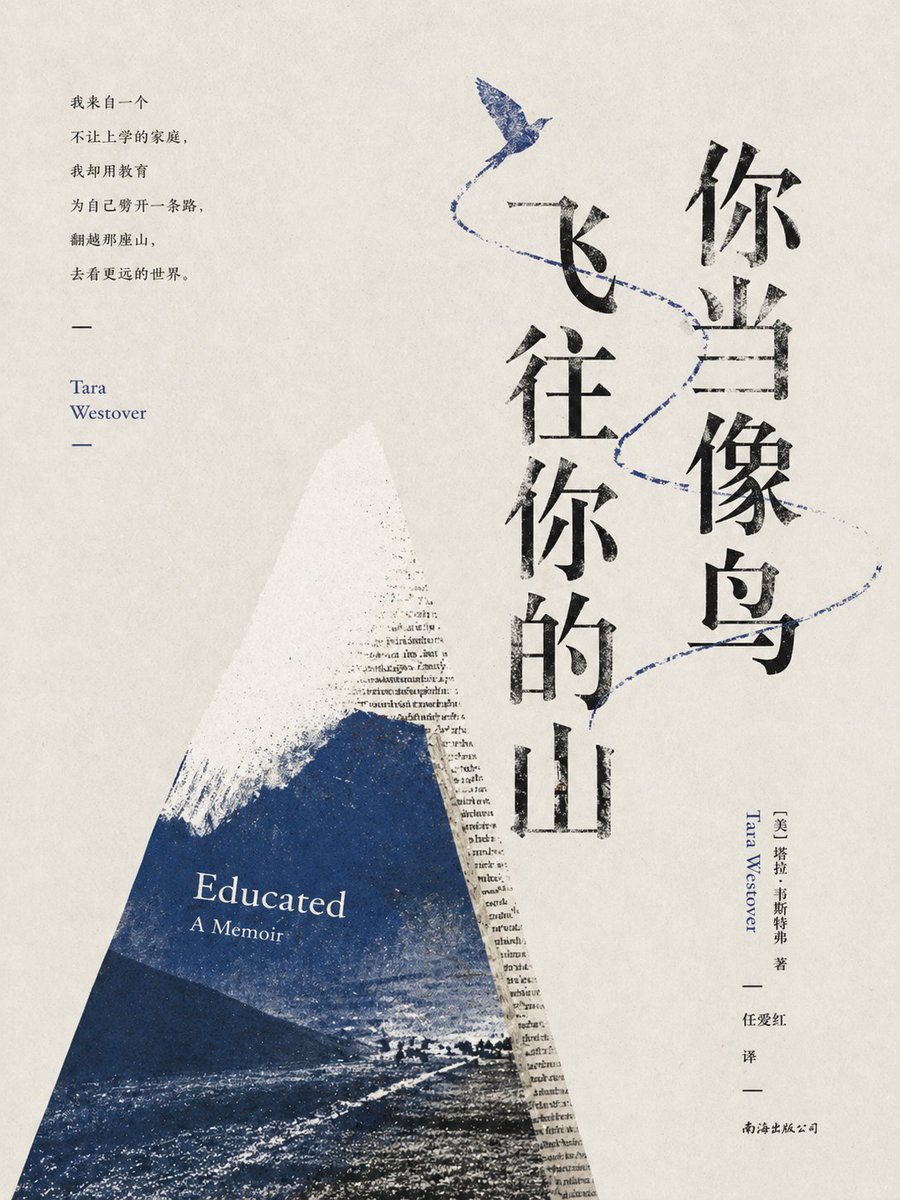
Copertina letteraria minimalista per Educated
Questo prompt genera una sofisticata copertina per un libro letterario destinato al mercato cinese, con una tipografia verticale audace, un collage di montagne blu e un motivo di uccelli, ideale per la copertina di romanzi e memorie di alta qualità.
Questo è un esempio di prompt GPT Image 2 per Grafica e poster . Utilizza il prompt pronto per la copia qui sotto per generare immagini simili e verifica l'attribuzione Awesome GPT Image 2 Prompts e i diritti di utilizzo commerciale prima del riutilizzo.
Free 1K preview
Generate one preview image instantly, no sign-up required.
Richiesta
prompt pronto per la copia
Design a refined and minimalist collage-style Chinese literary book cover, with a warm off-white textured paper background with subtle grain and a hint of age. The composition is tall and elegant, with a prominent vertical Chinese title centered on the right side, using aged black calligraphy font, reading “You should fly to your mountain,” arranged in two columns, with “You should fly” on the right and “to your mountain” on the left. Near the top center, there is a delicate indigo-blue bird, with a thin blue dashed line representing its flight path extending diagonally downwards, passing through the title and pointing to the lower right, creating a sense of ascension and freedom. A large triangular mountain shape is placed in the lower left corner, resembling torn paper collage or wedge-shaped painting, with a white snow-capped peak gradually transitioning into deep teal and navy blue textures. A faint vertical English book text is integrated into the right edge of the mountain, as if the mountain is composed of printed pages. Inside the blue mountain, the original English title is typeset in white serif font: the first line “Educated,” followed by “A Memoir.” Add a small vertical block of black Chinese quotation on the upper left side, arranged in 6 lines, followed by a long dash, then two lines of soft blue serif font for the author's name “Tara Westover,” followed by another dash. Add a slender vertical copyright notice along the lower right edge, including the author's Chinese name, followed by the blue English name “Tara Westover,” and below that, the black translator and publisher information. Maintain a spacious layout, utilizing strong negative space and asymmetrical balance to present a poetic contemporary publishing aesthetic. Use only 3 main colors: black, off-white, and indigo. The overall atmosphere should convey intellectualism, restraint, modernity, and the quality of an award-winning work, suitable for a high-end edition of {argument name="book title" default="Educated"} created by {argument name="author name" default="Tara Westover"}.Variabili di richiesta
Segnaposto per gli argomenti modificabili presenti nel prompt, con i relativi valori predefiniti.
Best for
- - Grafica e poster visual exploration
- - Image generation and reference-image edits
- - Reusable briefs that keep source attribution visible
Change these parts
- - Subject, product, character, or scene
- - Aspect ratio, camera, lighting, and background
- - Brand, text, color, and output constraints
Recommended model and settings
- - Model: gpt-image-2
- - Input mode: Testo in immagine
- - Aspect ratio: source
- - Commercial status: review original source
How to use this prompt
- 1. Copy the prompt and preserve its structure for the first test.
- 2. Replace the subject, context, and publishing channel.
- 3. Change one camera, lighting, or style variable per iteration.
- 4. Inspect the output, source, text, and rights before reuse.
Limitations, source, and reuse cautions
- - Generated output is an editable draft, not factual, legal, or rights evidence.
- - Review the linked source, people, brands, logos, text, and third-party media before commercial use.
Altri casi in questa categoria
Prioritizzazione in base a categoria, compatibilità della modalità di input, qualità e minor rischio.






Note sul riutilizzo e sulla fonte
Utilizza questo prompt in tutta sicurezza dopo aver visualizzato in anteprima il caso.
- 1.Copia il prompt oppure aprilo direttamente in Dovoo tramite il pulsante di generazione.
- 2.Regola le variabili, le proporzioni e le immagini di riferimento in base alle tue esigenze.
- 3.Prima della pubblicazione o dell'utilizzo a pagamento, verificare i diritti di fonte, i requisiti di attribuzione e i rischi relativi al marchio o all'immagine.