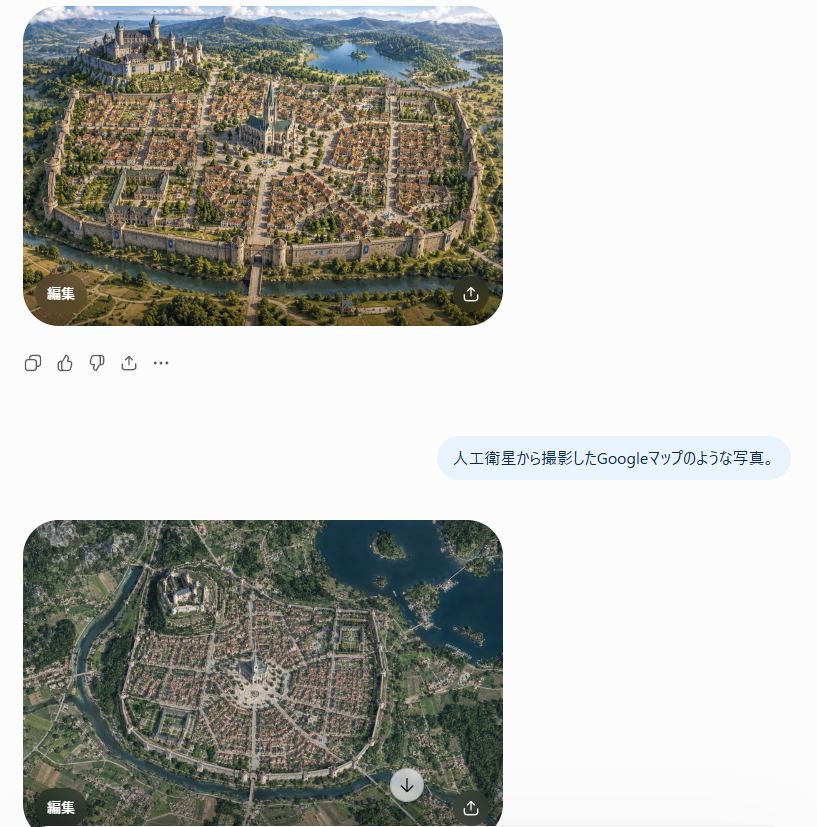
Satellite Map Medieval City
Transforms a fantasy city reference into a realistic top-down Google Maps-style satellite view for worldbuilding or concept visualization.
Questo è un esempio di prompt GPT Image 2 per Paesaggio e natura . Utilizza il prompt pronto per la copia qui sotto per generare immagini simili e verifica l'attribuzione Awesome GPT Image 2 Prompts e i diritti di utilizzo commerciale prima del riutilizzo.
Free 1K preview
Generate one preview image instantly, no sign-up required.
Free text preview doesn’t preserve reference-image consistency.
Richiesta
prompt pronto per la copia
Using REFERENCE_0 as the realistic landscape/detail base and REFERENCE_1 as the city-layout and sketch/worldbuilding reference, transform the scene into {argument name="style request" default="人工衛星から撮影したGoogleマップのような写真。"} Render it as a true vertical top-down satellite image, like a Google Maps capture, not an oblique fantasy illustration. Preserve the invented medieval city arrangement while making it look geographically real.

Keep exactly 5 major layout elements recognizable: 1) the walled oval/rounded city footprint, 2) the large castle district on the upper-left hill, 3) the central cathedral and radial plaza, 4) the lake in the upper-right/background area, and 5) the river or moat curving around the lower edge with a bridge/gate approach.

Style: photorealistic satellite imagery with natural terrain textures, muted earth colors, tiny roof grids, streets, vegetation, water, fields, and realistic atmospheric clarity. Remove the close foreground tower viewpoint from REFERENCE_0 and eliminate painterly/fantasy perspective. The result should feel like an authentic overhead map photo of {argument name="city type" default="a Central European medieval walled city"}, with believable scale and urban density.
Variabili di richiesta
Segnaposto per gli argomenti modificabili presenti nel prompt, con i relativi valori predefiniti.
Best for
- - Paesaggio e natura visual exploration
- - Image generation and reference-image edits
- - Reusable briefs that keep source attribution visible
Change these parts
- - Subject, product, character, or scene
- - Aspect ratio, camera, lighting, and background
- - Brand, text, color, and output constraints
Recommended model and settings
- - Model: gpt-image-2
- - Input mode: Immagine in immagine
- - Aspect ratio: source
- - Commercial status: review original source
How to use this prompt
- 1. Copy the prompt and preserve its structure for the first test.
- 2. Replace the subject, context, and publishing channel.
- 3. Change one camera, lighting, or style variable per iteration.
- 4. Inspect the output, source, text, and rights before reuse.
Limitations, source, and reuse cautions
- - Generated output is an editable draft, not factual, legal, or rights evidence.
- - Review the linked source, people, brands, logos, text, and third-party media before commercial use.
Altri casi in questa categoria
Prioritizzazione in base a categoria, compatibilità della modalità di input, qualità e minor rischio.






Note sul riutilizzo e sulla fonte
Utilizza questo prompt in tutta sicurezza dopo aver visualizzato in anteprima il caso.
- 1.Copia il prompt oppure aprilo direttamente in Dovoo tramite il pulsante di generazione.
- 2.Regola le variabili, le proporzioni e le immagini di riferimento in base alle tue esigenze.
- 3.Prima della pubblicazione o dell'utilizzo a pagamento, verificare i diritti di fonte, i requisiti di attribuzione e i rischi relativi al marchio o all'immagine.