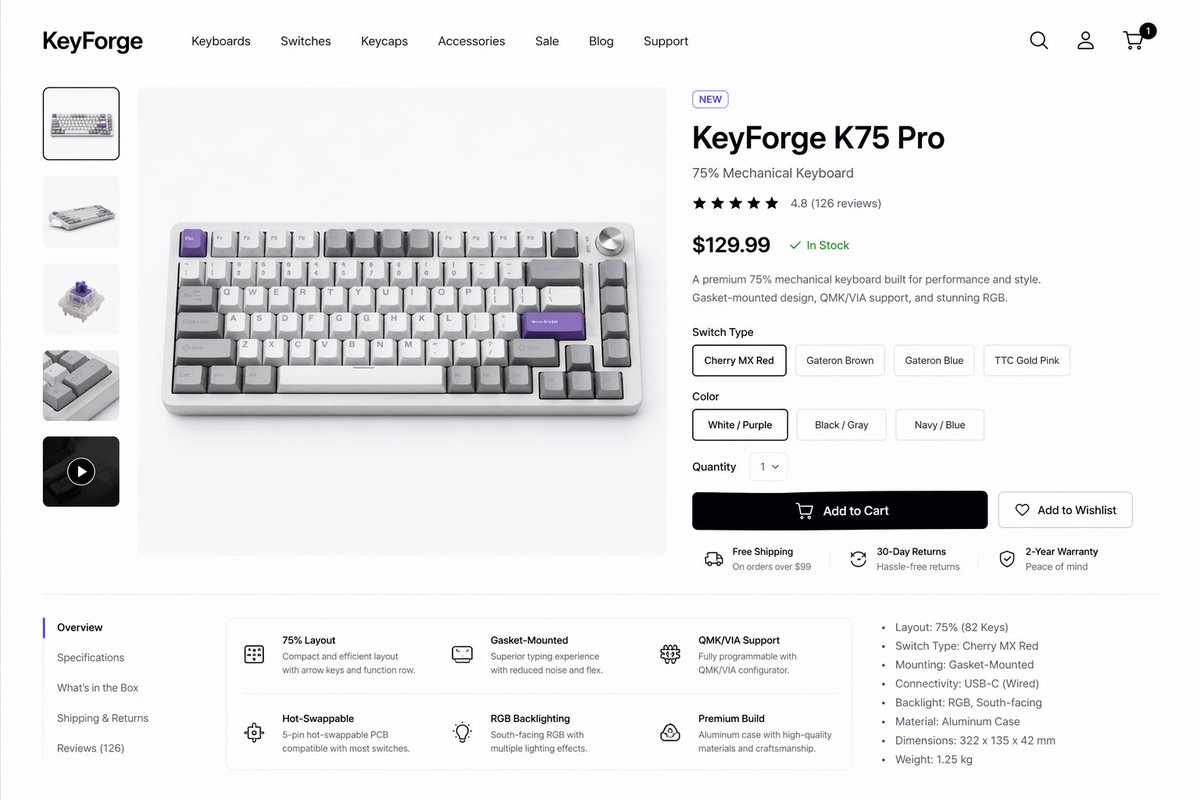
Mockup della pagina prodotto di una tastiera meccanica
Questo strumento genera una pagina prodotto e-commerce per desktop, elegante e raffinata, per una tastiera meccanica di alta gamma, ideale per presentazioni di design, concept di negozi online e mockup di interfacce utente.
Questo è un esempio di prompt GPT Image 2 per Grafica e poster . Utilizza il prompt pronto per la copia qui sotto per generare immagini simili e verifica l'attribuzione Awesome GPT Image 2 Prompts e i diritti di utilizzo commerciale prima del riutilizzo.
Free 1K preview
Generate one preview image instantly, no sign-up required.
Richiesta
prompt pronto per la copia
Create a clean modern e-commerce product detail page for a premium mechanical keyboard brand called {argument name="brand name" default="KeyForge"}, presented as a high-fidelity desktop website mockup on a white background with subtle light-gray dividers and generous spacing. The layout is a single unified storefront scene with a top navigation bar, a left product thumbnail rail, a large center product hero image, and a right-side purchase information panel. In the header, place the bold wordmark on the far left, then 7 navigation items reading “Keyboards”, “Switches”, “Keycaps”, “Accessories”, “Sale”, “Blog”, and “Support”, and on the far right 3 icons for search, account, and cart, with a small black notification badge showing “1” on the cart. The main product shown in the center is a compact 75% mechanical keyboard photographed from a slightly elevated front angle on a pale gray stage, with an aluminum case in silver, white and gray keycaps, several accent keys in lavender purple, and a silver volume knob at the top right. The left vertical gallery contains exactly 5 thumbnails: 1 selected front product shot, 1 angled keyboard view, 1 mechanical switch close-up, 1 keycap texture close-up, and 1 dark video thumbnail with a circular play icon. The right product panel includes a small pill badge reading “NEW”, a large bold product name {argument name="product name" default="KeyForge K75 Pro"}, a subtitle “75% Mechanical Keyboard”, a 5-star rating row with 4.8 and “(126 reviews)”, a large bold price {argument name="price" default="$129.99"} followed by a green “In Stock” status, and a short two-sentence description about premium performance, gasket-mounted design, QMK/VIA support, and RGB. Under that, include a “Switch Type” selector with exactly 4 pill buttons labeled “Cherry MX Red”, “Gateron Brown”, “Gateron Blue”, and “TTC Gold Pink”, with the first selected; a “Color” selector with exactly 3 pill buttons labeled “White / Purple”, “Black / Gray”, and “Navy / Blue”, with the first selected; a “Quantity” dropdown set to “1”; one large black primary button labeled “Add to Cart” with a cart icon; and one outlined secondary button labeled “Add to Wishlist” with a heart icon. Beneath the buttons, show exactly 3 horizontal service highlights with small icons: “Free Shipping” with subtext “On orders over $99”, “30-Day Returns” with subtext “Hassle-free returns”, and “2-Year Warranty” with subtext “Peace of mind”. In the lower content area, create a two-column section separated by light lines. On the left is a vertical tab list with exactly 5 items: “Overview” selected, then “Specifications”, “What’s in the Box”, “Shipping & Returns”, and “Reviews (126)”. To the right of the tabs, place a rounded white feature card grid with exactly 6 feature blocks in 2 rows of 3, each with a simple line icon, bold title, and short explanatory text: “75% Layout”, “Gasket-Mounted”, “QMK/VIA Support”, “Hot-Swappable”, “RGB Backlighting”, and “Premium Build”. On the far right of this lower area, add a specifications bullet list with exactly 7 bullets: “Layout: 75% (82 Keys)”, “Switch Type: Cherry MX Red”, “Mounting: Gasket-Mounted”, “Connectivity: USB-C (Wired)”, “Backlight: RGB, South-facing”, “Material: Aluminum Case”, and “Dimensions: 322 x 135 x 42 mm”, plus an additional final bullet “Weight: 1.25 kg”. Use a refined minimalist product-design aesthetic, realistic UI spacing, clean sans-serif typography similar to Inter or SF Pro, soft shadows, subtle rounded corners, monochrome icons, and polished startup-style consumer electronics presentation.Variabili di richiesta
Segnaposto per gli argomenti modificabili presenti nel prompt, con i relativi valori predefiniti.
Best for
- - Grafica e poster visual exploration
- - Image generation and reference-image edits
- - Reusable briefs that keep source attribution visible
Change these parts
- - Subject, product, character, or scene
- - Aspect ratio, camera, lighting, and background
- - Brand, text, color, and output constraints
Recommended model and settings
- - Model: gpt-image-2
- - Input mode: Testo in immagine
- - Aspect ratio: source
- - Commercial status: review original source
How to use this prompt
- 1. Copy the prompt and preserve its structure for the first test.
- 2. Replace the subject, context, and publishing channel.
- 3. Change one camera, lighting, or style variable per iteration.
- 4. Inspect the output, source, text, and rights before reuse.
Limitations, source, and reuse cautions
- - Generated output is an editable draft, not factual, legal, or rights evidence.
- - Review the linked source, people, brands, logos, text, and third-party media before commercial use.
Altri casi in questa categoria
Prioritizzazione in base a categoria, compatibilità della modalità di input, qualità e minor rischio.






Note sul riutilizzo e sulla fonte
Utilizza questo prompt in tutta sicurezza dopo aver visualizzato in anteprima il caso.
- 1.Copia il prompt oppure aprilo direttamente in Dovoo tramite il pulsante di generazione.
- 2.Regola le variabili, le proporzioni e le immagini di riferimento in base alle tue esigenze.
- 3.Prima della pubblicazione o dell'utilizzo a pagamento, verificare i diritti di fonte, i requisiti di attribuzione e i rischi relativi al marchio o all'immagine.