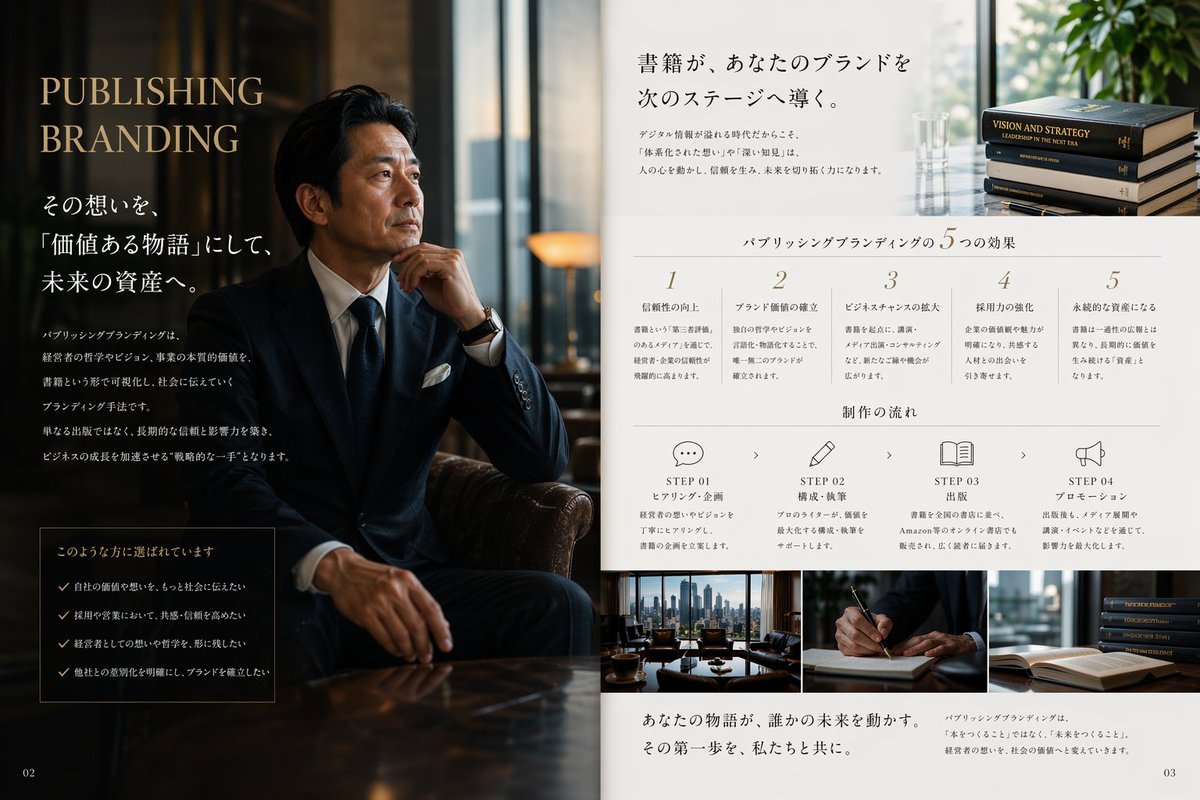
Impaginazione editoriale per il branding di case editrici di lusso.
Questo prompt genera una doppia pagina promozionale di alta qualità in stile rivista giapponese, ideale per servizi editoriali e di branding, brochure, materiale visivo per le pubbliche relazioni e marketing aziendale.
Questo è un esempio di prompt GPT Image 2 per Grafica e poster . Utilizza il prompt pronto per la copia qui sotto per generare immagini simili e verifica l'attribuzione Awesome GPT Image 2 Prompts e i diritti di utilizzo commerciale prima del riutilizzo.
Free 1K preview
Generate one preview image instantly, no sign-up required.
Richiesta
prompt pronto per la copia
Create a luxurious Japanese magazine-style PR editorial spread for a publishing and branding service, designed as a two-page brochure layout. The left half is a dark, cinematic portrait scene in a sophisticated office lounge: a seated Japanese businessman in a navy bespoke suit, white shirt, dark tie, white pocket square, and wristwatch sits in a leather chair with one hand near his chin, posed thoughtfully beside a glossy wooden table. Show every face clearly with natural, detailed facial features. The lighting is moody and warm, with reflections from tall windows and a premium executive atmosphere. On this dark left page, place large elegant serif headline text in English reading {argument name="headline text" default="PUBLISHING BRANDING"}, stacked in two lines near the upper left in muted gold. Below it, add multiple lines of Japanese copy in white, including a larger subheadline and several short body paragraphs arranged vertically. Near the lower left, include a bordered dark box containing exactly 4 checklist items, each preceded by a check mark, with Japanese text. Put a small page number "02" in the bottom-left corner. The right half is a clean white editorial information page with refined minimalist typography and generous spacing. At the top, place a large Japanese headline in black, aligned upper center-right, with two short Japanese body text blocks beneath it; on the upper far right include a small photo of exactly 4 stacked hardcover books and a glass vase near a bright window with greenery. Across the middle, add a centered section title in Japanese for five benefits, followed by exactly 5 numbered columns labeled 1 through 5, each with a short Japanese heading and several lines of smaller explanatory Japanese text. Beneath that, add another centered Japanese section title for workflow, followed by exactly 4 step blocks laid out horizontally: STEP 01 with a speech bubble icon, STEP 02 with a pencil icon, STEP 03 with an open book icon, STEP 04 with a megaphone icon. Each step includes the English word STEP plus a two-digit number, a short Japanese subtitle, and a few lines of smaller Japanese description, with small chevrons between steps. Along the bottom of the right page, place exactly 3 rectangular photos side by side: a city-view office meeting table scene, a close-up of a hand writing with a pen, and a stack of books near an open book. Under these images, add a prominent Japanese closing statement in a serif style on the lower left, and a smaller Japanese paragraph on the lower right. Put page number "03" in the bottom-right corner. Use a premium palette of deep navy, black, warm brown, ivory, and muted gold, with a balance of editorial luxury, corporate trust, and high-end publishing aesthetics. The overall composition should feel like a real magazine advertisement or consulting brochure, polished, photorealistic, elegant, and credible.Variabili di richiesta
Segnaposto per gli argomenti modificabili presenti nel prompt, con i relativi valori predefiniti.
Best for
- - Grafica e poster visual exploration
- - Image generation and reference-image edits
- - Reusable briefs that keep source attribution visible
Change these parts
- - Subject, product, character, or scene
- - Aspect ratio, camera, lighting, and background
- - Brand, text, color, and output constraints
Recommended model and settings
- - Model: gpt-image-2
- - Input mode: Testo in immagine
- - Aspect ratio: source
- - Commercial status: review original source
How to use this prompt
- 1. Copy the prompt and preserve its structure for the first test.
- 2. Replace the subject, context, and publishing channel.
- 3. Change one camera, lighting, or style variable per iteration.
- 4. Inspect the output, source, text, and rights before reuse.
Limitations, source, and reuse cautions
- - Generated output is an editable draft, not factual, legal, or rights evidence.
- - Review the linked source, people, brands, logos, text, and third-party media before commercial use.
Altri casi in questa categoria
Prioritizzazione in base a categoria, compatibilità della modalità di input, qualità e minor rischio.






Note sul riutilizzo e sulla fonte
Utilizza questo prompt in tutta sicurezza dopo aver visualizzato in anteprima il caso.
- 1.Copia il prompt oppure aprilo direttamente in Dovoo tramite il pulsante di generazione.
- 2.Regola le variabili, le proporzioni e le immagini di riferimento in base alle tue esigenze.
- 3.Prima della pubblicazione o dell'utilizzo a pagamento, verificare i diritti di fonte, i requisiti di attribuzione e i rischi relativi al marchio o all'immagine.