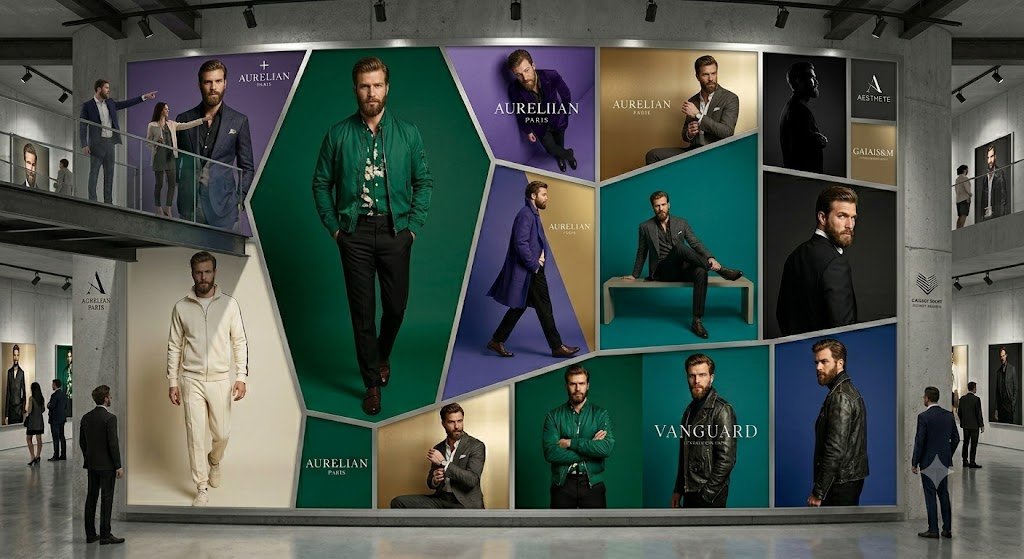
Luxury Menswear Gallery Collage
A photorealistic prompt for generating a modern gallery interior dominated by a monumental geometric luxury menswear advertising wall.
Questo è un esempio di prompt GPT Image 2 per Interni e architettura . Utilizza il prompt pronto per la copia qui sotto per generare immagini simili e verifica l'attribuzione Awesome GPT Image 2 Prompts e i diritti di utilizzo commerciale prima del riutilizzo.
Hai bisogno del set completo di prompt? Usa il Interni e architettura hub tematico per ulteriori esempi correlati oppure apri il GPT Image 2 catalogo rapido per l'indice completo degli esempi, le strutture riutilizzabili e l'attribuzione delle fonti.
Free 1K preview
Generate one preview image instantly, no sign-up required.
3034/4000
Richiesta
prompt pronto per la copia
Goal: Create a photorealistic high-end fashion exhibition interior showing an enormous wall-sized luxury menswear advertising collage inside a concrete gallery.

Canvas: Wide cinematic 16:9 image, eye-level perspective, realistic lighting, polished concrete floor with subtle reflections, industrial ceiling beams and black track lights.

Layout: A spacious modern gallery with a large central feature wall occupying most of the frame. Add upper mezzanine walkways on the left and right with glass railings, plus visitors standing and observing. The central wall is a geometric mosaic of exactly 13 fashion-ad panels separated by thick white beveled borders: 1) top-left large purple panel with a suited male model and the brand text “AURELIAN PARIS”; 2) center dominant tall emerald-green hexagonal panel with a full-body male model in a green jacket; 3) top-center purple panel with a seated male model and “AURELIAN PARIS”; 4) upper gold panel with a seated man adjusting his cuff and “AURELIAN PARIS”; 5) middle teal panel with a male model sitting on a rectangular bench; 6) upper-right black silhouette portrait panel; 7) far upper-right stacked brand panel with two small blocks, one reading “AESTHETE” and one reading “GALAISM”; 8) left lower cream panel with a man in an ivory tracksuit walking forward; 9) small lower green brand block reading “AURELIAN PARIS”; 10) lower gold panel with a man in a gray suit; 11) lower emerald panel with a man in a green jacket standing arms crossed; 12) lower teal/black panel with the large word “VANGUARD”; 13) far-right vertical blue panel with a side-profile man in a black leather jacket.

Subject details: The advertising models are adult men in upscale menswear: suits, blazers, leather jackets, knitwear, dress shoes, and one ivory athleisure outfit. Faces should be intentionally soft-blurred or featureless, while clothing and posture remain sharp. Use the main brand name {argument name="brand name" default="AURELIAN PARIS"} prominently in several panels, with a secondary headline {argument name="collection name" default="VANGUARD"} on the lower-right panel. Keep the palette elegant and editorial: emerald green, deep purple, teal, gold, cream, black, and white.

Gallery environment: Include exactly 9 visible visitors: two people on the left mezzanine, two people on the right mezzanine, one man standing near the left foreground looking at the wall, two small visitors near the left wall, and two men near the right foreground. Add smaller framed fashion posters on the side walls and minimalist brand placards on the concrete columns.

Visual style: Ultra-realistic commercial architecture visualization mixed with luxury fashion campaign photography, crisp details, soft museum lighting, premium editorial mood, no cartoon styling.

Constraints: Do not add extra readable text beyond the indicated luxury brand labels. Keep the 13-panel mosaic clear and symmetrical enough to read as a single monumental fashion installation. No watermark, no captions, no UI elements.
Variabili di richiesta
Segnaposto per gli argomenti modificabili presenti nel prompt, con i relativi valori predefiniti.
Variabile
brand name
Predefinito
AURELIAN PARIS
Variabile
collection name
Predefinito
VANGUARD
Best for
- - Interni e architettura visual exploration
- - Image generation and reference-image edits
- - Reusable briefs that keep source attribution visible
Change these parts
- - Subject, product, character, or scene
- - Aspect ratio, camera, lighting, and background
- - Brand, text, color, and output constraints
Recommended model and settings
- - Model: gpt-image-2
- - Input mode: Testo in immagine
- - Aspect ratio: source
- - Commercial status: review original source
How to use this prompt
- 1. Copy the prompt and preserve its structure for the first test.
- 2. Replace the subject, context, and publishing channel.
- 3. Change one camera, lighting, or style variable per iteration.
- 4. Inspect the output, source, text, and rights before reuse.
Limitations, source, and reuse cautions
- - Generated output is an editable draft, not factual, legal, or rights evidence.
- - Review the linked source, people, brands, logos, text, and third-party media before commercial use.
Importato da Awesome GPT Image 2 Prompts . È richiesta l'attribuzione. Lo stato di utilizzo commerciale è allowed ; verificare i diritti della fonte prima dell'utilizzo a pagamento.
Altri casi in questa categoria
Prioritizzazione in base a categoria, compatibilità della modalità di input, qualità e minor rischio.

Fashion Studio Portrait with Blue Rim Lighting
Testo in immagine

Spring Editorial Fashion Collage
Testo in immagine

New Chinese-Style Editorial Portrait
Testo in immagine

Transparent Earbuds on Stone Pedestal
Testo in immagine

Pink Hijab Mirror Selfie Portrait
Testo in immagine

Greyscale Puzzle Portrait with Color Accent
Testo in immagine
Note sul riutilizzo e sulla fonte
Utilizza questo prompt in tutta sicurezza dopo aver visualizzato in anteprima il caso.
- 1.Copia il prompt oppure aprilo direttamente in Dovoo tramite il pulsante di generazione.
- 2.Regola le variabili, le proporzioni e le immagini di riferimento in base alle tue esigenze.
- 3.Prima della pubblicazione o dell'utilizzo a pagamento, verificare i diritti di fonte, i requisiti di attribuzione e i rischi relativi al marchio o all'immagine.