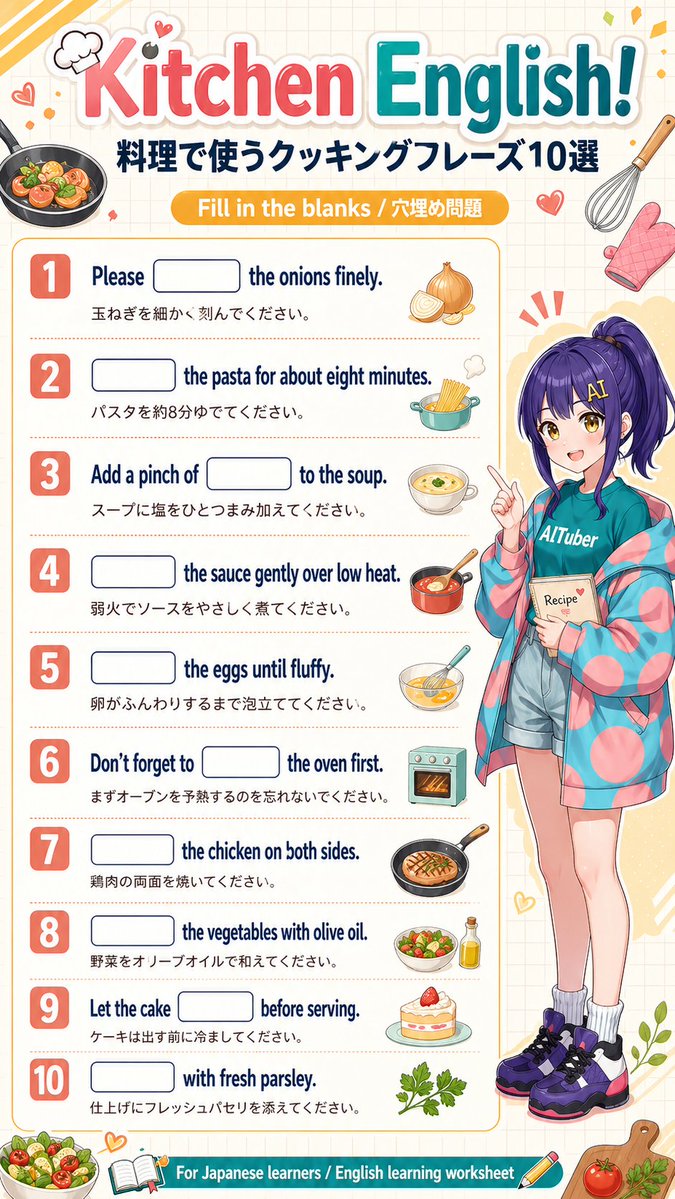
Poster con foglio di lavoro da completare in inglese per la cucina
Un colorato poster educativo in stile anime per chi impara il giapponese, con 10 frasi in inglese da completare relative alla cucina, con traduzione in giapponese e un simpatico personaggio tutor.
Questo è un esempio di prompt GPT Image 2 per Grafica e poster . Utilizza il prompt pronto per la copia qui sotto per generare immagini simili e verifica l'attribuzione Awesome GPT Image 2 Prompts e i diritti di utilizzo commerciale prima del riutilizzo.
Hai bisogno del set completo di prompt? Usa il Grafica e poster hub tematico per ulteriori esempi correlati oppure apri il GPT Image 2 catalogo rapido per l'indice completo degli esempi, le strutture riutilizzabili e l'attribuzione delle fonti.
Free 1K preview
Generate one preview image instantly, no sign-up required.
4000/4000
Richiesta
prompt pronto per la copia
{
  "type": "educational worksheet poster",
  "topic": "cooking English fill-in-the-blank worksheet for Japanese learners",
  "style": "bright cute anime classroom handout, clean vertical poster, friendly study-material design, soft cream grid-paper background, colorful sticker-like decorations, crisp printable layout",
  "language": "English with Japanese translations",
  "format": "single-page infographic worksheet",
  "canvas": {
    "orientation": "portrait",
    "aspect_ratio": "approximately 2:3",
    "background": "warm off-white with faint square grid"
  },
  "header": {
    "title": "{argument name=\"headline text\" default=\"Kitchen English!\"}",
    "subtitle": "料理で使うクッキングフレーズ10選",
    "banner": "Fill in the blanks / 穴埋め問題",
    "title_style": "large playful rounded lettering, 'Kitchen' in pink-red gradient, 'English!' in teal gradient, thick white outline and soft drop shadow"
  },
  "layout": {
    "sections": [
      {
        "title": "worksheet questions",
        "position": "left and center main column",
        "count": 10,
        "labels": [
          "1",
          "2",
          "3",
          "4",
          "5",
          "6",
          "7",
          "8",
          "9",
          "10"
        ]
      },
      {
        "title": "character panel",
        "position": "right side full height",
        "count": 1,
        "labels": [
          "anime tutor character"
        ]
      },
      {
        "title": "footer banner",
        "position": "bottom full width",
        "count": 1,
        "labels": [
          "For Japanese learners / English learning worksheet"
        ]
      }
    ],
    "question_rows": 10
  },
  "questions": [
    {
      "number": 1,
      "english": "Please [blank] the onions finely.",
      "japanese": "玉ねぎを細かく刻んでください。",
      "icon": "1 onion, partially sliced"
    },
    {
      "number": 2,
      "english": "[blank] the pasta for about eight minutes.",
      "japanese": "パスタを約8分ゆでてください。",
      "icon": "1 cooking pot with spaghetti"
    },
    {
      "number": 3,
      "english": "Add a pinch of [blank] to the soup.",
      "japanese": "スープに塩をひとつまみ加えてください。",
      "icon": "1 bowl of soup"
    },
    {
      "number": 4,
      "english": "[blank] the sauce gently over low heat.",
      "japanese": "弱火でソースをやさしく煮てください。",
      "icon": "1 saucepan with sauce and spoon"
    },
    {
      "number": 5,
      "english": "[blank] the eggs until fluffy.",
      "japanese": "卵がふんわりするまで泡立ててください。",
      "icon": "1 mixing bowl with whisked eggs"
    },
    {
      "number": 6,
      "english": "Don't forget to [blank] the oven first.",
      "japanese": "まずオーブンを予熱するのを忘れないでください。",
      "icon": "1 small oven"
    },
    {
      "number": 7,
      "english": "[blank] the chicken on both sides.",
      "japanese": "鶏肉の両面を焼いてください。",
      "icon": "1 frying pan with grilled chicken"
    },
    {
      "number": 8,
      "english": "[blank] the vegetables with olive oil.",
      "japanese": "野菜をオリーブオイルで和えてください。",
      "icon": "1 salad bowl and 1 olive oil bottle"
    },
    {
      "number": 9,
      "english": "Let the cake [blank] before serving.",
      "japanese": "ケーキは出す前に冷ましてください。",
      "icon": "1 slice of strawberry cake on a plate"
    },
    {
      "number": 10,
      "english": "[blank] with fresh parsley.",
      "japanese": "仕上げにフレッシュパセリを添えてください。",
      "icon": "1 parsley sprig"
    }
  ],
  "character": {
    "count": 1,
    "description": "full-body anime girl teacher standing on the right, youthful adult, long deep purple hair in a high ponytail with bangs, cheerful pose pointing upward with one finger, holding a small recipe notebook in the other hand",
    "outfit_count": 6,
    "outfit": [
      "teal T-shirt with the word '{argument name=\"shirt text\" default=\"AITuber\"}'",
      "oversized pastel jacket with pink and teal circular pattern",
      "light denim shorts",
      "white scrunched socks",
      "chunky purple black and white sneakers",
      "small recipe book labeled '{argument name=\"book text\" default=\"Recipe\"}'"
    ],
    "expression": "friendly enthusiastic tutor vibe"
  },
  "decorations": {
    "count": 15,
    "items": [
      "1 frying pan with vegetables at top left",
      "1 chef hat doodle",
      "2 small heart doodles near top left",
      "1 whisk at top right",
      "1 pink oven mitt",
      "1 small red heart near header right",
      "3 radiating emphasis marks behind character head",
      "1 bowl of salad at bottom left",
      "1 open book icon at bottom center-left",
      "1 pencil icon at bottom center-right",
      "1 cutting board at bottom right",
      "1 tomato on cutting board",
      "1 herb sprig on cutting board",
      "1 leafy plant accent near lower right edge"
    ]
  },
  "color_palette": {
    "primary": [
      "coral pink",
      "teal blue",
      "golden yellow",
      "navy",
      "cream"
    ],
    "accents": [
      "purple",
      "mint",
      "orange",
      "leaf green"
    ]
  },
  "rendering": "high-resolution polished educational poster, cute commercial workbook aesthetic, balanced spacing, rounded boxes for answer blanks, bold numbered badges, soft shadows, glossy sticker-like food illustrations"
}
Variabili di richiesta
Segnaposto per gli argomenti modificabili presenti nel prompt, con i relativi valori predefiniti.
Variabile
headline text
Predefinito
Kitchen English!
Variabile
shirt text
Predefinito
AITuber
Variabile
book text
Predefinito
Recipe
Best for
- - Grafica e poster visual exploration
- - Image generation and reference-image edits
- - Reusable briefs that keep source attribution visible
Change these parts
- - Subject, product, character, or scene
- - Aspect ratio, camera, lighting, and background
- - Brand, text, color, and output constraints
Recommended model and settings
- - Model: gpt-image-2
- - Input mode: Testo in immagine
- - Aspect ratio: source
- - Commercial status: review original source
How to use this prompt
- 1. Copy the prompt and preserve its structure for the first test.
- 2. Replace the subject, context, and publishing channel.
- 3. Change one camera, lighting, or style variable per iteration.
- 4. Inspect the output, source, text, and rights before reuse.
Limitations, source, and reuse cautions
- - Generated output is an editable draft, not factual, legal, or rights evidence.
- - Review the linked source, people, brands, logos, text, and third-party media before commercial use.
Importato da Awesome GPT Image 2 Prompts . È richiesta l'attribuzione. Lo stato di utilizzo commerciale è allowed ; verificare i diritti della fonte prima dell'utilizzo a pagamento.
Altri casi in questa categoria
Prioritizzazione in base a categoria, compatibilità della modalità di input, qualità e minor rischio.

Grumpy Rhino Storybook Illustration
Testo in immagine

Manga Desert Radio Telescope Road Trip
Testo in immagine

Martial Arts Legend Character Bible Sheet
Testo in immagine

Android Quantum Lab Workstation
Testo in immagine

Y2K Style Photo Booth Collage
Testo in immagine

Surreal 3D Chess Match Artwork
Testo in immagine
Note sul riutilizzo e sulla fonte
Utilizza questo prompt in tutta sicurezza dopo aver visualizzato in anteprima il caso.
- 1.Copia il prompt oppure aprilo direttamente in Dovoo tramite il pulsante di generazione.
- 2.Regola le variabili, le proporzioni e le immagini di riferimento in base alle tue esigenze.
- 3.Prima della pubblicazione o dell'utilizzo a pagamento, verificare i diritti di fonte, i requisiti di attribuzione e i rischi relativi al marchio o all'immagine.