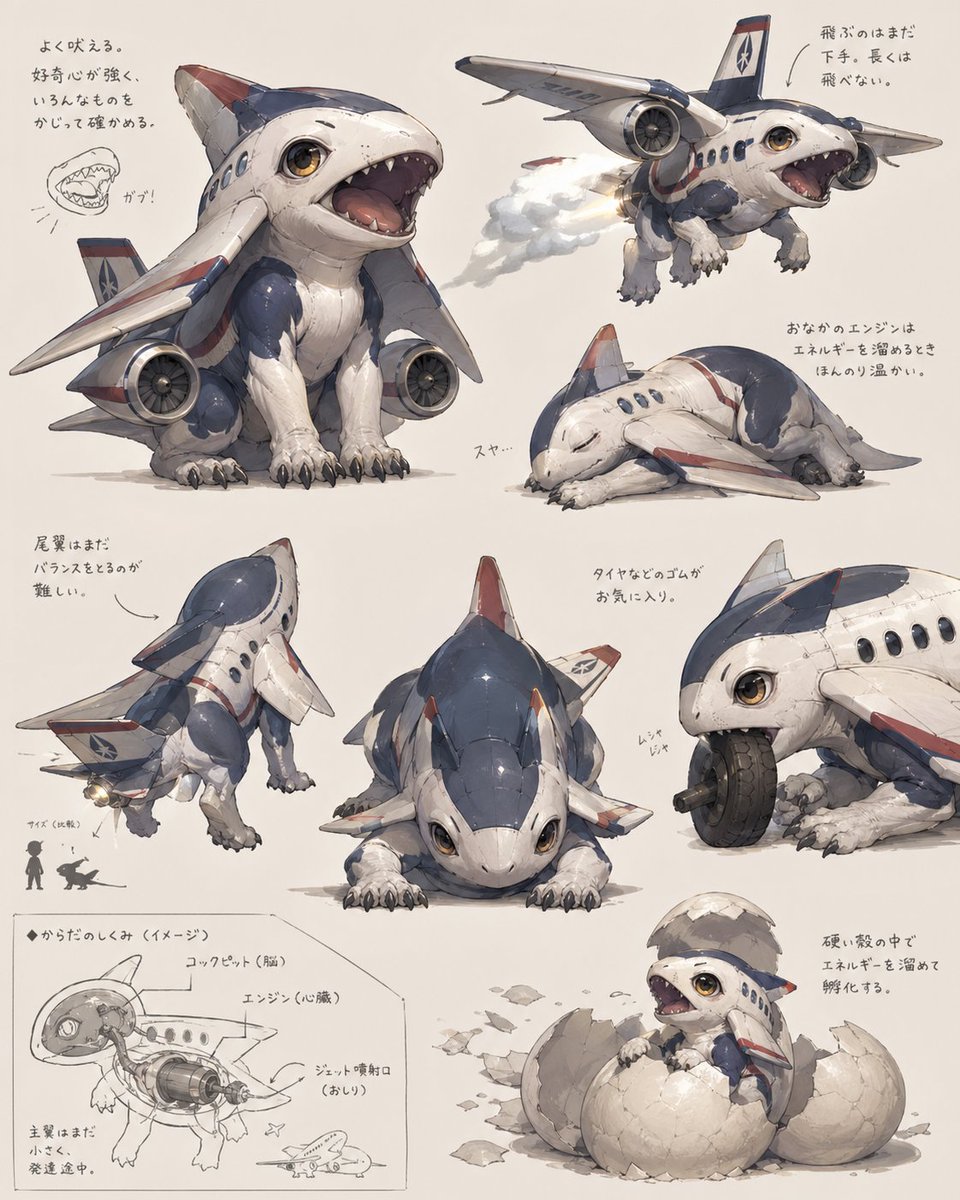
Foglio delle creature di un cucciolo di aereo a reazione
Un foglio di concept art rifinito che mostra un simpatico ibrido aereo-animale da 8 angoli e studi, ideale per la progettazione di creature, la creazione di mondi o visualizzazioni fantasy industriali fantasiose.
Questo è un esempio di prompt GPT Image 2 per Anime e videogiochi . Utilizza il prompt pronto per la copia qui sotto per generare immagini simili e verifica l'attribuzione Awesome GPT Image 2 Prompts e i diritti di utilizzo commerciale prima del riutilizzo.
Hai bisogno del set completo di prompt? Usa il Anime e videogiochi hub tematico per ulteriori esempi correlati oppure apri il GPT Image 2 catalogo rapido per l'indice completo degli esempi, le strutture riutilizzabili e l'attribuzione delle fonti.
Free 1K preview
Generate one preview image instantly, no sign-up required.
3580/4000
Richiesta
prompt pronto per la copia
{
  "type": "concept art creature sheet",
  "subject": {
    "category": "inorganic animal creature hybrid",
    "theme": "a cute baby shark-dog fused with a passenger jet airplane",
    "style": "detailed Japanese concept art on an off-white sketchbook background, painterly industrial design illustration, soft shadows, slightly worn surface textures, believable mechanical-organic fusion, adorable but functional creature design",
    "color_palette": {
      "primary": "white fuselage body",
      "secondary": "navy blue upper panels",
      "accent": "muted red striping and fin tips",
      "details": "warm amber eyes, gray claws, metallic engine parts"
    },
    "design": {
      "head": "rounded shark-like airplane nose with large glossy eyes and a wide open mouth full of small triangular teeth",
      "body": "compact puppy-like quadruped body with soft belly and aircraft fuselage shell",
      "wings": "2 short airplane wings attached as forelimb-side fins",
      "engines": "2 visible jet engines mounted low at the sides of the body",
      "tail": "vertical tail fin and small rear stabilizer surfaces",
      "legs": "4 animal legs with fluffy fur texture and dark claws",
      "surface_details": "panel seams, rivets, passenger windows, airline insignia, weathering scuffs"
    }
  },
  "layout": {
    "background": "plain warm ivory paper",
    "sections": [
      {
        "title": "main pose",
        "position": "upper left",
        "count": 1,
        "labels": [
          "front three-quarter sitting pose with mouth open"
        ]
      },
      {
        "title": "flying pose",
        "position": "upper right",
        "count": 1,
        "labels": [
          "airborne view with engine exhaust"
        ]
      },
      {
        "title": "sleeping pose",
        "position": "right center",
        "count": 1,
        "labels": [
          "curled up asleep"
        ]
      },
      {
        "title": "rear view",
        "position": "lower left",
        "count": 1,
        "labels": [
          "back three-quarter standing pose"
        ]
      },
      {
        "title": "front low pose",
        "position": "lower center",
        "count": 1,
        "labels": [
          "crouched front view"
        ]
      },
      {
        "title": "wheel chewing detail",
        "position": "lower right upper",
        "count": 1,
        "labels": [
          "close-up biting and playing with a tire"
        ]
      },
      {
        "title": "cross-section diagram",
        "position": "bottom left corner",
        "count": 1,
        "labels": [
          "internal anatomy sketch with labeled engine and cockpit"
        ]
      },
      {
        "title": "hatching pose",
        "position": "bottom right corner",
        "count": 1,
        "labels": [
          "baby creature emerging from a cracked egg"
        ]
      }
    ],
    "total_views": 8,
    "extra_elements": {
      "small_mouth_sketches": 1,
      "size_comparison_icons": 2,
      "handwritten_note_groups": 7
    }
  },
  "text": {
    "language": "Japanese handwritten annotations scattered near each drawing",
    "include_text": true,
    "text_density": "light notes around the poses and technical diagram"
  },
  "composition": "arrange all 8 drawings like a creature design reference sheet with generous spacing, asymmetrical but balanced layout, the largest view in the upper left and smaller supporting studies around it",
  "quality": "highly polished concept illustration for creature ideation, whimsical aerospace biology aesthetic"
}
Best for
- - Anime e videogiochi visual exploration
- - Image generation and reference-image edits
- - Reusable briefs that keep source attribution visible
Change these parts
- - Subject, product, character, or scene
- - Aspect ratio, camera, lighting, and background
- - Brand, text, color, and output constraints
Recommended model and settings
- - Model: gpt-image-2
- - Input mode: Testo in immagine
- - Aspect ratio: source
- - Commercial status: review original source
How to use this prompt
- 1. Copy the prompt and preserve its structure for the first test.
- 2. Replace the subject, context, and publishing channel.
- 3. Change one camera, lighting, or style variable per iteration.
- 4. Inspect the output, source, text, and rights before reuse.
Limitations, source, and reuse cautions
- - Generated output is an editable draft, not factual, legal, or rights evidence.
- - Review the linked source, people, brands, logos, text, and third-party media before commercial use.
Importato da Awesome GPT Image 2 Prompts . È richiesta l'attribuzione. Lo stato di utilizzo commerciale è allowed ; verificare i diritti della fonte prima dell'utilizzo a pagamento.
Altri casi in questa categoria
Prioritizzazione in base a categoria, compatibilità della modalità di input, qualità e minor rischio.

Manga Desert Radio Telescope Road Trip
Testo in immagine

Grumpy Rhino Storybook Illustration
Testo in immagine

Martial Arts Legend Character Bible Sheet
Testo in immagine

Female Clown Cyborg Portrait
Testo in immagine

Greyscale Puzzle Portrait with Color Accent
Testo in immagine

Glitch Aesthetic Surreal Portrait
Testo in immagine
Note sul riutilizzo e sulla fonte
Utilizza questo prompt in tutta sicurezza dopo aver visualizzato in anteprima il caso.
- 1.Copia il prompt oppure aprilo direttamente in Dovoo tramite il pulsante di generazione.
- 2.Regola le variabili, le proporzioni e le immagini di riferimento in base alle tue esigenze.
- 3.Prima della pubblicazione o dell'utilizzo a pagamento, verificare i diritti di fonte, i requisiti di attribuzione e i rischi relativi al marchio o all'immagine.