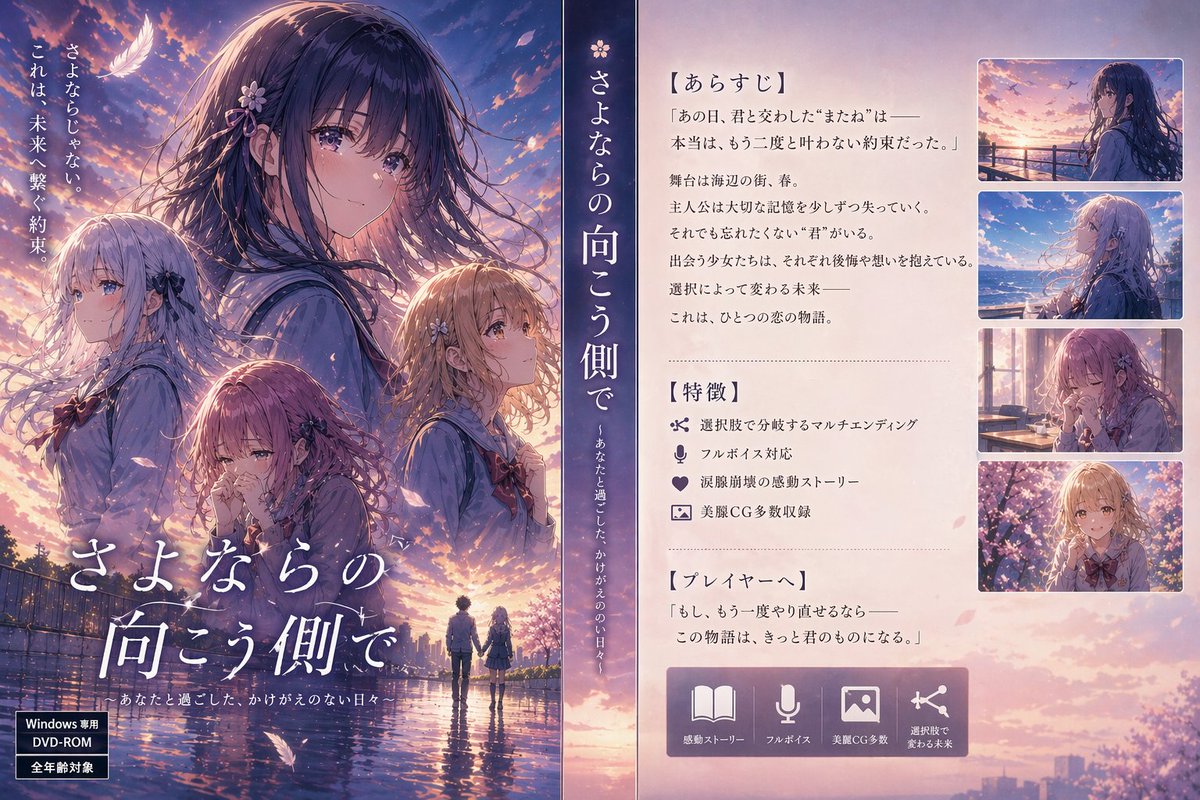
Poster promozionale della visual novel giapponese
Un poster pubblicitario per un gioco gal in stile anime, curato nei minimi dettagli, che combina un'immagine chiave di grande impatto con un pannello sinossi, icone delle funzionalità e anteprime di screenshot sovrapposte, ideale per il marketing di visual novel.
Questo è un esempio di prompt GPT Image 2 per Anime e videogiochi . Utilizza il prompt pronto per la copia qui sotto per generare immagini simili e verifica l'attribuzione Awesome GPT Image 2 Prompts e i diritti di utilizzo commerciale prima del riutilizzo.
Free 1K preview
Generate one preview image instantly, no sign-up required.
Richiesta
prompt pronto per la copia
Create a Japanese bishoujo game promotional poster in the style of a premium visual novel box cover and store page composite. The image is split into three vertical areas. The left two-thirds is a dramatic illustrated key visual at sunset: a dreamy spring sky filled with pink and violet clouds, glowing rim light, drifting petals, and a reflective wet road or riverside path. Show 4 anime girls in school uniforms, all with soft emotional expressions and highly detailed hair moving in the wind. The largest girl is centered upper-left, shown from the chest up in profile or three-quarter view, with long dark hair and a small flower hair ornament, looking wistful. A second girl stands at lower-left with very light silver hair and a ribbon accessory, turned slightly away. A third girl is at lower center, smaller, with mauve or reddish-brown hair and a bowed, melancholy pose. A fourth girl is at mid-right, blonde or light brown-haired, facing upward with a hopeful expression. At the very bottom center of the key art, show 2 tiny full-body silhouettes of a boy and girl holding hands in the glowing distance, reflected in the wet ground. Add a white feather near the upper-left and scattered cherry blossom petals throughout. Overlay elegant Japanese title typography in large white brush-like serif lettering near the bottom-left to center: 「{argument name="title text" default="さよならの向こう側で"}」, with a smaller subtitle line beneath it. Along the far left edge, place 3 vertical lines of small Japanese catchphrase text in white. In the bottom-left corner, add 2 stacked black product labels with white text like a PC game package badge, one reading Windows compatible and one reading all ages.

The center is a narrow dark indigo vertical band separating the art from the info panel. On this band, place the game title again vertically in large white Japanese characters, with a smaller vertical tagline beneath it. Keep this band clean and elegant, like the spine of a game box.

The right third is a soft cream-colored information panel with a gentle paper texture. At top-left of this panel, add a bold Japanese heading in brackets: 「【あらすじ】」 followed by several lines of Japanese synopsis text laid out like a visual novel description page. Below that, add a dotted or dashed divider line. Then add a second bracketed heading: 「【特徴】」 with 4 feature bullets, each preceded by a simple icon. The 4 features are: branching choices, full voice support, tearjerking emotional story, and many beautiful CGs. Use small dark blue-gray icons and text. Add another divider line, then a third bracketed heading: 「【プレイヤーへ】」 followed by 2 short lines of Japanese message text.

On the far right side of the cream panel, stack 4 rounded-rectangle screenshot thumbnails vertically, each with thin white borders. Thumbnail 1: the dark-haired heroine by a seaside railing at sunset. Thumbnail 2: a pale-haired heroine with windblown hair against a bright blue ocean. Thumbnail 3: a girl indoors by a sunlit classroom or café window, warm and contemplative. Thumbnail 4: a girl surrounded by cherry blossoms in soft pink light. At the bottom of the cream panel, place a wide rounded lavender feature bar containing 4 large icons with short Japanese labels beneath or beside them: an open book, a microphone, an image/photo symbol, and a branching path/share-like icon. The overall mood should be nostalgic, romantic, cinematic, and emotionally overwhelming, like a high-budget Japanese gal game advertisement from the 2000s to 2010s. Use polished anime illustration, luminous backlighting, rich pastel sunset colors, glossy reflections, detailed typography, and authentic visual novel promo design.
Variabili di richiesta
Segnaposto per gli argomenti modificabili presenti nel prompt, con i relativi valori predefiniti.
Best for
- - Anime e videogiochi visual exploration
- - Image generation and reference-image edits
- - Reusable briefs that keep source attribution visible
Change these parts
- - Subject, product, character, or scene
- - Aspect ratio, camera, lighting, and background
- - Brand, text, color, and output constraints
Recommended model and settings
- - Model: gpt-image-2
- - Input mode: Testo in immagine
- - Aspect ratio: source
- - Commercial status: review original source
How to use this prompt
- 1. Copy the prompt and preserve its structure for the first test.
- 2. Replace the subject, context, and publishing channel.
- 3. Change one camera, lighting, or style variable per iteration.
- 4. Inspect the output, source, text, and rights before reuse.
Limitations, source, and reuse cautions
- - Generated output is an editable draft, not factual, legal, or rights evidence.
- - Review the linked source, people, brands, logos, text, and third-party media before commercial use.
Altri casi in questa categoria
Prioritizzazione in base a categoria, compatibilità della modalità di input, qualità e minor rischio.






Note sul riutilizzo e sulla fonte
Utilizza questo prompt in tutta sicurezza dopo aver visualizzato in anteprima il caso.
- 1.Copia il prompt oppure aprilo direttamente in Dovoo tramite il pulsante di generazione.
- 2.Regola le variabili, le proporzioni e le immagini di riferimento in base alle tue esigenze.
- 3.Prima della pubblicazione o dell'utilizzo a pagamento, verificare i diritti di fonte, i requisiti di attribuzione e i rischi relativi al marchio o all'immagine.