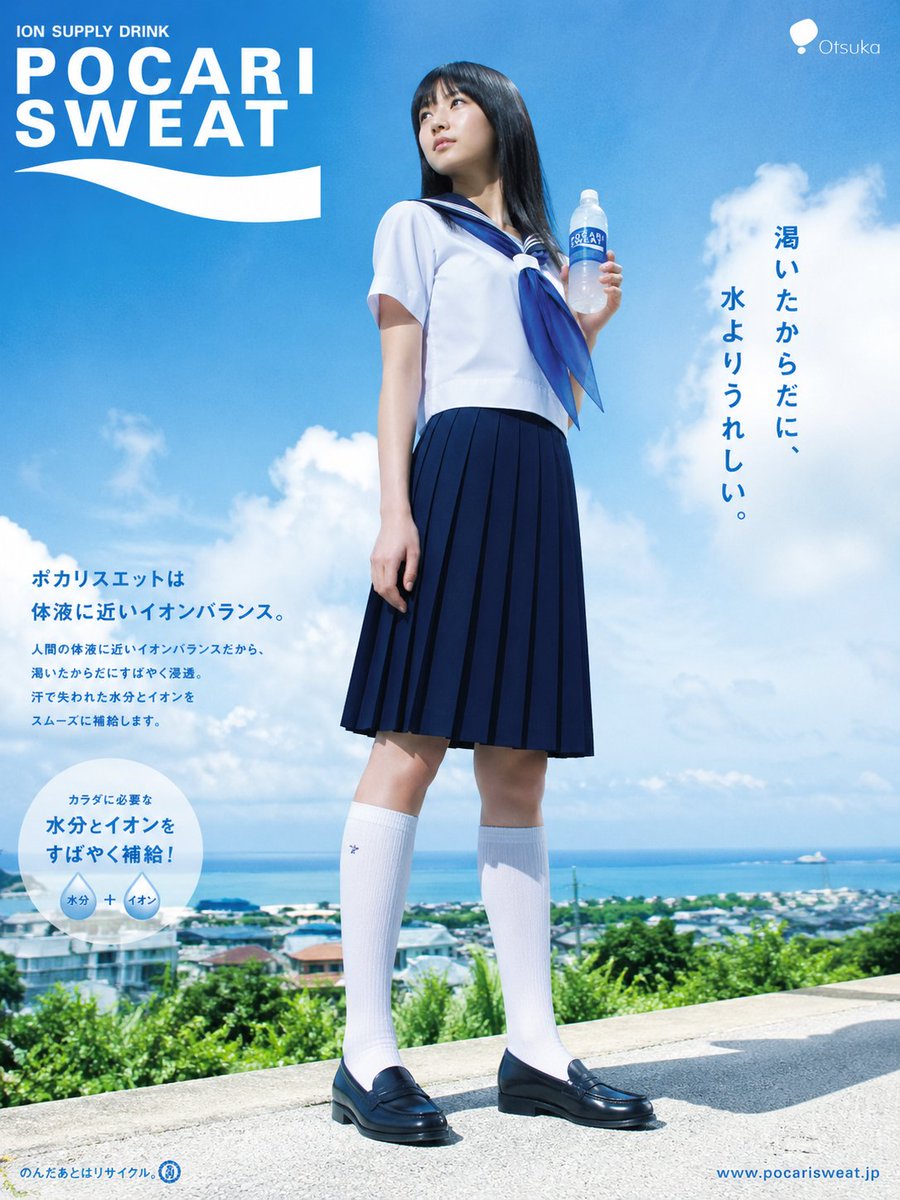
Locandina giapponese di una bevanda sportiva estiva.
Un poster pubblicitario realistico in stile giapponese per una bevanda, raffigurante una studentessa in uniforme da marinaretta sullo sfondo di un cielo costiero luminoso, ideale come sfondo per il desktop o per prototipi di campagne pubblicitarie.
Questo è un esempio di prompt GPT Image 2 per Prodotto e commerciale . Utilizza il prompt pronto per la copia qui sotto per generare immagini simili e verifica l'attribuzione Awesome GPT Image 2 Prompts e i diritti di utilizzo commerciale prima del riutilizzo.
Free 1K preview
Generate one preview image instantly, no sign-up required.
Richiesta
prompt pronto per la copia
A photorealistic Japanese summer beverage advertisement poster in a tall vertical layout, designed like an official sports drink campaign. Show a full-body teenage schoolgirl standing outdoors on a sunny hilltop road overlooking a coastal town and the ocean under a vivid blue sky with large white clouds. She is centered slightly left, posed confidently with one leg relaxed, looking off into the distance, holding a clear plastic bottle of {argument name="drink brand" default="POCARI SWEAT"} in her right hand near shoulder height. She wears a classic Japanese sailor school uniform: 1 white short-sleeve sailor blouse, 1 navy sailor collar with white stripes, 1 large navy neckerchief bow, 1 navy pleated skirt to the knees, 2 white knee-high socks, and 2 dark navy or black loafers. Her hair is long, straight, and black with a glossy sheen. Bright midday lighting, crisp shadows, fresh clean atmosphere, high realism, commercial poster finish.

Use a strong brand-forward composition. In the top left, place a large bold white logo reading "ION SUPPLY DRINK" above oversized {argument name="main logo text" default="POCARI SWEAT"} with a white wave shape beneath it. In the top right, add a small white corporate mark and the text {argument name="company name" default="Otsuka"}. On the right side, set a vertical Japanese headline in dark blue reading {argument name="headline text" default="渇いたからだに、水よりうれしい。"}. In the lower left, add a Japanese body copy block in blue, including a larger subheading and several smaller lines of explanatory text, styled like authentic ad copy. Near that text, include 1 white circular information badge with blue Japanese text and 2 small inner circles labeled "水分" and "イオン" joined by a plus sign. At the very bottom left, add small blue recycling-related fine print and iconography; at the bottom right, add the website URL {argument name="website" default="www.pocarisweat.jp"}. Make the overall design feel like a believable premium Japanese poster for a refreshing ion supply drink, suitable as a desktop wallpaper.
Variabili di richiesta
Segnaposto per gli argomenti modificabili presenti nel prompt, con i relativi valori predefiniti.
Best for
- - Prodotto e commerciale visual exploration
- - Image generation and reference-image edits
- - Reusable briefs that keep source attribution visible
Change these parts
- - Subject, product, character, or scene
- - Aspect ratio, camera, lighting, and background
- - Brand, text, color, and output constraints
Recommended model and settings
- - Model: gpt-image-2
- - Input mode: Testo in immagine
- - Aspect ratio: source
- - Commercial status: review original source
How to use this prompt
- 1. Copy the prompt and preserve its structure for the first test.
- 2. Replace the subject, context, and publishing channel.
- 3. Change one camera, lighting, or style variable per iteration.
- 4. Inspect the output, source, text, and rights before reuse.
Limitations, source, and reuse cautions
- - Generated output is an editable draft, not factual, legal, or rights evidence.
- - Review the linked source, people, brands, logos, text, and third-party media before commercial use.
Altri casi in questa categoria
Prioritizzazione in base a categoria, compatibilità della modalità di input, qualità e minor rischio.






Note sul riutilizzo e sulla fonte
Utilizza questo prompt in tutta sicurezza dopo aver visualizzato in anteprima il caso.
- 1.Copia il prompt oppure aprilo direttamente in Dovoo tramite il pulsante di generazione.
- 2.Regola le variabili, le proporzioni e le immagini di riferimento in base alle tue esigenze.
- 3.Prima della pubblicazione o dell'utilizzo a pagamento, verificare i diritti di fonte, i requisiti di attribuzione e i rischi relativi al marchio o all'immagine.