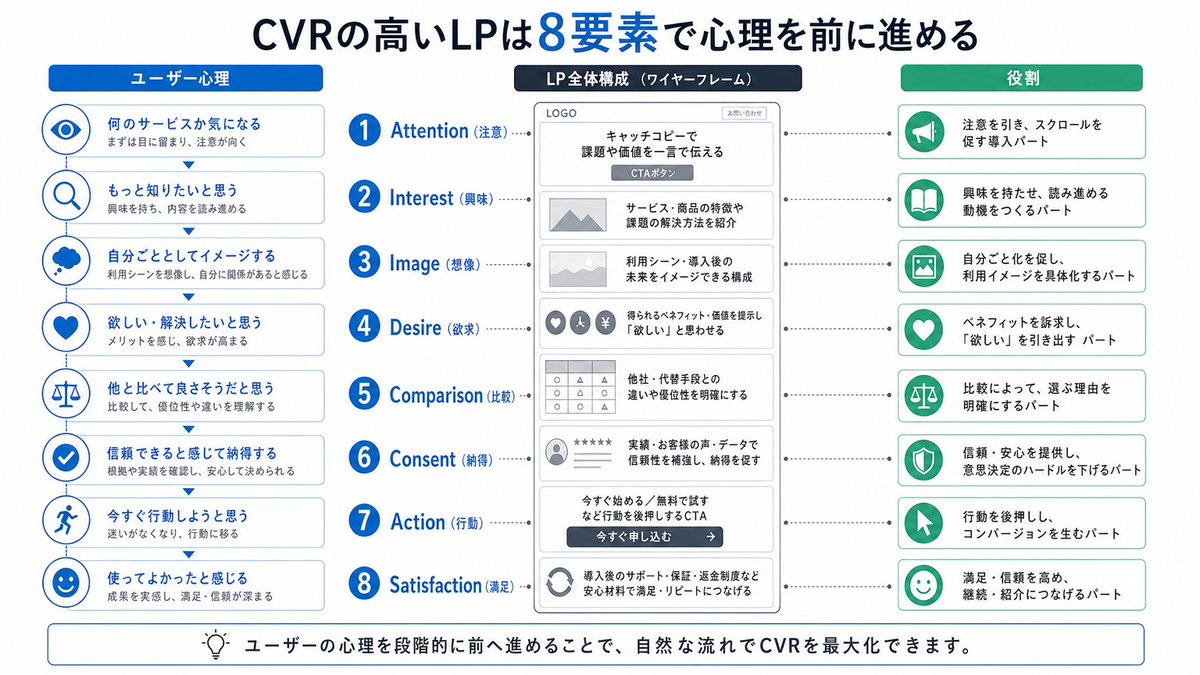
Infografica giapponese sulla psicologia LP in 8 fasi
Un'infografica didattica giapponese chiara e intuitiva che mostra la struttura di una landing page in 8 fasi, in linea con la psicologia dell'utente, ideale per manuali di marketing, presentazioni e corsi di formazione sulla conversione delle landing page.
Questo è un esempio di prompt GPT Image 2 per Grafica e poster . Utilizza il prompt pronto per la copia qui sotto per generare immagini simili e verifica l'attribuzione Awesome GPT Image 2 Prompts e i diritti di utilizzo commerciale prima del riutilizzo.
Free 1K preview
Generate one preview image instantly, no sign-up required.
Richiesta
prompt pronto per la copia
{
  "type": "Japanese marketing infographic",
  "topic": "high-converting landing page structure guided by user psychology",
  "style": {
    "look": "clean flat business infographic",
    "palette": {
      "primary": "blue",
      "secondary": "green",
      "neutral": "white and light gray",
      "accent": "dark navy headline with one highlighted blue numeral"
    },
    "background": "plain white",
    "lines": "thin gray connectors and borders",
    "icons": "simple circular line icons in blue and green",
    "aspect_ratio": "16:9 landscape"
  },
  "headline": {
    "text": "CVRの高いLPは{argument name=\"number of elements\" default=\"8\"}要素で心理を前に進める",
    "position": "top center",
    "emphasis": "the numeral is large and bright blue"
  },
  "layout": {
    "columns": 3,
    "sections": [
      {
        "title": "ユーザー心理",
        "position": "left column",
        "count": 8,
        "items": [
          {
            "index": 1,
            "icon": "eye",
            "label": "何のサービスか気になる",
            "subtext": "まずは目に留まり、注意が向く"
          },
          {
            "index": 2,
            "icon": "magnifying glass",
            "label": "もっと知りたいと思う",
            "subtext": "興味を持ち、内容を読み進める"
          },
          {
            "index": 3,
            "icon": "thought cloud",
            "label": "自分ごととしてイメージする",
            "subtext": "利用シーンを想像し、自分に関係があると感じる"
          },
          {
            "index": 4,
            "icon": "heart",
            "label": "欲しい・解決したいと思う",
            "subtext": "メリットを感じ、欲求が高まる"
          },
          {
            "index": 5,
            "icon": "balance scale",
            "label": "他と比べて良さそうだと思う",
            "subtext": "比較して、優位性や違いを理解する"
          },
          {
            "index": 6,
            "icon": "check mark badge",
            "label": "信頼できると感じて納得する",
            "subtext": "根拠や実績を確認し、安心して決められる"
          },
          {
            "index": 7,
            "icon": "running person",
            "label": "今すぐ行動しようと思う",
            "subtext": "迷いがなくなり、行動に移る"
          },
          {
            "index": 8,
            "icon": "smiling face",
            "label": "使ってよかったと感じる",
            "subtext": "成果を実感し、満足・信頼が深まる"
          }
        ]
      },
      {
        "title": "LP全体構成(ワイヤーフレーム)",
        "position": "center column",
        "count": 8,
        "items": [
          {
            "index": 1,
            "label": "Attention (Note)",
            "wireframe": "logo at top, main hero block with headline and CTA button",
            "text": "キャッチコピーで課題や価値を一言で伝える"
          },
          {
            "index": 2,
            "label": "Interest (Interest)",
            "wireframe": "image placeholder and text block",
            "text": "サービス・商品の特徴や課題の解決方法を紹介"
          },
          {
            "index": 3,
            "label": "Image (Imagination)",
            "wireframe": "wide image placeholder",
            "text": "利用シーン・導入後の未来をイメージできる構成"
          },
          {
            "index": 4,
            "label": "Desire (Desire)",
            "wireframe": "three small circular icons and text",
            "text": "得られるベネフィット/価値を提示し『欲しい』と思わせる"
          },
          {
            "index": 5,
            "label": "Comparison (Comparison)",
            "wireframe": "comparison table grid",
            "text": "他社・代替手段との違いや優位性を明確にする"
          },
          {
            "index": 6,
            "label": "Consent (Recognition)",
            "wireframe": "star rating, avatar, testimonial lines",
            "text": "実績・お客様の声・データで信頼性を補強し、納得を促す"
          },
          {
            "index": 7,
            "label": "Action (Action)",
            "wireframe": "large CTA area with dark button",
            "text": "今すぐ始める/無料で試すなど行動を後押しするCTA"
          },
          {
            "index": 8,
            "label": "Satisfaction (Satisfaction)",
            "wireframe": "circular arrow support icon and text",
            "text": "導入後のサポート・保証・返金制度など安心材料で満足・リピートにつなげる"
          }
        ],
        "extra_labels": [
          "LOGO",
          "CTAボタン",
          "今すぐ申し込む"
        ]
      },
      {
        "title": "Role",
        "position": "right column",
        "count": 8,
        "items": [
          {
            "index": 1,
            "icon": "megaphone",
            "text": "注意を引き、スクロールを促す導入パート"
          },
          {
            "index": 2,
            "icon": "open book",
            "text": "興味を持たせ、読み進める動機をつくるパート"
          },
          {
            "index": 3,
            "icon": "picture frame",
            "text": "自分ごと化を促し、利用イメージを具体化するパート"
          },
          {
            "index": 4,
            "icon": "heart",
            "text": "ベネフィットを訴求し、『欲しい』を引き出すパート"
          },
          {
            "index": 5,
            "icon": "balance scale",
            "text": "比較によって、選ぶ理由を明確にするパート"
          },
          {
            "index": 6,
            "icon": "shield",
            "text": "信頼・安心を提供し、意思決定のハードルを下げるパート"
          },
          {
            "index": 7,
            "icon": "cursor arrow",
            "text": "行動を後押しし、コンバージョンを生むパート"
          },
          {
            "index": 8,
            "icon": "smile face",
            "text": "満足・信頼を高め、継続・紹介につなげるパート"
          }
        ]
      }
    ],
    "connectors": "dotted horizontal guide lines connect each of the 8 center stages to matching items in the left and right columns; small downward arrows connect stacked cards in the left column"
  },
  "footer": {
    "style": "rounded rectangular note bar with light background and thin blue outline",
    "icon": "light bulb",
    "text": "ユーザーの心理を段階的に前へ進めることで、自然な流れでCVRを最大化できます。"
  },
  "composition": "top headline, three evenly spaced vertical columns beneath it, eight aligned horizontal rows across the page, symmetrical educational slide design for a landing page optimization manual",
  "quality": "sharp vector text, presentation-slide clarity, polished corporate training material"
}
Variabili di richiesta
Segnaposto per gli argomenti modificabili presenti nel prompt, con i relativi valori predefiniti.
Best for
- - Grafica e poster visual exploration
- - Image generation and reference-image edits
- - Reusable briefs that keep source attribution visible
Change these parts
- - Subject, product, character, or scene
- - Aspect ratio, camera, lighting, and background
- - Brand, text, color, and output constraints
Recommended model and settings
- - Model: gpt-image-2
- - Input mode: Testo in immagine
- - Aspect ratio: source
- - Commercial status: review original source
How to use this prompt
- 1. Copy the prompt and preserve its structure for the first test.
- 2. Replace the subject, context, and publishing channel.
- 3. Change one camera, lighting, or style variable per iteration.
- 4. Inspect the output, source, text, and rights before reuse.
Limitations, source, and reuse cautions
- - Generated output is an editable draft, not factual, legal, or rights evidence.
- - Review the linked source, people, brands, logos, text, and third-party media before commercial use.
Altri casi in questa categoria
Prioritizzazione in base a categoria, compatibilità della modalità di input, qualità e minor rischio.






Note sul riutilizzo e sulla fonte
Utilizza questo prompt in tutta sicurezza dopo aver visualizzato in anteprima il caso.
- 1.Copia il prompt oppure aprilo direttamente in Dovoo tramite il pulsante di generazione.
- 2.Regola le variabili, le proporzioni e le immagini di riferimento in base alle tue esigenze.
- 3.Prima della pubblicazione o dell'utilizzo a pagamento, verificare i diritti di fonte, i requisiti di attribuzione e i rischi relativi al marchio o all'immagine.