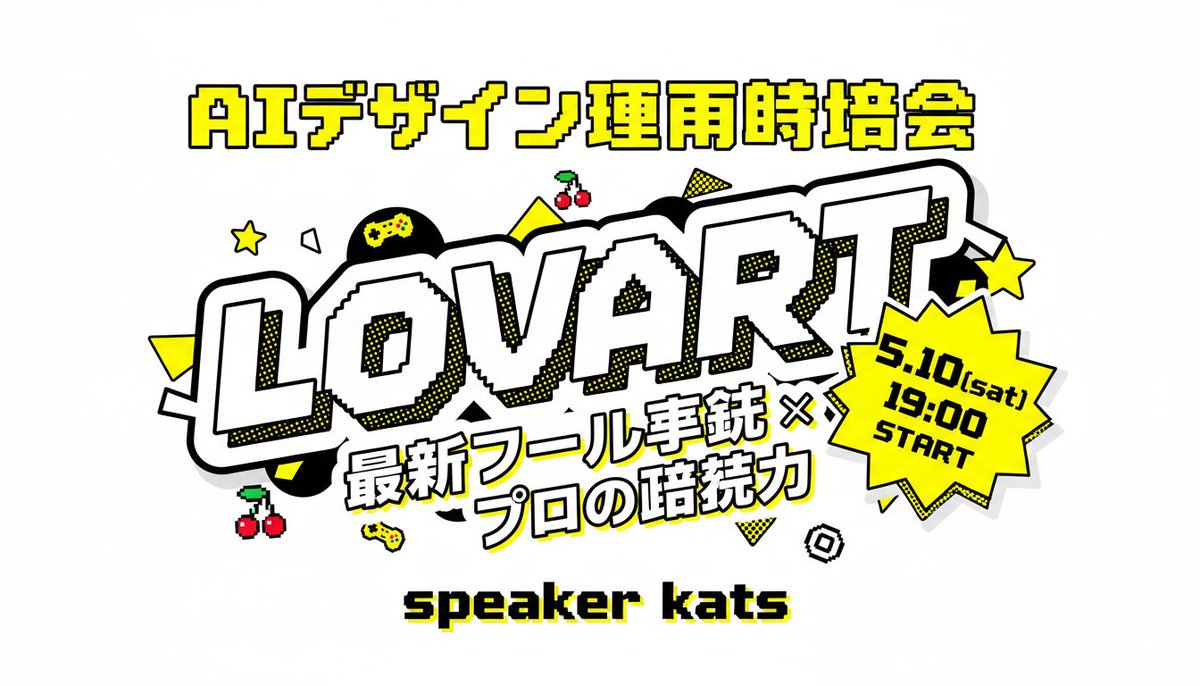
Locandina per un evento a tema Loveart giapponese in stile retrò
Un audace poster in miniatura in stile arcade giapponese per eventi, con testo grande e leggibile, icone di gioco e un layout promozionale in stile pop-art, ideale per annunci sui social media.
Questo è un esempio di prompt GPT Image 2 per Grafica e poster . Utilizza il prompt pronto per la copia qui sotto per generare immagini simili e verifica l'attribuzione Awesome GPT Image 2 Prompts e i diritti di utilizzo commerciale prima del riutilizzo.
Hai bisogno del set completo di prompt? Usa il Grafica e poster hub tematico per ulteriori esempi correlati oppure apri il GPT Image 2 catalogo rapido per l'indice completo degli esempi, le strutture riutilizzabili e l'attribuzione delle fonti.
Free 1K preview
Generate one preview image instantly, no sign-up required.
1455/4000
Richiesta
prompt pronto per la copia
A bold Japanese event thumbnail poster on a light gray background in a retro arcade pop-art style. Center the composition around a huge diagonal wordmark reading “LOVART” in oversized white block letters with thick black outline, chunky 3D feel, subtle pixel-stepped inner edges, and yellow halftone shadow accents. Above it, place one line of large Japanese header text in bright yellow with black outline: “AIデザイン運用時培会”. Below the main wordmark, add a two-line Japanese subtitle in heavy white lettering with black outline and slight tilt: “最新ツール実銃 ×” on the first line and “プロの暗続力” on the second line. At the lower center, place a pixel-style black text label with a yellow drop shadow reading “speaker kats”. On the right side overlapping the main logo, add a bright yellow jagged starburst badge with thick black outline containing 3 stacked lines of black text: “5.10(sat)”, “19:00”, “START”. Decorate the layout with exactly 12 playful gaming-style accent icons and shapes scattered around the logo: 2 yellow five-point stars, 2 pairs of red cherries with green stems, 2 small yellow game controllers, 1 black circle with a yellow gamepad symbol inside, 2 solid yellow triangles, 1 yellow dotted triangle, 1 white outlined polygon, and 1 small black-and-white spiral square. Use a high-contrast palette of yellow, black, white, and light gray, with thick outlines, sticker-like layering, comic halftone dots, and crisp readable Japanese typography.
Best for
- - Grafica e poster visual exploration
- - Image generation and reference-image edits
- - Reusable briefs that keep source attribution visible
Change these parts
- - Subject, product, character, or scene
- - Aspect ratio, camera, lighting, and background
- - Brand, text, color, and output constraints
Recommended model and settings
- - Model: gpt-image-2
- - Input mode: Testo in immagine
- - Aspect ratio: source
- - Commercial status: review original source
How to use this prompt
- 1. Copy the prompt and preserve its structure for the first test.
- 2. Replace the subject, context, and publishing channel.
- 3. Change one camera, lighting, or style variable per iteration.
- 4. Inspect the output, source, text, and rights before reuse.
Limitations, source, and reuse cautions
- - Generated output is an editable draft, not factual, legal, or rights evidence.
- - Review the linked source, people, brands, logos, text, and third-party media before commercial use.
Importato da Awesome GPT Image 2 Prompts . È richiesta l'attribuzione. Lo stato di utilizzo commerciale è allowed ; verificare i diritti della fonte prima dell'utilizzo a pagamento.
Altri casi in questa categoria
Prioritizzazione in base a categoria, compatibilità della modalità di input, qualità e minor rischio.

Grumpy Rhino Storybook Illustration
Testo in immagine

Martial Arts Legend Character Bible Sheet
Testo in immagine

Manga Desert Radio Telescope Road Trip
Testo in immagine

Spring Editorial Fashion Collage
Testo in immagine

Pink Hijab Mirror Selfie Portrait
Testo in immagine

Android Quantum Lab Workstation
Testo in immagine
Note sul riutilizzo e sulla fonte
Utilizza questo prompt in tutta sicurezza dopo aver visualizzato in anteprima il caso.
- 1.Copia il prompt oppure aprilo direttamente in Dovoo tramite il pulsante di generazione.
- 2.Regola le variabili, le proporzioni e le immagini di riferimento in base alle tue esigenze.
- 3.Prima della pubblicazione o dell'utilizzo a pagamento, verificare i diritti di fonte, i requisiti di attribuzione e i rischi relativi al marchio o all'immagine.