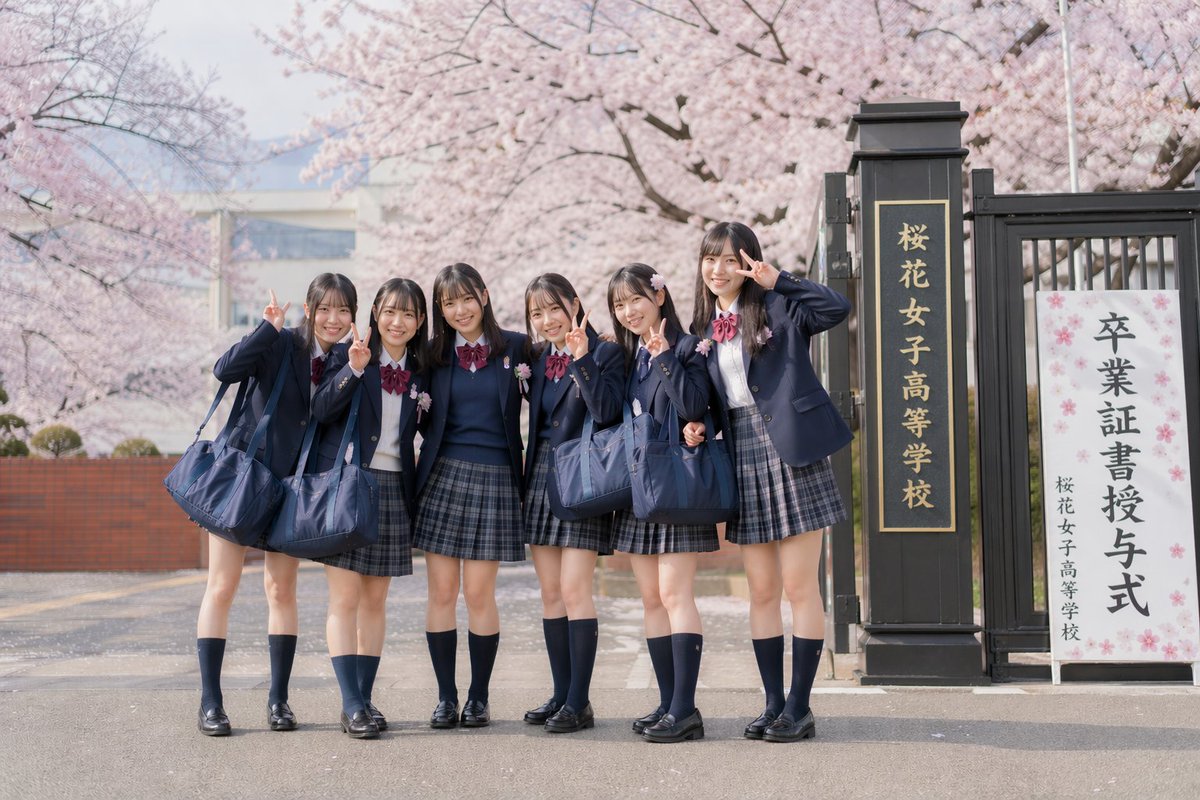
Foto di laurea giapponese sotto i ciliegi in fiore
Questo spunto genera un ritratto di gruppo realistico e nostalgico di 6 studentesse giapponesi in uniforme che posano con il segno della pace all'ingresso di una scuola addobbata con fiori di ciliegio in occasione della cerimonia di diploma.
Questo è un esempio di prompt GPT Image 2 per Ritratto e personaggio . Utilizza il prompt pronto per la copia qui sotto per generare immagini simili e verifica l'attribuzione Awesome GPT Image 2 Prompts e i diritti di utilizzo commerciale prima del riutilizzo.
Hai bisogno del set completo di prompt? Usa il Ritratto e personaggio hub tematico per ulteriori esempi correlati oppure apri il GPT Image 2 catalogo rapido per l'indice completo degli esempi, le strutture riutilizzabili e l'attribuzione delle fonti.
Free 1K preview
Generate one preview image instantly, no sign-up required.
1588/4000
Richiesta
prompt pronto per la copia
A soft, realistic Japanese graduation day photo in a retro film photography style, depicting 6 teenage girls standing outdoors with blooming cherry blossoms and the school gate in the background. They are wearing uniform Japanese high school attire: navy blue blazer jackets, white shirts, burgundy ribbons, gray-blue plaid pleated skirts, navy blue knee-high socks, and black loafers, each carrying a large navy blue school bag. The group of students stands closely together on the road in front of the school gate, with relaxed and cheerful body language, presenting a casual class photo feel. At least 5 of the girls are making the peace sign (scissor hand gesture) next to their faces, and the girl furthest to the right is raising her hand in a playful salute. Emphasize natural, slender leg lines, neat dark straight hair with soft bangs, youthful styling, and realistic proportions. The composition is a front-facing full-body shot, with the students slightly to the left and the school gate on the right. The scene includes a tall black gatepost with vertical golden Japanese characters reading “桜花女子高等学校” (Sakura Girls' High School), and next to it stands a white ceremonial sign with the prominent Japanese text “卒業証書授与式” (Graduation Ceremony) and the smaller school name below. The background features blooming pale pink cherry blossom trees, a shallow depth of field, soft pastel tones, a light spring haze, bright daylight on an overcast day, fine film grain, and soft contrast, creating a subdued and nostalgic atmosphere reminiscent of an old-fashioned commemorative photo.
Best for
- - Ritratto e personaggio visual exploration
- - Image generation and reference-image edits
- - Reusable briefs that keep source attribution visible
Change these parts
- - Subject, product, character, or scene
- - Aspect ratio, camera, lighting, and background
- - Brand, text, color, and output constraints
Recommended model and settings
- - Model: gpt-image-2
- - Input mode: Testo in immagine
- - Aspect ratio: source
- - Commercial status: review original source
How to use this prompt
- 1. Copy the prompt and preserve its structure for the first test.
- 2. Replace the subject, context, and publishing channel.
- 3. Change one camera, lighting, or style variable per iteration.
- 4. Inspect the output, source, text, and rights before reuse.
Limitations, source, and reuse cautions
- - Generated output is an editable draft, not factual, legal, or rights evidence.
- - Review the linked source, people, brands, logos, text, and third-party media before commercial use.
Importato da Awesome GPT Image 2 Prompts . È richiesta l'attribuzione. Lo stato di utilizzo commerciale è allowed ; verificare i diritti della fonte prima dell'utilizzo a pagamento.
Altri casi in questa categoria
Prioritizzazione in base a categoria, compatibilità della modalità di input, qualità e minor rischio.






Note sul riutilizzo e sulla fonte
Utilizza questo prompt in tutta sicurezza dopo aver visualizzato in anteprima il caso.
- 1.Copia il prompt oppure aprilo direttamente in Dovoo tramite il pulsante di generazione.
- 2.Regola le variabili, le proporzioni e le immagini di riferimento in base alle tue esigenze.
- 3.Prima della pubblicazione o dell'utilizzo a pagamento, verificare i diritti di fonte, i requisiti di attribuzione e i rischi relativi al marchio o all'immagine.