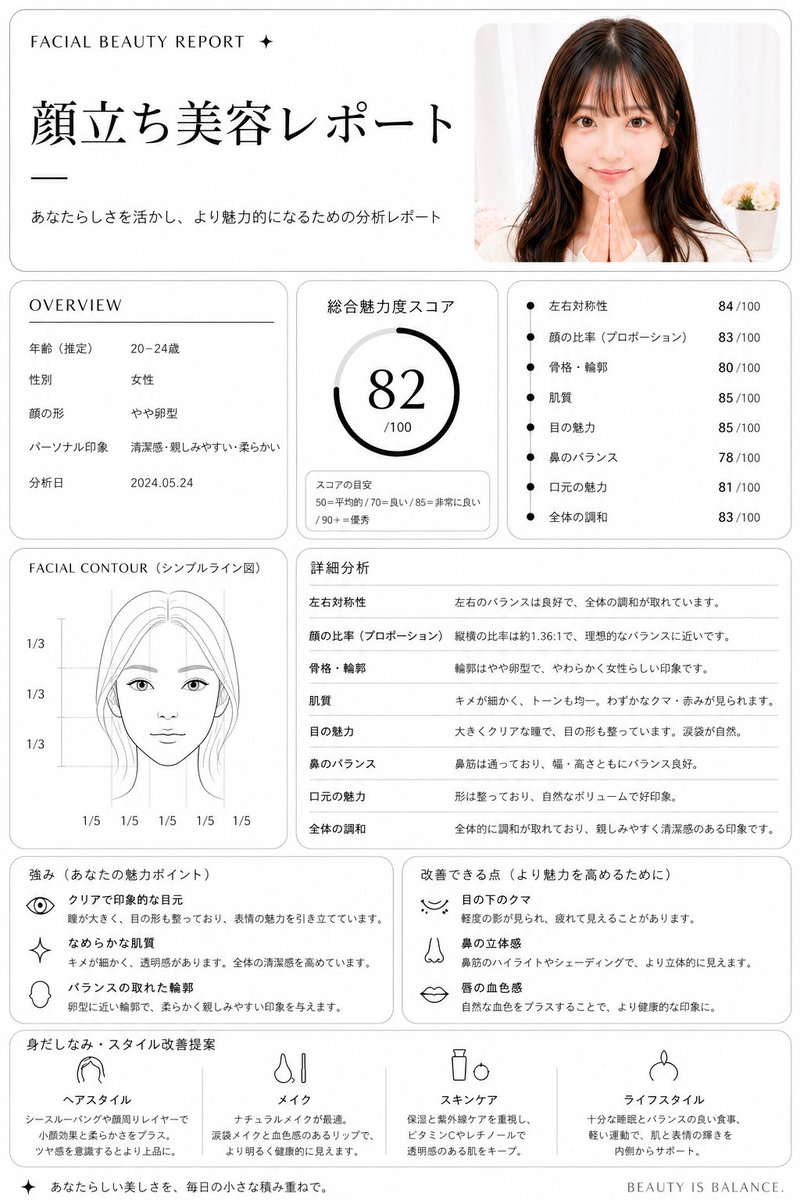
Struttura del report sulla bellezza del viso giapponese
Genera un'interfaccia utente raffinata per un report di analisi della bellezza in stile giapponese a partire da un ritratto di riferimento, utile per prototipi di servizi di cura della pelle, cosmetici o valutazione del viso.
Questo è un esempio di prompt GPT Image 2 per Grafica e poster . Utilizza il prompt pronto per la copia qui sotto per generare immagini simili e verifica l'attribuzione Awesome GPT Image 2 Prompts e i diritti di utilizzo commerciale prima del riutilizzo.
Free 1K preview
Generate one preview image instantly, no sign-up required.
Free text preview doesn’t preserve reference-image consistency.
Richiesta
prompt pronto per la copia
Using REFERENCE_0, turn the uploaded portrait into a clean, premium Japanese aesthetic analysis dashboard titled {argument name="headline text" default="顔立ち美容レポート"}. Keep the same photo as the source image, Show every face clearly with natural, detailed facial features, and place it in a rounded card at the top right. Reformat the output as a white editorial report page with thin gray borders, black typography, and a luxury beauty-consultation layout. Add these 8 report sections: 1) top header with small English text "FACIAL BEAUTY REPORT ✦", the large Japanese title, and the subtitle "あなたらしさを活かし、より魅力的になるための分析レポート"; 2) an OVERVIEW box listing exactly 5 rows: 年齢(推定) 20–24歳, 性別 女性, 顔の形 やや卵型, パーソナル印象 清潔感・親しみやすい・柔らかい, 分析日 2024.05.24; 3) a total score box labeled 総合魅力度スコア with a circular gauge showing {argument name="total score" default="82"}/100 and a small score guide reading 50=平均的 / 70=良い / 85=非常に良い / 90+=優秀; 4) a metrics box with exactly 7 bullet scores: 左右対称性 84/100, 顔の比率(プロポーション) 83/100, 骨格・輪郭 80/100, 肌質 85/100, 目の魅力 85/100, 鼻のバランス 78/100, 口元の魅力 81/100, 全体の調和 83/100; Show every face clearly with natural, detailed facial features, 1/3, 1/3 vertically and 1/5 repeated 5 times along the bottom; 6) a 詳細分析 section with exactly 8 rows matching the metrics above and short explanatory Japanese comments; 7) a strengths box titled 強み(あなたの魅力ポイント) with exactly 3 icon-led items: クリアで印象的な目元, なめらかな肌質, バランスの取れた輪郭; 8) an improvements box titled 改善できる点(より魅力を高めるために) with exactly 3 icon-led items: 目の下のクマ, 鼻の立体感, 唇の血色感; 9) a final recommendation row titled 身だしなみ・スタイル改善提案 with exactly 4 columns labeled ヘアスタイル, メイク, スキンケア, ライフスタイル, each with a simple black line icon and short Japanese advice. Add a small footer line on the bottom right reading {argument name="footer text" default="BEAUTY IS BALANCE."}. Overall style: minimalist clinic report, balanced grid layout, soft shadows, rounded panels, black and gray only, highly legible Japanese magazine design.Variabili di richiesta
Segnaposto per gli argomenti modificabili presenti nel prompt, con i relativi valori predefiniti.
Best for
- - Grafica e poster visual exploration
- - Image generation and reference-image edits
- - Reusable briefs that keep source attribution visible
Change these parts
- - Subject, product, character, or scene
- - Aspect ratio, camera, lighting, and background
- - Brand, text, color, and output constraints
Recommended model and settings
- - Model: gpt-image-2
- - Input mode: Immagine in immagine
- - Aspect ratio: source
- - Commercial status: review original source
How to use this prompt
- 1. Copy the prompt and preserve its structure for the first test.
- 2. Replace the subject, context, and publishing channel.
- 3. Change one camera, lighting, or style variable per iteration.
- 4. Inspect the output, source, text, and rights before reuse.
Limitations, source, and reuse cautions
- - Generated output is an editable draft, not factual, legal, or rights evidence.
- - Review the linked source, people, brands, logos, text, and third-party media before commercial use.
Altri casi in questa categoria
Prioritizzazione in base a categoria, compatibilità della modalità di input, qualità e minor rischio.






Note sul riutilizzo e sulla fonte
Utilizza questo prompt in tutta sicurezza dopo aver visualizzato in anteprima il caso.
- 1.Copia il prompt oppure aprilo direttamente in Dovoo tramite il pulsante di generazione.
- 2.Regola le variabili, le proporzioni e le immagini di riferimento in base alle tue esigenze.
- 3.Prima della pubblicazione o dell'utilizzo a pagamento, verificare i diritti di fonte, i requisiti di attribuzione e i rischi relativi al marchio o all'immagine.